Skip to content

📈 Read the 2026 Salesforce Threat Landscape Report

Cloud Protection by WithSecure
  • Home
  • Product
    • Product overviewLearn how WithSecure protects your Salesforce from advanced cyber threats.
    • File protectionDefend your organization against malware and ransomware attacks.
    • URL protectionPrevent phishing and malicious URL attacks with real-time protection.
    • Identity ProtectionDetect compromised users before attackers.
    • Protection for AgentforceSecure Agentforce workflows in real-time from phishing and malware.
    • Analytics and visibilityGet comprehensive real-time visibility into security events.
    • QR code protectionIdentify and block QR codes leading to phishing sites.
    • Content filteringBlock unwanted files and URLs.
    • All featuresExplore product features in detail.
  • Solutions
  • Success Stories
  • Pricing
  • Resources
    • SupportHow to install, configure and troubleshoot the product.
    • Events & webinars1 upcomingWhere are we headed next? See our upcoming schedule.
    • ComplianceSee what certifications we have and how we comply with regulations.
    • BlogGet the latest product updates and Salesforce security insights.
    • DatasheetsAccess our datasheets, solution overviews and other collaterals.
    • For partnersLet’s deliver more value to Salesforce customers – together.
    • Risk assessmentGet your free Salesforce content risk assessment.
    • About usLearn who we are, why we do what we do and how it all started.
    • Legal and privacyReview the legal and privacy documentation here.
  • Contact sales
  • Get a demoClaim your free 15-day trial
  • English
    • English
    • æ—„æœŹèȘž (Japanese)
  • Contact sales
  • Get a demoClaim your free 15-day trial
  • Salesforce Experience Cloud Security: What the Guest User Attacks Teach Us About Protecting Identities 

    Key Takeaways

    • Experience Cloud connects external audiences directly to your Salesforce data, so guest user configuration is a critical security boundary. 
    • Attackers have been exploiting misconfigured guest user profiles in a new campaign called City-Forum.
    • No Salesforce vulnerability was involved. The attacks exploit customer configuration, which means the fix is in your hands. 
    • The key lesson is to practice least privilege when it comes to guest users.

    What is Salesforce Experience Cloud and why do organizations use it? 

    If you work in the Salesforce ecosystem, you already know Experience Cloud. It is the platform that connects your business with the people outside it, whether that means customers, partners, or the public, and gives them a direct window into the data your teams manage in Salesforce every day. 

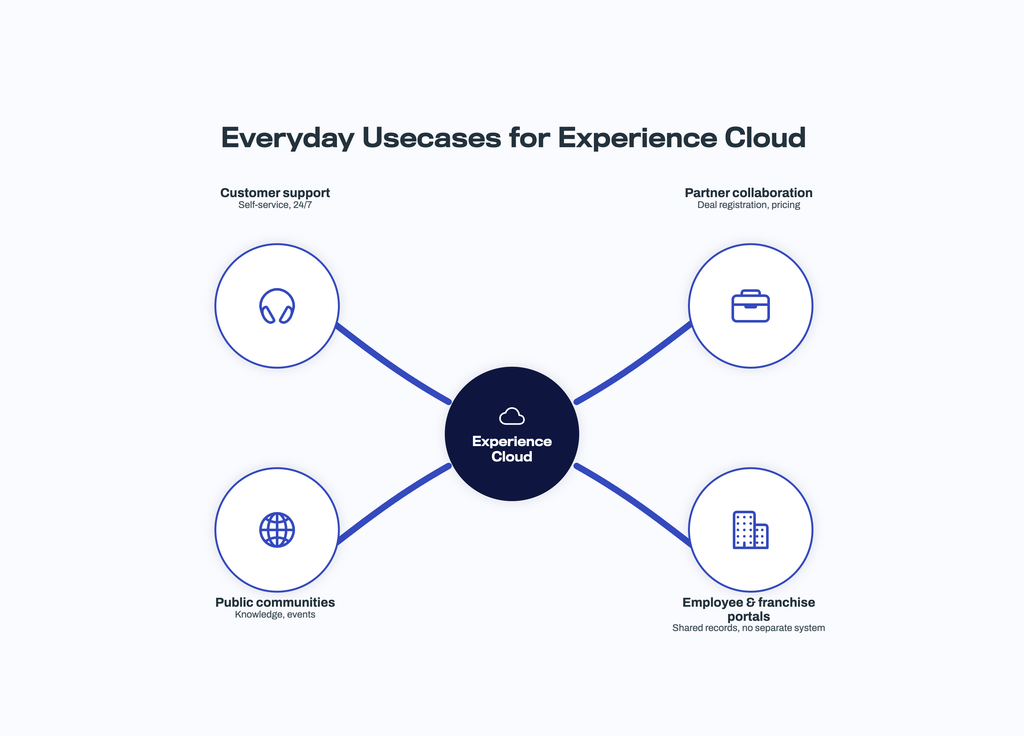
    Here are a few of the ways teams put it to work every day: 

    • Customer support and self-service, where people log cases, track orders, and find answers at 2 am without ever calling support. 
    • Partner collaboration, where resellers register deals and pull the latest price lists themselves instead of emailing your sales team. 
    • Public communities, where prospects browse knowledge articles and sign up for events before you have ever spoken to them. 
    • Employee and franchise portals, where distributed teams log in for the same records and processes as headquarters, without needing a separate internal system. 

    What makes all of this work so well is that there is no separate website to build and no data to sync. The portal reads and writes the same records your internal teams use, so a case a customer logs in the portal is the same case your service team picks up in the console. That direct line to live CRM data is exactly why so many organizations rely on Experience Cloud. 
    Why Experience Cloud guest user access creates security risk 

    Every Experience Cloud site that allows anonymous visitors relies on something called the guest user profile. All unauthenticated visitors to your site share this single profile, and its permissions decide what those visitors can see and do. And we all know that when it comes to user permissions and profiles in Salesforce, it is a can of worms. Any admin who works with them daily will vouch for that. 

    The guest user profile is meant to grant access only to data you intend to make public, such as knowledge articles or product listings. But Salesforce permissions are layered and granular, spanning object access, record access, field level security, and sharing settings. If any one of those layers is set too broadly, an anonymous visitor can reach data you never intended to expose. And because Experience Cloud sites expose API endpoints to make their pages work, that access is query-able at scale, not just browsable page by page. 

    In other words, a guest user is an identity like any other. It just happens to be an identity that anyone on the internet can use. And after years of sitting quietly as a known weak spot, attackers have finally started to abuse it at scale. 

    The Experience Cloud attacks so far  

    This is not a theoretical risk. It is one of the most active attack patterns in the Salesforce ecosystem today. 

    Attackers have been abusing misconfigured guest user access since 2025, and the campaigns are still running. Importantly, none of this involved a vulnerability in the Salesforce platform itself. It comes down to the shared responsibility model: Salesforce secures the platform, and the customer is responsible for making sure permissions and configurations are designed correctly. 
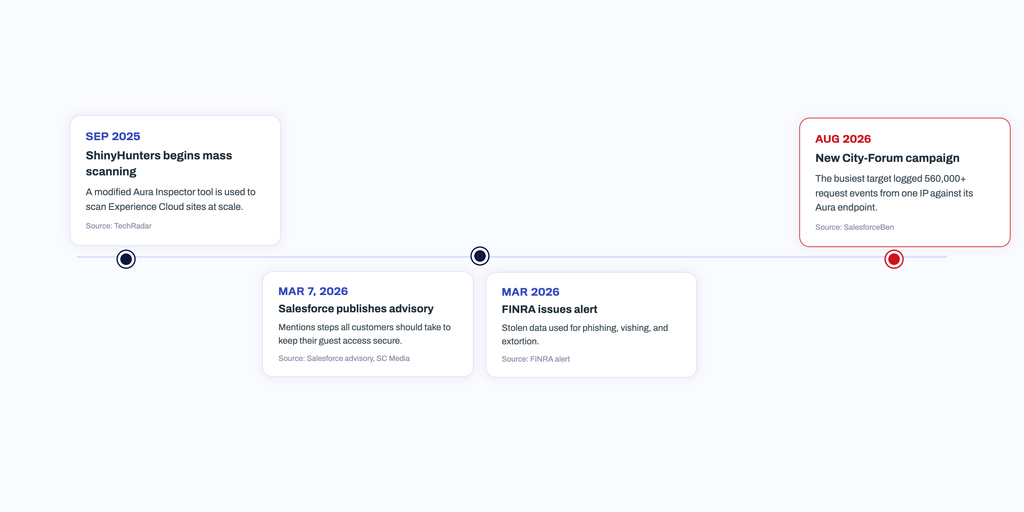
    Sources (left to right): TechRadar, Salesforce advisory,FINRA alert, SalesforceBen 

    Two details from these campaigns deserve special attention:

    1. First, the attackers never needed credentials. Misconfigured guest access meant the front door was already open. 
    1. Second, guest access was often just the starting point. Salesforce’s advisory warns that data exposed through guest misconfigurations can be used to self-register portal accounts, turning an anonymous guest session into an authenticated user with broader data access. The line between external identities and your internal data is thinner than most teams assume. 

    How to secure Experience Cloud guest user access 

    Salesforce’s advisory lists concrete hardening steps with implementation instructions for each, and they are worth acting on this week rather than this quarter.  These steps will close the gap the attackers used. But there is a harder truth behind them. 
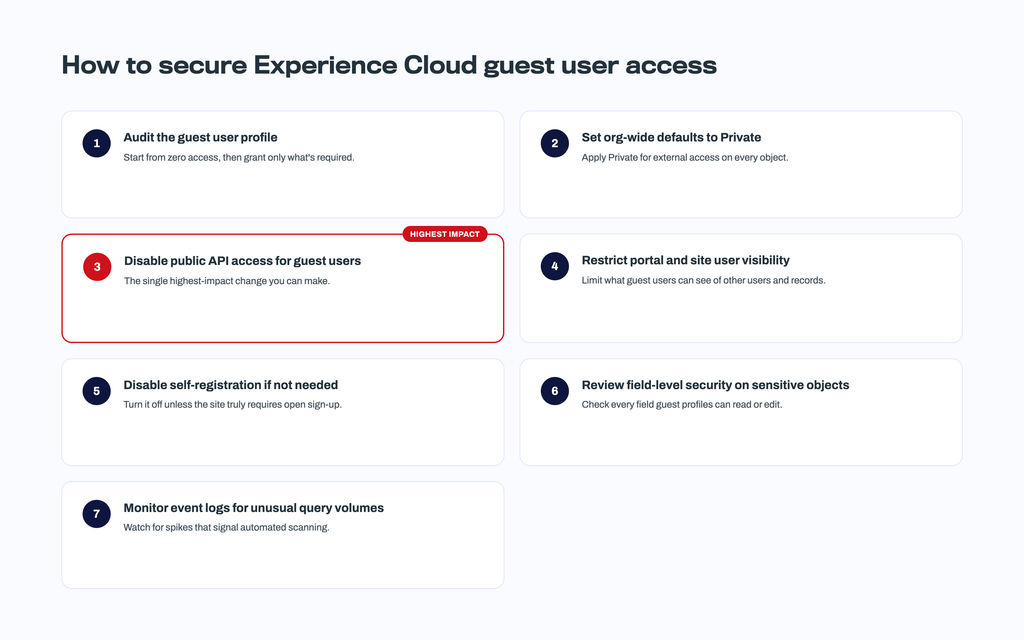
    Source: Salesforce security advisory

    What can you learn: least privilege is not a one-time project 

    None of the organizations caught in these campaigns set out to expose their data. Access just grows over time, and anyone who has managed a Salesforce org for a few years knows how it happens.

    • A permission set created for a one-off project never gets cleaned up
    • A profile gets cloned for convenience and carries access nobody remembers granting
    • Someone changes roles and keeps everything they had before, or a partner account quietly outlives the partnership.

    And let’s not forget the two most common cases of all:

    • The admin who designed the permissions has since left the company,
    • Or the Experience Cloud site was built by an external consultant and nobody in house ever fully owned its configuration.

    We have written before about the Salesforce permission gap nobody talks about, and these attacks are what it looks like when that gap meets an attacker with automated tooling. An audit today can fix the problems you have today, but your org will not stand still. New permission sets get created, users come and go, and credentials leak in breaches you will never hear about. The question is not whether your permissions are right at this moment; it is whether you would know when they stop being right. That is the part most Salesforce security programs still miss. 

    Closing the gap with Identity Protection 

    This is the gap we built Identity Protection to close. Part of Cloud Protection for Salesforce, it gives administrators continuous visibility into user level risk across their org, focusing on three signals that matter most in the wake of these campaigns: 
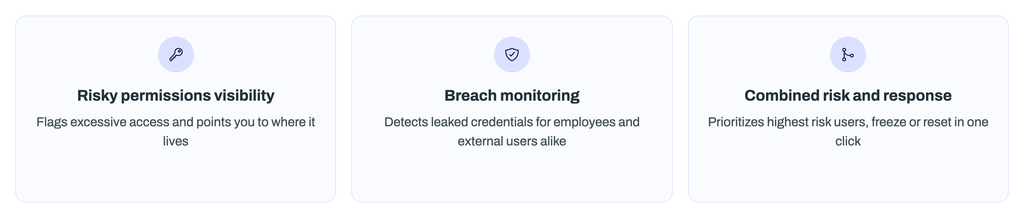
    Risky permissions visibility. Identity Protection evaluates the permissions assigned to your monitored users and flags high risk system permissions such as Modify All Data, View All Data, and Manage Users.  You see which users hold excessive access, and Identity Protection points you to Salesforce’s own advanced user views to pinpoint exactly where that access comes from. This is least privilege turned from an annual project into an always on practice.  

    Breach monitoring. Identity Protection detects when your Salesforce users’ credentials appear in third party data breaches, so you can act before attackers do. This matters for both internal users and external ones. Experience Cloud community and partner logins often sit outside your corporate security stack, with no company managed devices or identity provider behind them, yet they login and interact with the platform and the data inside your Salesforce org. Identity Protection monitors not only your employees but also these external identities at enterprise scale. 

    Combined risk signals and immediate response.  The Identities at Risk overview brings risky permissions and breach exposure together with visibility into MFA and SSO usage and the connected apps and active tokens tied to each user, so you can prioritize the users who represent the highest combined risk. From the same panel, you can freeze a user or force a password reset immediately.  

    These campaigns showed what happens when one over permissioned identity, in that case an anonymous guest, meets an attacker with automated tooling. Continuous identity monitoring is how you stay ahead of both. Identity Protection is included in the Cloud Protection for Salesforce user-based license, with no separate add-on required. It works alongside file protection and URL protection to cover the content and identity layers that native Salesforce controls leave to you. 

    The takeaway 

    The organizations that were hit by these campaigns were not careless. They were running the same portals, with the same permission model, that thousands of Salesforce customers run today. The difference between being a headline and being fine came down to configuration details that are easy to get wrong and easy to lose track of. 

    So, treat this as your prompt. Audit your guest user access this week, work every identity in your org down to least privilege, and put something in place that tells you when things drift, because they will. The attackers are already scanning. The only question is what they find when they reach your site. 

    If you want to see what your identity risk looks like right now, book a demo and we will show you in minutes, not weeks. 
  • What’s new in Cloud Protection for Salesforce Autumn 3.4

    Key Takeaways

    • Introduced support for the way your team handles Cloud Protection for Salesforce alerts via statuses.  
    • Log retention is no longer capped at 24 months. Set your own period per data type, or keep records indefinitely, without exporting anything out of Salesforce. 
    • One button registers your alerts, file scan logs, URL scan logs and identity breaches as Security Center metrics. 

    Detection is hard, and it’s where most of our engineering goes. It’s also only half of what lands on an admin’s desk. The other half is what happens after an alert fires: who looked at it, what they decided, whether the record still exists when compliance asks, and whether anyone outside the Salesforce admin can see any of it. 

    Autumn 3.4 is aimed squarely at that. Here’s what changed and what it means for you. 

    Support for the way your team handles alerts 

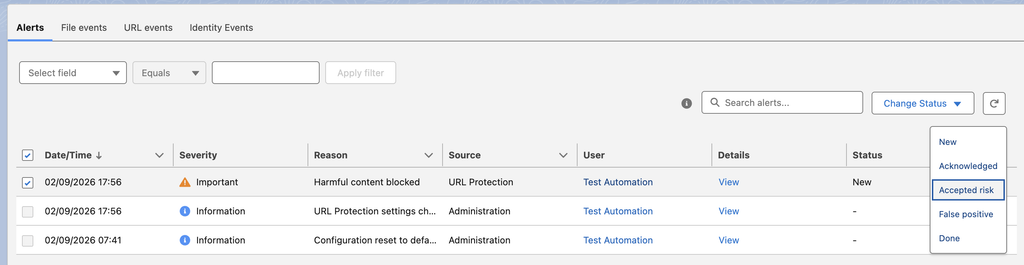
    Most teams already have a process for handling detections, even if nobody has written it down. Someone looks at each one first, decides whether it needs further action, and passes anything suspicious on to the security team. Cloud Protection for Salesforce now supports that process in the alert list itself. You can see at a glance which alerts are still waiting on someone, two admins can split the work without going over the same records twice, and if a question comes up months later about a particular alert, the decision is written on the record where anyone can find it. 

    How it works: in Analytics → Alerts, every alert now carries one of five statuses:

    • New,
    • Acknowledged,
    • Accepted risk,
    • False positive, or
    • Done.

    Filter by status the same way you filter anything else and update many alerts at once with bulk editing. Bulk changes ask for confirmation first, so a fast click can’t quietly reclassify a batch. Informational alerts don’t need a status and show N/A. Anything already in your org when you upgrade starts as New. 

    Retain logs on your terms 

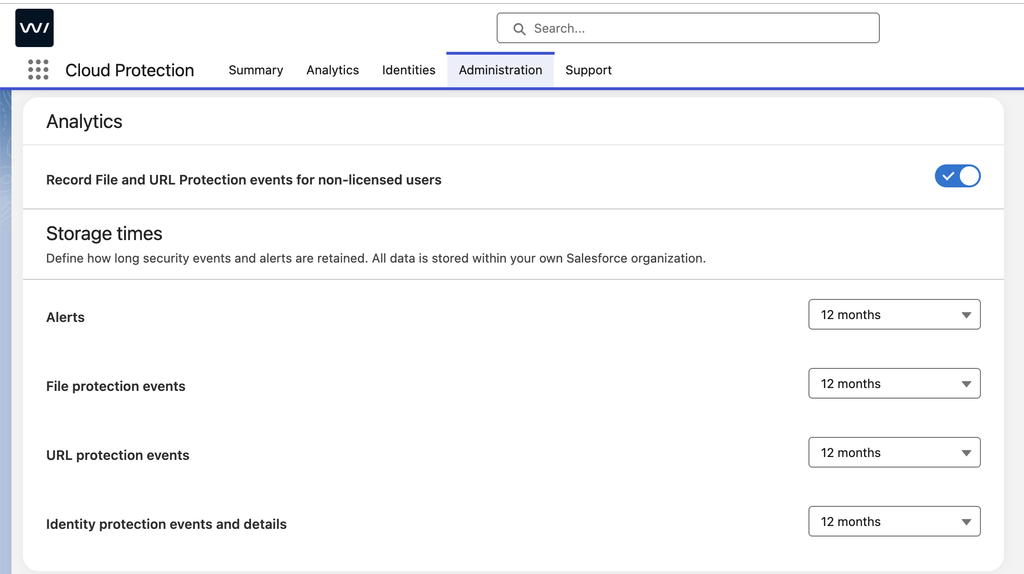
    If your organization has retention rules to follow, or you simply do not like the idea of your logs disappearing on a schedule somebody else set, you have probably already run into the gap between what your policy asks for and what the product would keep. Your compliance team says five years, retention topped out at two, and closing that gap became your job, usually with an export routine and somewhere else to keep the data and look after it. You can now set retention to whatever length you actually need, up to and including keeping records indefinitely, so the logs stay where they were created and when your security team or your auditor asks whether you still have last year’s scan history, the answer is simply yes. 

    How it works: in Admin → General → Analytics → Storage Times, the fixed retention windows are still there, capped at 24 months as before, and alongside them you’ll now find two new options for alerts and for every scan log category. You can set up a custom period measured in days, weeks, months, or years, or you can choose Never delete, which switches off the daily cleanup for that category and hands its lifecycle over to you entirely. It’s worth remembering that Never delete means the category will keep growing along with your volume, so most orgs will want it on the records they need to prove something with rather than on all of them. 

    One-click to put your alerts in front of the security team 

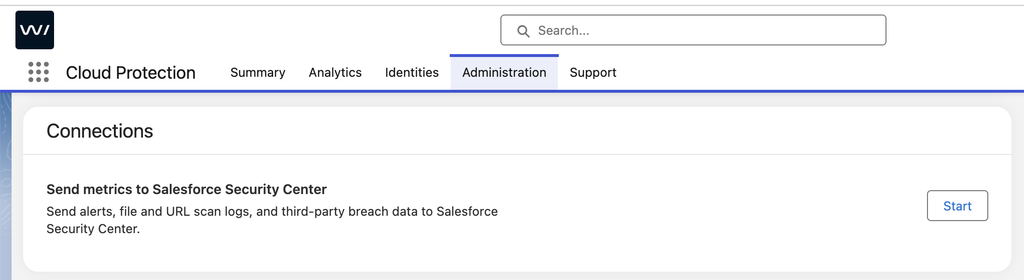
    When your alerts, scan verdicts and identity breach data show up in Salesforce Security Center, your security team can see what Cloud Protection for Salesforce is catching in the place they already watch, without waiting for you to pull a report. That has been possible since Summer 3.3, but only if you were willing to build four custom metrics by hand in Salesforce Setup, field by field, and get every one of them right. Autumn 3.4 takes that job off your hands, so if it has been sitting on your to-do list, it is now about a minute’s work. 

    How it works: open Cloud Protection for Salesforce App → Administration → Tools and you will find a new Connections section with a Start button that registers all four objects as Security Center metrics for you: 

    • Alerts 
    • File Scan Logs
    • URL Scan Logs
    • Identity Breaches

    The button only appears for users who have access to Security Center, and it is safe to press more than once because it skips anything that is already registered, so if you built the metrics manually back in Summer 3.3, there is nothing here you need to do. 

    Available on AgentExchange 

    Autumn 3.4 is available from Salesforce AgentExchange: September 7, 2026. 

    • Sandbox automatic updates begin: September 28, 2026. 
    • Production automatic updates begin: October 12, 2026. 

    Detecting the risks that reach your Salesforce has always been our focus, and helping you keep track of what happens after a detection is becoming just as much of one. The updates above are the ones we think you will notice first, and there is more in Autumn 3.4 than we have covered here.  

    Already a customer? Read the release notes to see everything in Autumn 3.4.  

    Not yet a customer? We’d love to show you what it can do for your organization. Book a demo and we’ll walk you through it personally. [Book a demo] 

  • Cloud Protection for Salesforce becomes an independent company, spinning off from WithSecure to focus exclusively on Salesforce security

    HELSINKI, Finland – September 1, 2026 WithSecure today announced the demerger of Cloud
    Protection for Salesforce, its Salesforce security business, into an independent company. Operating as
    Cloud Protection by WithSecure, the new company will focus exclusively on protecting Salesforce
    environments from malware, phishing, and data-borne threats, while WithSecure concentrates on a
    unified proactive security platform for managed service providers (MSPs) and value-added distributors
    (VADs) – covering endpoint, identity, cloud, and collaboration security, plus Exposure Management and
    AI-powered MDR. The demerger involves no change in ownership.

    Cloud Protection for Salesforce has operated as a highly autonomous business unit within WithSecure
    for years, building its own product, go-to-market, and customer success functions. In that time, it has
    established itself as the leading Salesforce-native security solution, trusted by organizations including
    Rolls-Royce Financing, Coca-Cola Bottlers, and Yahoo.

    As a standalone company, Cloud Protection will be able to dedicate its full resources, roadmap, and
    investment to Salesforce security – while WithSecure sharpens its focus on its core cybersecurity
    offering.

    “Cloud Protection has proven it can grow and compete as an independent business, and this demerger
    simply reflects that reality. Spinning it out lets both companies concentrate fully on what they do best –
    WithSecure on its core Elements platform, and Cloud Protection on being the definitive security layer for
    Salesforce,” said Antti Koskela, CEO of WithSecure.

    “The Salesforce ecosystem and threat landscape are changing faster than ever as cyber attackers
    embrace AI and businesses shift to Agentforce and Headless360. Becoming an independent company
    allows us to move even faster and invest with total focus on ensuring businesses and their customers
    stay protected on Salesforce.” said Juhana Autio, General Manager of Cloud Protection by WithSecure.

    For customers, the transition changes nothing about the product, support, or relationships they rely on
    today. Existing contracts, service levels, and points of contact remain in place. If anything, customers can
    expect an even more dedicated and responsive partner going forward, as Cloud Protection channels its
    full attention into Salesforce security.

    Cloud Protection will continue to operate from its Helsinki base, with teams across North America,
    EMEA, and APAC, and will continue to be available directly and via Salesforce AgentExchange.

    About Cloud Protection

    Cloud Protection offers enterprise-grade security for Salesforce environments, trusted by organizations
    worldwide including Fortune 500 enterprises and government agencies such as Rolls-Royce, Coca-Cola
    Bottlers, and Yahoo.

    Its Salesforce-native solution scans every file, link, identity, and Agentforce workflow in real time –
    stopping the malware, phishing, and identity-based threats that built-in platform tools and traditional
    email security miss, without altering customers’ existing configurations. Learn more at
    cloudprotection.com

    About WithSecure

    Founded in 1988, WithSecure is Europe’s cybersecurity partner of choice. Trusted by MSPs, value added
    distributors, and businesses worldwide, we deliver cybersecurity solutions that protect mid-market
    companies. Committed to the European Way of data protection, WithSecure prioritizes privacy, digital
    sovereignty, and regulatory compliance.

    Boasting more than 35 years of industry experience, WithSecure has designed its portfolio to navigate
    the paradigm shift from reactive to proactive cybersecurity.

    Central to WithSecure’s cutting-edge offering is Elements Cloud, which seamlessly integrates AIpowered technologies, human expertise, and co-security services. Further, it empowers mid-market customers with modular capabilities spanning endpoint and cloud protection, threat detection and response, and exposure management.

    Media contact

    Jaakko Jalkanen
    Head of Marketing, Cloud Protection
    jaakko.jalkanen@cloudprotection.com | cloudprotection.com

    Inari Anttila
    PR Manager, WithSecure
    pr@withsecure.com | withsecure.com

  • How to scan Salesforce files and attachments for malware and monitor threats in Security Center 

    Key Takeaways

    • Salesforce now scans some files natively, but it skips attachments, files over 100 MB, and links.  
    • Cloud Protection for Salesforce scans every file, attachment, and URL in real time, at upload and again at download. 
    • With the Security Center integration, scan results and threat trends show up on the dashboard your team already uses. 

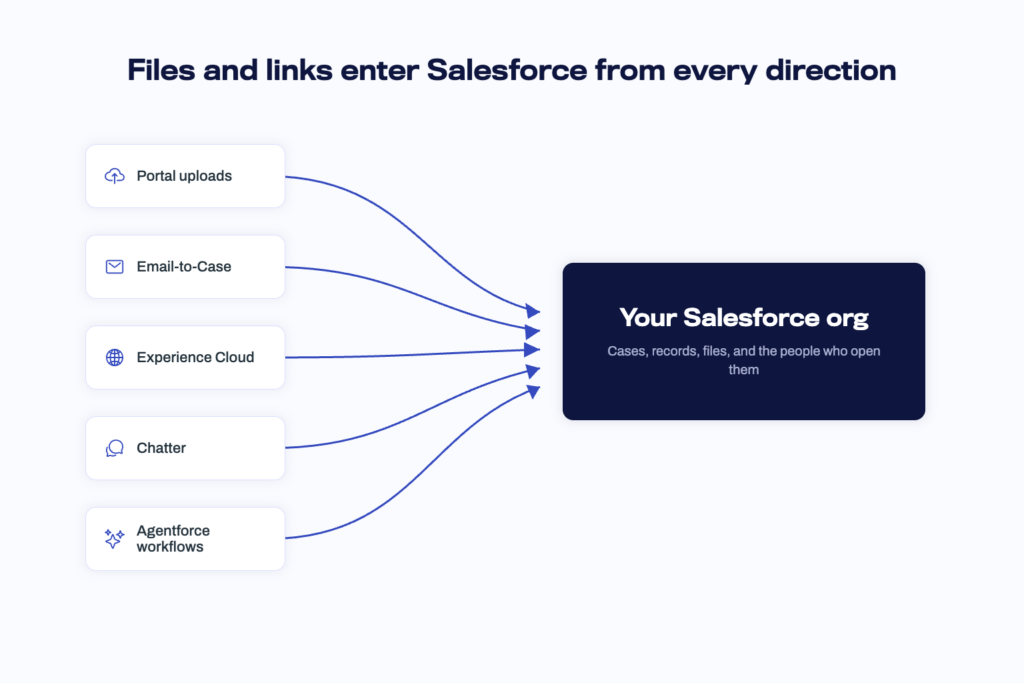
    Files flow into Salesforce constantly, arriving as documents customers upload through portals, attachments on support cases, emails coming in through Email to Case, and files partners share through Experience Cloud. Any one of them can carry malware, and your service agents open them all day long. 

    So how do you scan all of it? The short answer: since Salesforce scans some files natively since the Spring 26 release, but complete coverage of files, attachments, and links takes a dedicated scanning app such as Cloud Protection for Salesforce, which can also feed its results into Salesforce Security Center so you can monitor threats over time. 

    This guide walks through the details: what native file scanning protects, where it stops, and how to close the gaps.

    What Salesforce does and does NOT scan by default 

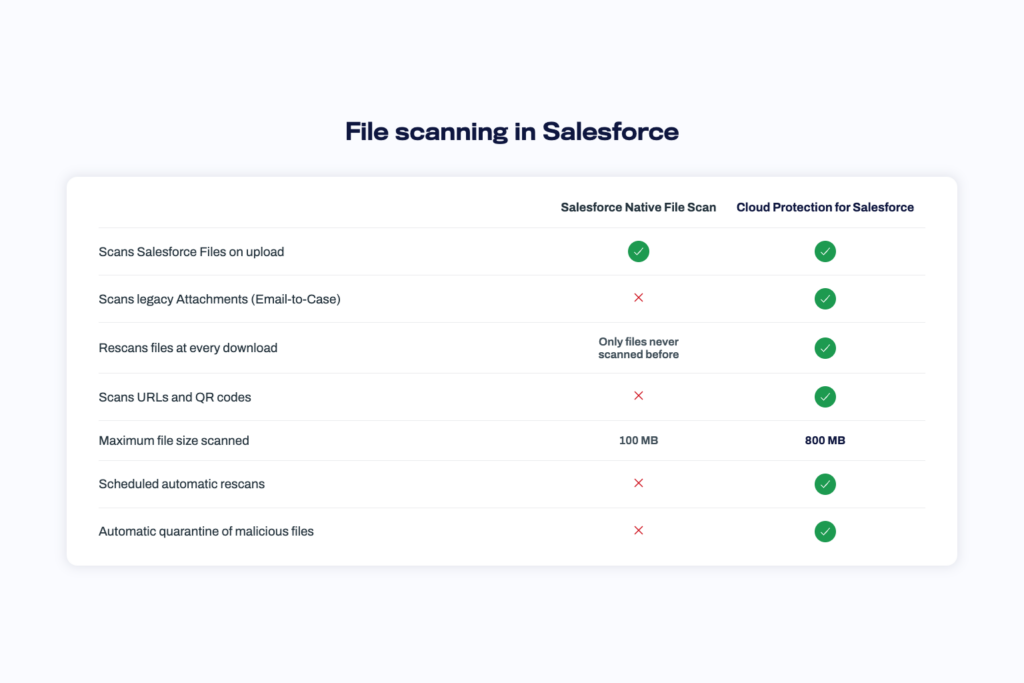
    Based on Salesforce’s own documentation, the native File Scan works like this: 

    • It scans Salesforce Files at upload and blocks files identified as malicious. 
    • It covers Salesforce Files only. Legacy Attachments are out of scope. This matters because Email to Case creates attachments, which means one of the most common ways files enter your org from the outside is not covered. 
    • Files over 100 MB are not scanned and not blocked. 
    • It flags only files with a high probability of being malicious. 
    • Files uploaded before the feature was enabled are checked only when someone downloads them. 

    There is also no scanning of URLs inside your records, and no reporting layer where you can see what was scanned, what was caught, and how threat activity develops over time. 

    Salesforce is transparent about this. Its documentation points customers with more stringent scanning requirements toward security partners on AgentExchange. In other words, native scanning is the floor, not the ceiling. For a full feature by feature breakdown, see our detailed comparison of Salesforce file scanning and Cloud Protection for Salesforce. 

    How to scan every file and attachment in real time

    Cloud Protection for Salesforce is built for exactly the gaps listed above. Here is what changes when it is running in your org: 

    Every file and every attachment is scanned. Salesforce Files, Legacy Attachments, Content from Email to Case, portal uploads, Experience Cloud, Chatter, and content flowing through Agentforce workflows. No file type or entry point is left out. 

    Scanning happens at upload and again at download. A file that was clean yesterday can be identified as malware today, because threat intelligence keeps improving. The native scan checks a file once, while Cloud Protection for Salesforce rechecks every download, catching these late discoveries before a user opens the file. 

    Files already in your org get scanned too. You can run a manual scan on demand or set up a scheduled scan that bulk checks your files outside business hours. 

    Malicious files are handled automatically. Depending on your policy, harmful content is blocked or quarantined at the moment it is found, with alerts to your admins. No manual review queue. 

    Links get the same treatment. URLs are checked against live threat intelligence wherever they appear: in cases, Chatter posts, emails, leads, tasks, and other standard and custom records. QR codes in files and images are extracted and their destinations scanned too, because phishing links do not always sit in plain sight. They hide inside documents and behind QR codes. 

    Getting up and running is fast. The app installs from AgentExchange, setup takes little time, and no changes to your Salesforce configuration are needed. Scanning starts in real time as files and links enter your org. 

    How to monitor it all in Security Center 

    Scanning catches threats as they arrive. Without visibility into that activity, you have no way to know it is working, spot a pattern, or prove it to anyone who asks. 

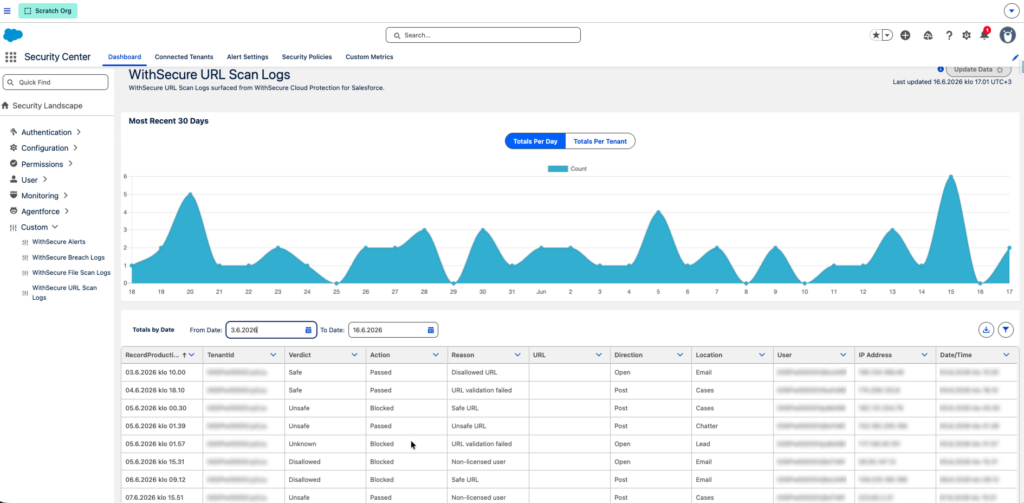
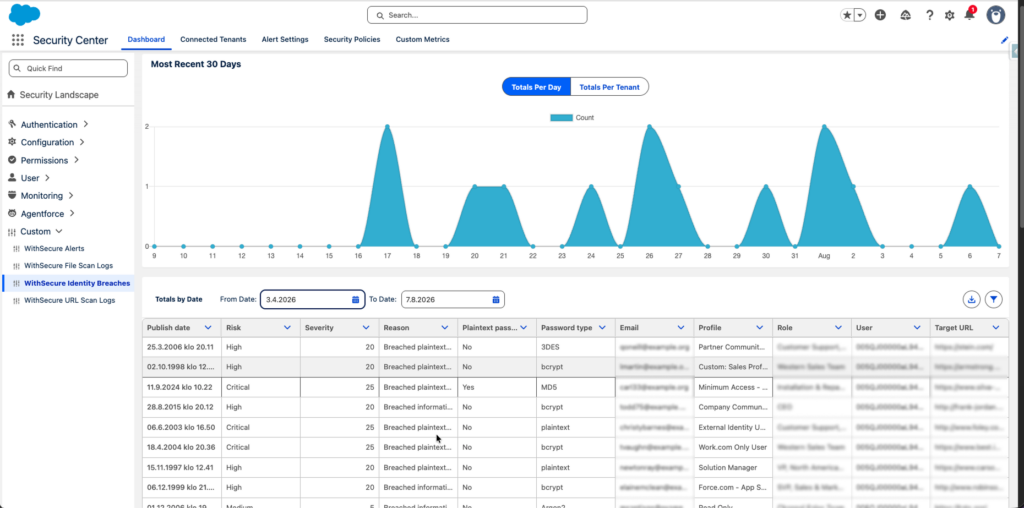
    If you use Security Center, Salesforce’s tool for monitoring security across your orgs from one dashboard, your threat data from Cloud Protection for Salesforce can appear right there. File scan verdicts, URL scan results, alerts, and identity breach records show up as custom metrics with trend charts. 

    That turns individual events into patterns you can act on. A spike in blocked files after launching a new portal. Malicious links clustering in cases from one region. And when an auditor or executive asks what protects your Salesforce, the evidence is already on the dashboard they trust, with up to six months of history. 

    We wrote a full walkthrough of the integration, including the dashboard views and the three step setup: How to integrate Cloud Protection for Salesforce with Salesforce Security Center. 

    If you do not use Security Center, the same data is available in the analytics views inside Cloud Protection for Salesforce, covering scan activity, detections, and trends. The Security Center integration simply brings that data into one place alongside your other Salesforce security signals. 

    Scan everything, see everything  

    Native file scanning is a good start, and it is by default for a reason. But email attachments, large files, and links still pass through unchecked, and there is no way to see how threats develop over time. That is what Cloud Protection for Salesforce is for. It closes the scanning gaps, and through the Security Center, it gives you the monitoring layer. With both in place, every file and link entering your org gets checked, and you can monitor it. 

    For the full field by field configuration, including the recommended display fields for each metric, see the Security Center integration guide. 

    Getting started 

    Already a customer? The Security Center integration is available from release 3.3 onwards. Update to the latest release and follow the setup guide to register the custom metrics. No configuration changes are needed in Cloud Protection for Salesforce itself. 

    Not a customer yet? Two ways to start. A free Salesforce risk assessment shows you what is currently entering your org unscanned, with real numbers from your own environment. Or book a demo and we will walk you through file scanning, URL protection, and the Security Center integration live. 

    Frequently asked questions

    Does Salesforce scan files for viruses?

    Partially. Since the Spring 26 release, Salesforce natively scans uploaded Salesforce Files and blocks those identified as malicious. The native scan does not cover legacy Attachments, skips files over 100 MB, and flags only high probability threats. Complete coverage requires a dedicated scanning solution. 

    Is there a file size limit for Salesforce malware scanning?

    The native Salesforce File Scan does not scan or block files over 100 MB. Cloud Protection for Salesforce scans files up to 800 MB. 

    Can I scan files already stored in Salesforce?

    Cloud Protection for Salesforce can scan your existing files on demand with a manual scan, or in bulk with a scheduled scan that runs outside business hours. 

    Can I see scan results in Salesforce Security Center?

    Yes. Cloud Protection for Salesforce surfaces file scan logs, URL scan logs, alerts, and breach logs in Security Center as custom metrics with trend charts. 

  • What happens to your data when an employee leaves?

    This is not a niche concern. Departing employees are a well-recognized insider-risk scenario, particularly where users have legitimate access to commercially sensitive data. The combination of high-value data, broad user access, and limited monitoring creates exactly the conditions that make it easy to walk out the door with more than a company laptop.

    Why Salesforce is particularly exposed

    Most enterprise data loss prevention tools are designed around the file system and email. They monitor what gets attached to an outbound message, what gets copied to a USB drive, and what leaves the network perimeter. Salesforce sits largely outside that coverage. A sales rep who exports their entire account list to a CSV through the Salesforce UI isn’t triggering a DLP alert – they’re doing something that looks, to most monitoring systems, like normal work.

    The data at risk is also uniquely valuable. A Salesforce org built up over several years contains customer contact details, full account and opportunity history, deal values, renewal dates, pricing structures, and relationship notes that no public database can replicate. For a sales rep moving to a competitor, that data has immediate commercial value. For a disgruntled employee, it’s leverage. For someone simply being careless on their last week, it’s a liability the company may not know about for months.

    “CRM data is particularly difficult to replace. There are years of relationship history, renewal dates, and pricing context that doesn’t exist in any public source. For someone moving to a competitor, it’s a head start that would otherwise take months to build. What makes CRM exfiltration especially concerning is that the value of the data is obvious, and the barrier to taking it can be low,” according to Karmina Aquino, Head of Threat Intelligence at WithSecure Cloud Protection for Salesforce.

    The window of exposure

    The risk doesn’t begin on the last day. It often starts weeks earlier, when a resignation is submitted, a new role accepted, or a relationship with a manager deteriorates. In the period between that moment and the point when access is formally revoked, a motivated individual has ample opportunity to act.

    Even when offboarding is handled promptly, the window can be wider than it appears. Access revocation in Salesforce requires deliberate action: deactivating the user account and reassigning records, as well as reviewing sharing rules and connected app permissions. In large orgs with complex configurations, this is rarely as clean as an IT checklist implies. OAuth tokens granted to third-party apps may persist. Shared login credentials, where they exist, are harder to revoke entirely. In organizations where offboarding is handled centrally by IT rather than by Salesforce admins, the specific steps required for the platform may simply be missed.

    The result is a meaningful gap between when a person stops being an employee and when they stop being able to access your data.

    The detection problem

    What makes this risk particularly difficult to manage is how hard it is to see in hindsight. Salesforce provides several native sources of audit and activity data – Setup Audit Trail, Field History Tracking, Event Monitoring, Login History – but the level of visibility, retention, and real-time detection available depends on the features and licensing in use. Without Transaction Security Policies from Shield, the default setup has significant gaps: event log retention is 30 days for most orgs, field-level history tracking has to be manually enabled for each object, and large-scale exports don’t generate the kind of alerts that would prompt immediate investigation.

    By the time a company realizes that a former employee took their pipeline data or deleted their account records, the audit trail may already be gone. And even where logs exist, reconstructing what happened – such as which records were accessed, exported, or deleted, and when – requires a level of forensic effort that most teams aren’t equipped to undertake quickly.

    “Having logs is not the same as having detection. Meaningful monitoring requires enough context to recognise when otherwise legitimate user activity becomes unusual or risky, and the ability to act before that activity results in data loss,” Aquino concludes.

    How to prevent it

    Protecting Salesforce data from departing employees isn’t solely an HR or IT problem. Instead, it’s a data governance problem that requires the right tooling to solve. Effective protection means three things working together.

    First, continuous visibility into user activity: not just login events, but what data is being accessed, exported, or deleted, and by whom. This needs to be always-on, not reconstructed after the fact.

    Second, complete and granular backup. If a departing employee deletes or corrupts records – intentionally or otherwise – the ability to restore that data to a specific point in time, without depending on a 15-day recycle bin, is the difference between a recoverable incident and a permanent loss.

    Third, a clear offboarding process specific to Salesforce: one that goes beyond deactivating a user account to include reviewing connected app access, OAuth tokens, shared credentials, and data exports in the period leading up to departure.

    Departures are inevitable. Data loss because of them doesn’t have to be.

  • How to integrate Cloud Protection for Salesforce with Security Center

    Key Takeaways

    • Your file, URL, and identity threat data from Cloud Protection for Salesforce shows up in Security Center, next to the signals you already monitor. 
    • Getting started takes three steps and about 30 minutes. All you need is Cloud Protection for Salesforce and a Security Center license. 
    • Spot spikes, track patterns, and show auditors the evidence on one dashboard. 

    Security Center is Salesforce’s tool for monitoring security posture across one or more orgs from a single dashboard, covering areas like authentication, permissions, and the health of your org. If you use Salesforce Security Center, you already know why it exists. One place to monitor security signals across your org instead of ten browser tabs and a spreadsheet. 

    Now the threat data from Cloud Protection for Salesforce can be part of that view. The integration works by registering four custom metrics in Security Center, one for each data type: alerts, file scan logs, URL scan logs, and breach logs.

    In this guide, you will learn what threat data you can surface in Security Center and why it matters, how to read the trends so patterns turn into action, and how to set up the integration in three steps. If you want to get the most value out of Security Center, you are in the right place. 

    What you can see in Security Center   

    The integration surfaces four types of data from Cloud Protection for Salesforce. Each one is registered as a custom metric in Security Center, so you choose which ones appear in your dashboards. 

    Why does this matter? Security Center is strong on configuration and access signals. Health checks, permissions, login activity. What it cannot show on its own is the content flowing through your org: the files your customers upload, the links inside your cases, the credentials of your users circulating in breach dumps. Those are the threats that reach people. Without them, your security picture has a blind spot exactly where attacks happen. This integration closes it, and it means one less tool to check when something looks wrong. 

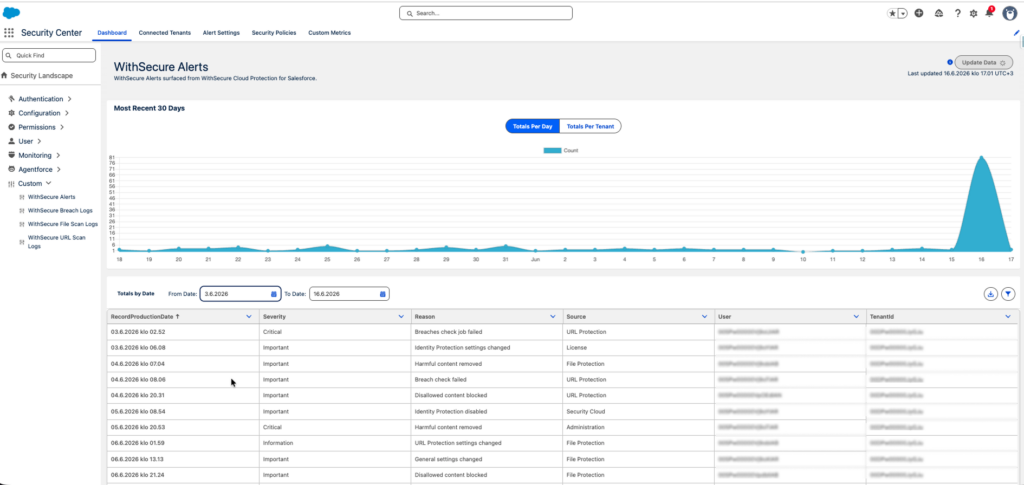
    Alerts. Detections, setting changes, job statuses, and grouped breach events, each with a severity level. This gives you an immediate view of what needs attention and how urgent it is. 

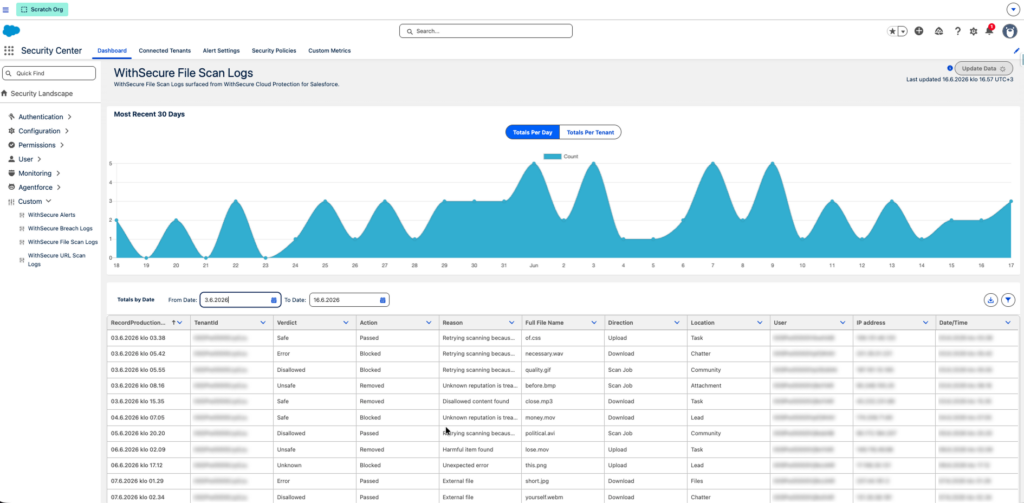
    File scan logs. Every file scan results with its verdict and the action taken. You see what was scanned, whether it was safe or blocked, who uploaded it, where it came from, and the IP address behind it. If a malicious attachment arrives through a case or a portal upload, this is where the story lives. 

    URL scan logs. Every link checked across Cases, Chatter, emails, leads, and tasks, with the same verdict and action detail. Phishing links do not only arrive in the inbox. They arrive inside your Salesforce records too, and now their trail is visible where you monitor everything else. 

    Breach logs. Records of users whose credentials have appeared in a known breach, including the risk level, the breach source, and whether the password was exposed in plaintext. This is often the earliest warning you get that an account takeover attempt is coming. 

    What the trends tell you 

    Individual events are useful. Patterns are where the real value is. 

    Every metric in Security Center supports time series trending, which turns your scan logs into signals. A spike in blocked files the week after you launch a new customer portal. Malicious URLs arriving through cases from the same region. Breach alerts clustering around a specific user profile. These are patterns you act on, and they only become visible when the data sits in one place over time. 

    Trending also answers a question every admin eventually gets from an auditor or an executive: what protects our Salesforce, and can you show me? With this integration, the answer is already on the dashboard they trust. Not a separate tool someone has to dig up, but evidence sitting alongside the rest of your security posture. 

    Requirements and availability 

    You need three things: 

    • Cloud Protection for Salesforce release 3.3 or later 
    • Salesforce Security Center licensed in your org 
    • Admin access to create permission sets and custom metrics 

    Records created after you upgrade to release 3.3 populate Security Center automatically. Historical data is available through the optional Data Loader backfill described above. 

    How to set it up 

    The setup happens entirely in the Salesforce Setup. No configuration is needed in Cloud Protection for Salesforce itself.  

    • Step 1: Assign permissions. In Salesforce Setup, create a permission set with the Manage Security Center system permission and assign it to the admins who need access. Then open the Security Center from the App Launcher. 
    • Step 2: Register the custom metrics. Go to Setup, then Security Center, then Settings, then Custom Metrics, and create one metric for each data type you want to surface: alerts, file scan logs, URL scan logs, and breach logs. For each metric you select the source object, the fields to display, the Tenant ID field, and the Record Production Date field that drives the trending. Save and activate each one. 
    • Step 3: Verify your dashboards. Open your Security Center dashboards and confirm each metric shows data. If a metric looks empty, click Update Data. Security Center refreshes its own cadence, so the first load can take a few minutes. 

    That is the whole setup. For the full field by field configuration, including the recommended display fields for each metric, see the Security Center integration guide. 

    The full picture in one place  

    Security tools earn trust in two ways. By catching threats, and by showing their work. This integration takes the threat activity Cloud Protection for Salesforce catches every day and puts it where your team already looks, in the dashboard built for exactly that purpose. 

    Already a customer? Make sure you are on release 3.3 or later, then follow our detailed setup guide to get started today. 

    Not yet a customer? Book a demo and we will show you the integration live, along with everything else Cloud Protection for Salesforce catches before it reaches your users. 

    Frequently asked questions

    What is Salesforce Security Center?

    Security Center is Salesforce’s security monitoring tool. It gives admins one dashboard for tracking security posture across one or more orgs, covering areas like authentication, permissions, configuration health, and user activity. 

    Can the Security Center show data from third party security tools?

    Yes, through custom metrics. Security Center lets you register data from other sources as metrics with trend charts. Cloud Protection for Salesforce uses this mechanism to surface its alerts, file scan logs, URL scan logs, and breach logs. 

    Can I see historical threat data in the Security Center?

    Yes. Records created after you upgrade to release 3.3 flow automatically, and you can backfill up to six months of older records using Salesforce Data Loader. 

    Do I need a separate license for this integration?

    No separate license is needed for this integration. You need Salesforce Security Center licensed in your org and Cloud Protection for Salesforce release 3.3 or later. 

  • CRM is your prized possession, so why are you treating it as out of scope?

    That gap is a problem. And it’s a bigger one than most organizations realize.

    The data that runs the business

    Think about what actually lives in your Salesforce org:

    • Every active opportunity and its value.
    • Your entire customer and prospect base, with contact details, relationship history, and account intelligence built up over years.
    • Revenue forecasts.
    • Renewal dates.
    • Contractual terms.
    • Notes from sales calls that contain more competitive intelligence than most internal briefing documents.

    This is not peripheral data, it’s the operational core of the business. It drives hiring decisions, informs product strategy, and sits at the centre of almost every commercial conversation. The moment something goes wrong with it – whether through loss, corruption, or unauthorized access – the effects ripple outward. Fast.

    And yet, in most enterprise security program, the CRM sits somewhere between an afterthought and a blind spot.

    How this happened

    It’s worth understanding why this is the case, because the gap didn’t emerge from carelessness. It emerged from the way security thinking evolved alongside cloud adoption.

    For most of its history, enterprise security was built around the perimeter. You protected what sat on your network. When SaaS platforms arrived, the mental model didn’t fully keep pace. The often-unstated assumption was that SaaS providers handled security, so internal teams could focus elsewhere. That assumption was never entirely accurate, but it became baked into how security programs were structured and budgets allocated.

    Salesforce, specifically, reinforced this with its reputation for reliability and enterprise-grade compliance certifications. If it ticks the SOC 2 box, it must be secure. The organization relaxed, and the CRM dropped off the threat model.

    “It’s still common for Salesforce to be recognised as business-critical, but not always treated as security-critical. The turning point typically comes when organizations stop thinking of it as ‘just another SaaS application’ and start viewing it as one of their most valuable data stores. Once that shift happens, conversations naturally move toward governance, identity, continuous monitoring, and recovery. The same disciplines they’d already apply to their most critical business systems,” believes Karmina Aquino, Head of Threat Intelligence at Cloud Protection for Salesforce.

    What attackers already know

    Here’s the uncomfortable truth: the people who want access to your data are not making the same assumption.

    A compromised Salesforce org is extraordinarily valuable. A single account with broad access can expose your full customer list, the pipeline at every stage, pricing structures, and renewal vulnerabilities. Sadly, this is the kind of intelligence a competitor or malicious actor would pay handsomely for.

    Threat actors increasingly rely on stolen credentials, infostealer logs, and social engineering to gain legitimate access to CRM platforms, because they provide direct access to high-value business data and trusted customer relationships. Social engineering campaigns are crafted around the account and opportunity data they’ve already scraped from a compromised org.

    Meanwhile, your security team is focused on the endpoint that got the phishing email, rather than what the access was subsequently used to reach.

    “To a threat actor, a CRM is far more than a customer database. It’s a blueprint of how the business operates. Once attackers obtain legitimate credentials, they can identify key customers, upcoming renewals, high-value opportunities, trusted relationships, and the people behind them. That intelligence allows them to prioritise victims, craft highly convincing social engineering campaigns, and make follow-on attacks such as fraud, phishing, and extortion significantly more effective. The initial compromise is often just the beginning,” Aquino states.

    The scope problem in practice

    Treating Salesforce as out of scope has concrete consequences beyond the abstract risk. It means the platform is rarely included in pen testing. Salesforce configurations aren’t reviewed during security audits. User access isn’t subject to the same periodic review cycle as Active Directory. Offboarding processes often have gaps specific to the CRM. Data classification policies that apply everywhere else simply don’t cover the org.

    The result is that one of your highest-value assets is running with less scrutiny than the average file share.

    The takeaway

    However, there is good news. Bringing the CRM into scope doesn’t require rebuilding your entire security program. It requires a deliberate decision that Salesforce is a critical asset and therefore treating it accordingly. This means understanding who has access to it, what they can do with that access, how the data is protected, and what your recovery position looks like if something goes wrong.

    Solutions like Cloud Protection for Salesforce exist precisely because your CRM deserves the same level of dedicated protection as any other critical business system: continuous monitoring, access visibility, and the ability to recover quickly when the unexpected happens.

    Your sales team already knows Salesforce is the most important system in the business. It’s time your security program caught up.

  • Shadow IT in the CRM: who is actually connecting to your Salesforce org?

    This is shadow IT in its modern form. Not consumer apps on corporate laptops, but a quiet accumulation of third-party connections sitting inside your most sensitive business system, largely unmonitored, and in many cases entirely unknown to the security team.

    How the attack surface grows

    Salesforce is designed to connect. The AppExchange alone lists thousands of third-party applications, and most enterprise orgs run a significant number of integrations alongside it, including marketing platforms, data enrichment services, CPQ tools, customer success software, custom-built middleware, and more. Each connection is legitimate when it’s made. The problem is what happens next.

    OAuth tokens – the credentials that allow third-party apps to access Salesforce on behalf of a user – don’t expire by default. They persist unless explicitly revoked. In a large org with high staff turnover and a long history of integration projects, the gap between ‘connected apps in use’ and ‘connected apps that exist’ can be substantial.

    An integration authorized by a user with broad permissions carries that same access level regardless of whether the tool is still in active use, whether the vendor has since been acquired, or whether anyone in your organization still knows it exists.

    Each dormant connection is a potential entry point. If a third-party vendor is compromised, every customer whose Salesforce org that vendor can access is exposed. The attack doesn’t need to target you directly. It only requires the targeting of the weakest point in your integration ecosystem.

    “Almost every time we run a connected-app assessment, the biggest surprise isn’t a new vulnerability – it’s the sheer number of OAuth tokens nobody remembers granting. Integrations get built for a project, the project ends, and the token just keeps working. Visibility is the first real security win most teams get,” says Tapas Tripathi, Salesforce Architect at Cloud Protection for Salesforce.

    Why security teams miss it

    Traditional security monitoring isn’t built for this problem:

    • Endpoint detection tools watch devices.
    • Network monitoring watches traffic.
    • SIEM platforms correlate events across infrastructure.

    None of them have native visibility into what is authorized to access your Salesforce data at the application layer.

    Within Salesforce itself, connected app management is an administrative function, not a security one. It falls to Salesforce admins to review what’s authorized, but without automated alerting or scheduled review processes this rarely happens proactively. The information exists inside the platform, but it isn’t surfaced in a way that makes risk visible. An admin would need to know to look for it, know where to look, and have the time to act on what they find.

    The result is a class of risk that sits in a gap between security, IT, and Salesforce administration: owned by no one, reviewed by no one, and growing with every new integration that gets added.

    The data exposure

    The stakes are high because of what your Salesforce contains. A connected app with read access to your org can see your full customer list, pipeline, account history, and contact details. One with modify access can alter or delete records. The permission scope granted to third-party integrations is often broader than necessary – because it’s easier to grant wide access and move on than to carefully scope permissions at the point of integration.

    When a third-party vendor suffers a breach, the question isn’t just what data they held on your behalf. It’s what their platform credentials could access in your systems. For organizations that haven’t audited their connected apps, the answer to that question is often uncomfortable.

    “Supply chain risk isn’t just about the code you didn’t write – it’s about the access you didn’t revoke. A single over-permissioned connected app from a vendor you barely think about can be the difference between a contained incident and a full breach,” Tripathi concludes.

    The takeaway

    Getting visibility into your connected app landscape is the starting point. That means:

    • A complete inventory of every application authorized to access your Salesforce org
    • The permissions each holds
    • The last time each was used
    • Whether the user who authorized it is still with the organization

    From there, you need a process: a regular review cycle that revokes access for dormant or decommissioned integrations, enforces least-privilege scoping for new connections, and ensures that offboarding a user also means reviewing the integrations they authorized.

    The connected app problem is solvable. But it only gets solved once someone is responsible for both solving it and putting the right tooling in place to make the invisible visible.

  • The Salesforce permission gap nobody talks about

    It starts small. A sales rep needs temporary access to a restricted object to close a deal, so permission is granted but never revoked. A manager moves into a new role but keeps the access from their previous one. A consultant is given admin rights during an implementation and never walked back. A permission set is cloned without anyone checking what the original contained.

    Individually, none of these decisions feel significant. Collectively, they produce an access landscape that no one designed and no one fully understands. This creates risk in ways that rarely surface until something goes wrong.

    How permission sprawl happens

    Salesforce’s security model is genuinely complex. Profiles, permission sets, permission set groups, role hierarchies, sharing rules, field-level security, object access – each layer interacts with the others in ways that aren’t always intuitive, even to experienced admins. In an org still finding its feet, this complexity is manageable. In an org that’s been running for five or ten years, with dozens of admins, hundreds of users, and a history of one-off configuration decisions, it becomes almost impossible to hold a complete picture of who can see and do what.

    What makes this so persistent is the absence of friction. Salesforce admins are typically focused on keeping the business moving – onboarding new users, supporting sales cycles, enabling new workflows. Granting a permission takes seconds. Auditing whether it should still exist requires time and tooling that most teams don’t have. The result is a one-way ratchet: access gets added continuously, and it almost never gets taken away.

    There is rarely a single owner responsible for the overall access posture of the org. Without that ownership, no one is asking the question that matters most: does this person still need this?

    “Admins grant object-level View All/Modify All (or the org-wide View All Data/Modify All Data) to solve a narrow reporting or integration need, then never scope it back. This silently overrides all sharing rules, OWD, and record-level restrictions for every user holding that permission set,” says Tapas Tripathi, Salesforce Architect at Cloud Protection for Salesforce.

    Why it rarely gets fixed

    The root problem is visibility. Most organizations don’t have a clear, current map of who has access to what in Salesforce. Native reporting can surface some of this information, but gaining a meaningful picture of effective permissions – accounting for the interaction between profiles, permission sets, and sharing rules – requires significant manual effort. For most teams, that effort is hard to justify until something goes wrong.

    There’s also an organizational gap. Access reviews are standard practice for Active Directory and core infrastructure. For Salesforce, the same rigor rarely applies. It doesn’t fall cleanly under IT security, Salesforce administration, or compliance, so it tends to fall between them. The result is that permission configurations that would fail a basic least-privilege audit sit untouched for years, simply because no one is looking.

    “Instead of building least-privilege profiles, teams clone the admin profile and strip a few checkboxes. Because the base is so permissive, things like Manage Users, Modify All Data, Author Apex, or Customize Application often survive the cleanup unnoticed,” Tripathi states.

    The impact when it goes wrong

    Over-permissioned accounts don’t create breaches. Instead, they determine how bad they are. A phishing attack that lands on a standard user account is a bad day. The same attack on an account carrying system administrator rights, modify-all access, or broad data export permissions is a categorically different incident: full visibility into your pipeline, the ability to exfiltrate or destroy records at scale, and potentially a path into connected systems. The permission model doesn’t just define what users can do. It defines the blast radius when something goes wrong.

    The same applies to insider risk. A departing employee with standard sales rep access can do damage. One with elevated permissions, accumulated over years of tenure, can do considerably more. And because permission sprawl is invisible, the security team often doesn’t know what they were capable of until after the fact.

    Misconfiguration is also a factor. Overly permissive sharing rules can inadvertently expose records to users who have no business reason to access them. Field-level security gaps can leave sensitive data, such as contract values, personal information, strategic account details, visible to a far wider audience than intended.

    The takeaway

    Closing the permission gap starts with getting visibility. That means being able to see the effective access of every user in the org. This means not just their assigned profile, but the combined result of every permission set, sharing rule, and role hierarchy entry that applies to them.

    From there, it requires a regular review cycle: a structured process for identifying access that no longer reflects current roles, flagging dormant accounts, and ensuring that exceptions granted for specific circumstances don’t become permanent. This isn’t a one-time project, it’s an ongoing discipline and needs tooling that makes the process manageable rather than a manual exercise that nobody has time for.

    The permission gap is quiet, unglamorous, and almost entirely preventable. That’s exactly what makes it worth talking about.

  • Ransomware doesn’t care if it’s Salesforce or not

    Unfortunately not. Indeed, that assumption has aged badly. And for organizations running business-critical operations on Salesforce, the gap between perception and reality is wide enough to be genuinely dangerous.

    The evolution of the threat

    Traditional ransomware worked by encrypting local files and demanding payment for the decryption key. It was blunt, visible, and relatively easy to attribute. The attacker needed access to your systems, and the damage was immediate and obvious.

    Modern ransomware operations are more sophisticated, more patient, and considerably more targeted. Attackers spend weeks or months inside an environment before making themselves known. Once in, they map systems, identifying the most valuable data and positioning themselves to cause maximum disruption at the moment of their choosing.

    The goal isn’t just to encrypt files. It’s to make recovery as painful and expensive as possible – and then demand payment to make it stop.

    Increasingly, that means targeting SaaS platforms like Salesforce as part of broader extortion campaigns. Rather than encrypting the infrastructure – which they can’t – modern ransomware groups steal, manipulate, or delete business-critical data to increase pressure on the victim. The extortion lever isn’t a locked screen. It’s the threat of your customer database being published, your pipeline wiped, or your records corrupted beyond recovery. The ransom demand follows from there.

    “Security controls are designed to reduce the likelihood of compromise, but no organization should assume they’re infallible. A well-tested backup and recovery strategy is what ultimately determines how quickly you can recover when privileged access is misused,” says Karmina Aquino, Head of Threat Intelligence at Cloud Protection for Salesforce.

    How attackers reach your Salesforce org

    There are far more entry points than most security teams account for:

    • A phishing email that harvests Salesforce credentials
    • An OAuth token granted to a third-party app that later becomes compromised
    • An endpoint infection that captures session cookies before the user even knows something is wrong
    • A former employee whose access was never fully revoked

    Once inside, an attacker with the right access can do significant damage without triggering a single traditional security alert. As part of an extortion campaign, they may:

    • Exfiltrate your entire customer and pipeline database – giving them leverage before they’ve touched a single record
    • Mass-delete records and wait until they are permanently purged from the Recycle Bin, eliminating your recovery options
    • Corrupt data in ways that aren’t immediately visible but undermine the integrity of everything downstream
    • Do all of this through the Salesforce UI, using legitimate credentials, in a way that looks like normal user behavior to anyone watching

    There’s no encryption. There’s no ransom note on a locked screen – at least not yet. But the leverage is being built, and your ability to resist a demand depends entirely on what protection you had in place before the incident.

    The recovery problem

    This is where the absence of a proper backup strategy becomes critical. It’s also where extortion campaigns gain their real power. If an attacker has deleted or corrupted a significant volume of records and you’re relying on Salesforce’s native tools – a 15-day recycle bin, a weekly CSV export – your recovery options are severely limited. That limitation is the point. It’s what makes the ransom demand credible.

    A weekly export doesn’t restore relationship data, workflow history, or configuration. It gives you a flat file of records as they existed at a point in time, with no guarantee it was before the damage occurred. And if you don’t notice the problem within 15 days, the recycle bin is already empty.

    For organizations that discover the issue too late, recovery means rebuilding from incomplete data, going back to customers and prospects to verify information, and operating with a degraded CRM for months. The business cost, in terms of in lost deals, eroded customer confidence, and internal disruption, can easily eclipse what any ransom demand would have been.

    The takeaway

    Ransomware resilience for Salesforce isn’t about securing the platform infrastructure, because Salesforce handles that. It’s about ensuring that if an attacker uses your CRM data as extortion leverage – stealing it, corrupting it, or deleting it – your organization can recover quickly and completely, thereby removing the foundation of their demand.

    That means continuous, automated backup with granular restore capabilities, rather than a weekly export that overwrites itself. It means the ability to restore specific records, relationships, and configurations to a point in time you know was good, independent of what’s in the recycle bin. A credible recovery position is what makes an extortion threat fail.

    “As more business-critical processes move into SaaS platforms like Salesforce, resilience becomes just as important as prevention. Organizations need to plan not only for keeping attackers out, but also for recovering quickly if legitimate credentials are abused,” Aquino continues.

    Ransomware groups don’t need to touch your infrastructure to hold your business to ransom. The question is whether your recovery position is strong enough to call their bluff.

Product

  • Book a demo
  • Product
  • Solutions
  • Customers
  • Pricing

Resources

  • Blog
  • Events & webinars
  • For partners
  • Compliance
  • Datasheets
  • Risk assessment

Company

  • About us
  • Careers

Support

  • Support portal
  • User guides
  • Release notes
  • Product lifecycle
  • English
    • English
    • æ—„æœŹèȘž (Japanese)
Cloud Protection by WithSecure

Terms Of Service

Privacy

Legal

Code of Conduct

Website Privacy Policy