
Key Takeaways
- Introduced support for the way your team handles Cloud Protection for Salesforce alerts via statuses.
- Log retention is no longer capped at 24 months. Set your own period per data type, or keep records indefinitely, without exporting anything out of Salesforce.
- One button registers your alerts, file scan logs, URL scan logs and identity breaches as Security Center metrics.
Detection is hard, and it’s where most of our engineering goes. It’s also only half of what lands on an admin’s desk. The other half is what happens after an alert fires: who looked at it, what they decided, whether the record still exists when compliance asks, and whether anyone outside the Salesforce admin can see any of it.
Autumn 3.4 is aimed squarely at that. Here’s what changed and what it means for you.
Support for the way your team handles alerts
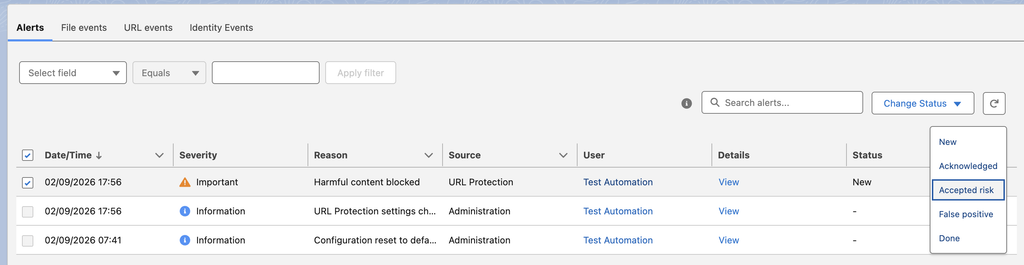
Most teams already have a process for handling detections, even if nobody has written it down. Someone looks at each one first, decides whether it needs further action, and passes anything suspicious on to the security team. Cloud Protection for Salesforce now supports that process in the alert list itself. You can see at a glance which alerts are still waiting on someone, two admins can split the work without going over the same records twice, and if a question comes up months later about a particular alert, the decision is written on the record where anyone can find it.
How it works: in Analytics → Alerts, every alert now carries one of five statuses:
- New,
- Acknowledged,
- Accepted risk,
- False positive, or
- Done.
Filter by status the same way you filter anything else and update many alerts at once with bulk editing. Bulk changes ask for confirmation first, so a fast click can’t quietly reclassify a batch. Informational alerts don’t need a status and show N/A. Anything already in your org when you upgrade starts as New.
Retain logs on your terms
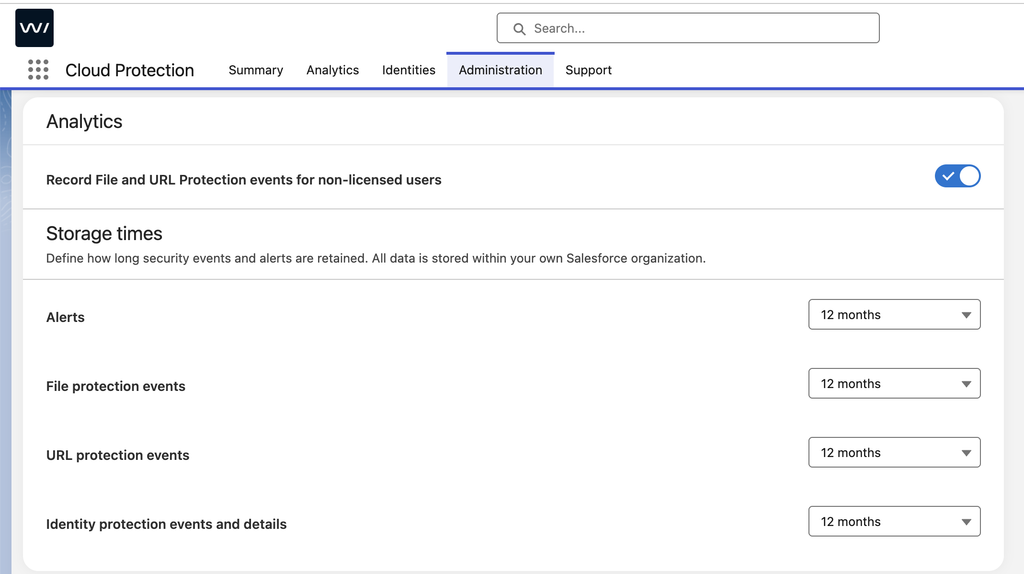
If your organization has retention rules to follow, or you simply do not like the idea of your logs disappearing on a schedule somebody else set, you have probably already run into the gap between what your policy asks for and what the product would keep. Your compliance team says five years, retention topped out at two, and closing that gap became your job, usually with an export routine and somewhere else to keep the data and look after it. You can now set retention to whatever length you actually need, up to and including keeping records indefinitely, so the logs stay where they were created and when your security team or your auditor asks whether you still have last year’s scan history, the answer is simply yes.
How it works: in Admin → General → Analytics → Storage Times, the fixed retention windows are still there, capped at 24 months as before, and alongside them you’ll now find two new options for alerts and for every scan log category. You can set up a custom period measured in days, weeks, months, or years, or you can choose Never delete, which switches off the daily cleanup for that category and hands its lifecycle over to you entirely. It’s worth remembering that Never delete means the category will keep growing along with your volume, so most orgs will want it on the records they need to prove something with rather than on all of them.
One-click to put your alerts in front of the security team
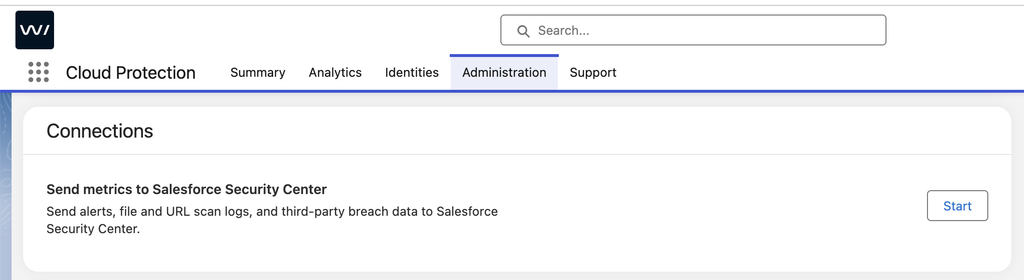
When your alerts, scan verdicts and identity breach data show up in Salesforce Security Center, your security team can see what Cloud Protection for Salesforce is catching in the place they already watch, without waiting for you to pull a report. That has been possible since Summer 3.3, but only if you were willing to build four custom metrics by hand in Salesforce Setup, field by field, and get every one of them right. Autumn 3.4 takes that job off your hands, so if it has been sitting on your to-do list, it is now about a minute’s work.
How it works: open Cloud Protection for Salesforce App → Administration → Tools and you will find a new Connections section with a Start button that registers all four objects as Security Center metrics for you:
- Alerts
- File Scan Logs
- URL Scan Logs
- Identity Breaches
The button only appears for users who have access to Security Center, and it is safe to press more than once because it skips anything that is already registered, so if you built the metrics manually back in Summer 3.3, there is nothing here you need to do.
Available on AgentExchange
Autumn 3.4 is available from Salesforce AgentExchange: September 7, 2026.
- Sandbox automatic updates begin: September 28, 2026.
- Production automatic updates begin: October 12, 2026.
Detecting the risks that reach your Salesforce has always been our focus, and helping you keep track of what happens after a detection is becoming just as much of one. The updates above are the ones we think you will notice first, and there is more in Autumn 3.4 than we have covered here.
Already a customer? Read the release notes to see everything in Autumn 3.4.
Not yet a customer? We’d love to show you what it can do for your organization. Book a demo and we’ll walk you through it personally. [Book a demo]