This is not a niche concern. Departing employees are a well-recognized insider-risk scenario, particularly where users have legitimate access to commercially sensitive data. The combination of high-value data, broad user access, and limited monitoring creates exactly the conditions that make it easy to walk out the door with more than a company laptop.
Why Salesforce is particularly exposed
Most enterprise data loss prevention tools are designed around the file system and email. They monitor what gets attached to an outbound message, what gets copied to a USB drive, and what leaves the network perimeter. Salesforce sits largely outside that coverage. A sales rep who exports their entire account list to a CSV through the Salesforce UI isn’t triggering a DLP alert – they’re doing something that looks, to most monitoring systems, like normal work.
The data at risk is also uniquely valuable. A Salesforce org built up over several years contains customer contact details, full account and opportunity history, deal values, renewal dates, pricing structures, and relationship notes that no public database can replicate. For a sales rep moving to a competitor, that data has immediate commercial value. For a disgruntled employee, it’s leverage. For someone simply being careless on their last week, it’s a liability the company may not know about for months.
“CRM data is particularly difficult to replace. There are years of relationship history, renewal dates, and pricing context that doesn’t exist in any public source. For someone moving to a competitor, it’s a head start that would otherwise take months to build. What makes CRM exfiltration especially concerning is that the value of the data is obvious, and the barrier to taking it can be low,” according to Karmina Aquino, Head of Threat Intelligence at WithSecure Cloud Protection for Salesforce.
The window of exposure
The risk doesn’t begin on the last day. It often starts weeks earlier, when a resignation is submitted, a new role accepted, or a relationship with a manager deteriorates. In the period between that moment and the point when access is formally revoked, a motivated individual has ample opportunity to act.
Even when offboarding is handled promptly, the window can be wider than it appears. Access revocation in Salesforce requires deliberate action: deactivating the user account and reassigning records, as well as reviewing sharing rules and connected app permissions. In large orgs with complex configurations, this is rarely as clean as an IT checklist implies. OAuth tokens granted to third-party apps may persist. Shared login credentials, where they exist, are harder to revoke entirely. In organizations where offboarding is handled centrally by IT rather than by Salesforce admins, the specific steps required for the platform may simply be missed.
The result is a meaningful gap between when a person stops being an employee and when they stop being able to access your data.
The detection problem
What makes this risk particularly difficult to manage is how hard it is to see in hindsight. Salesforce provides several native sources of audit and activity data – Setup Audit Trail, Field History Tracking, Event Monitoring, Login History – but the level of visibility, retention, and real-time detection available depends on the features and licensing in use. Without Transaction Security Policies from Shield, the default setup has significant gaps: event log retention is 30 days for most orgs, field-level history tracking has to be manually enabled for each object, and large-scale exports don’t generate the kind of alerts that would prompt immediate investigation.
By the time a company realizes that a former employee took their pipeline data or deleted their account records, the audit trail may already be gone. And even where logs exist, reconstructing what happened – such as which records were accessed, exported, or deleted, and when – requires a level of forensic effort that most teams aren’t equipped to undertake quickly.
“Having logs is not the same as having detection. Meaningful monitoring requires enough context to recognise when otherwise legitimate user activity becomes unusual or risky, and the ability to act before that activity results in data loss,” Aquino concludes.
How to prevent it
Protecting Salesforce data from departing employees isn’t solely an HR or IT problem. Instead, it’s a data governance problem that requires the right tooling to solve. Effective protection means three things working together.
First, continuous visibility into user activity: not just login events, but what data is being accessed, exported, or deleted, and by whom. This needs to be always-on, not reconstructed after the fact.
Second, complete and granular backup. If a departing employee deletes or corrupts records – intentionally or otherwise – the ability to restore that data to a specific point in time, without depending on a 15-day recycle bin, is the difference between a recoverable incident and a permanent loss.
Third, a clear offboarding process specific to Salesforce: one that goes beyond deactivating a user account to include reviewing connected app access, OAuth tokens, shared credentials, and data exports in the period leading up to departure.
Departures are inevitable. Data loss because of them doesn’t have to be.
Key Takeaways
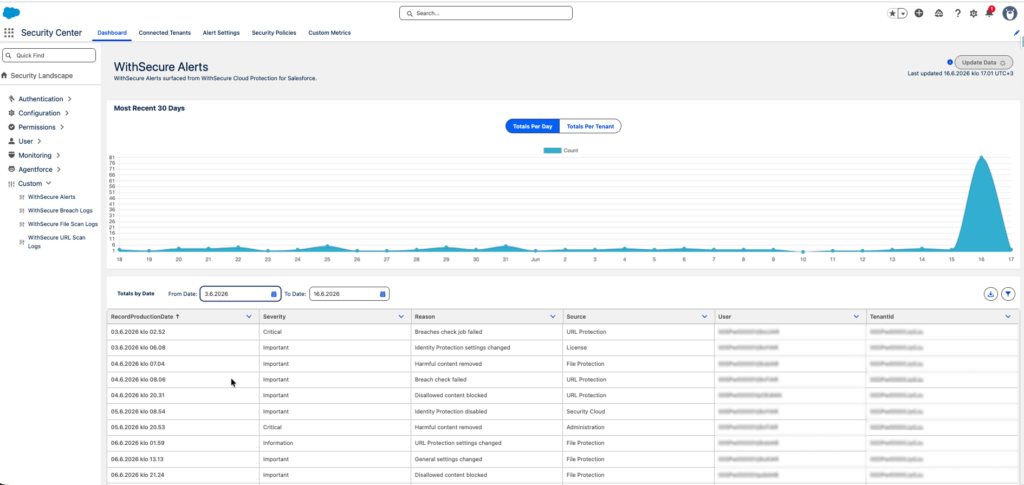
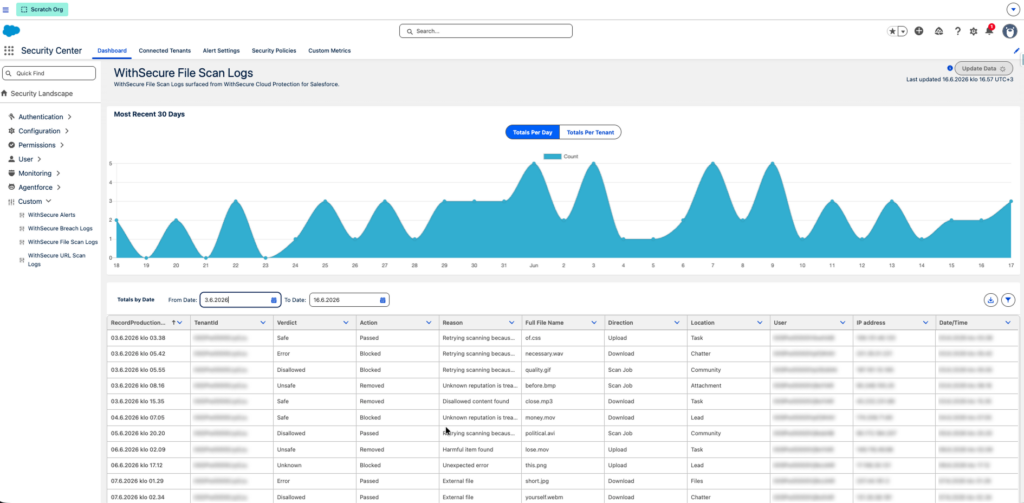
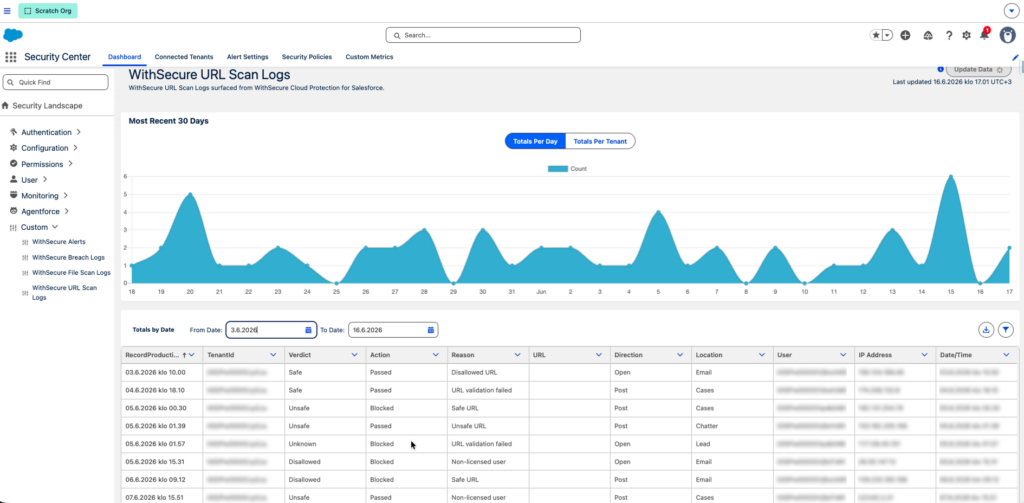
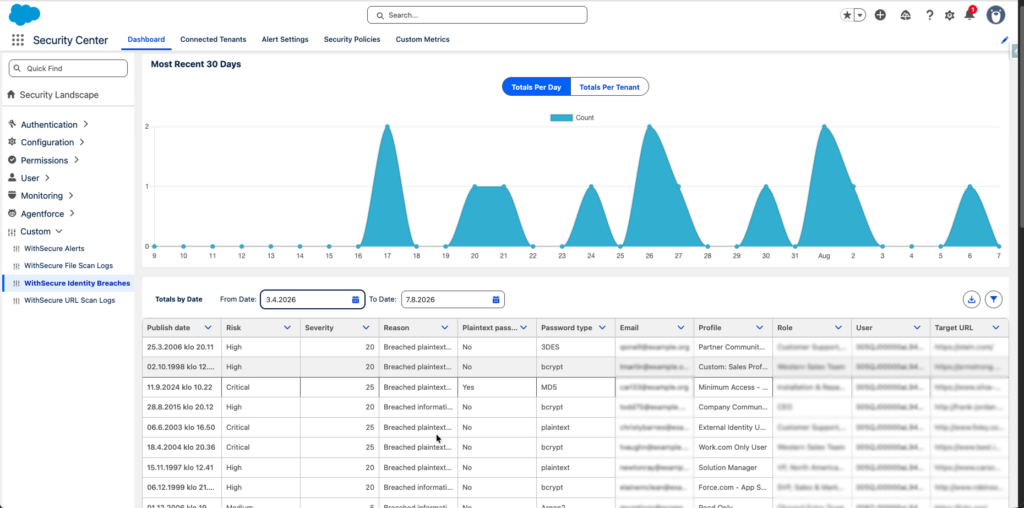
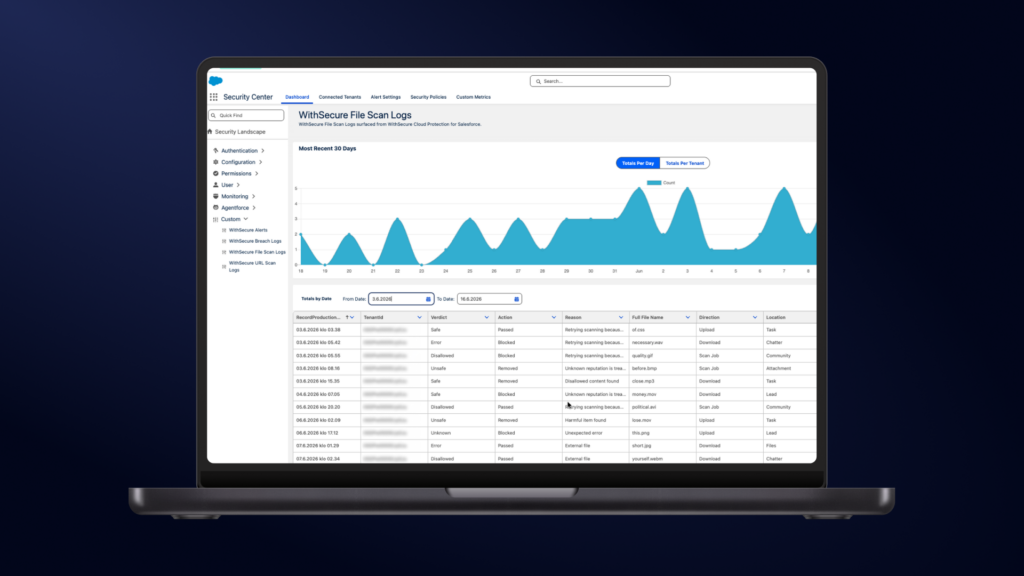
Your file, URL, and identity threat data from Cloud Protection for Salesforce shows up in Security Center, next to the signals you already monitor.
Getting started takes three steps and about 30 minutes. All you need is Cloud Protection for Salesforce and a Security Center license.
Spot spikes, track patterns, and show auditors the evidence on one dashboard.
Security Center is Salesforce’s tool for monitoring security posture across one or more orgs from a single dashboard, covering areas like authentication, permissions, and the health of your org. If you use Salesforce Security Center, you already know why it exists. One place to monitor security signals across your org instead of ten browser tabs and a spreadsheet.
Now the threat data from Cloud Protection for Salesforce can be part of that view. The integration works by registering four custom metrics in Security Center, one for each data type: alerts, file scan logs, URL scan logs, and breach logs.
In this guide, you will learn what threat data you can surface in Security Center and why it matters, how to read the trends so patterns turn into action, and how to set up the integration in three steps. If you want to get the most value out of Security Center, you are in the right place.
What you can see in Security Center
The integration surfaces four types of data from Cloud Protection for Salesforce. Each one is registered as a custom metric in Security Center, so you choose which ones appear in your dashboards.
Why does this matter? Security Center is strong on configuration and access signals. Health checks, permissions, login activity. What it cannot show on its own is the content flowing through your org: the files your customers upload, the links inside your cases, the credentials of your users circulating in breach dumps. Those are the threats that reach people. Without them, your security picture has a blind spot exactly where attacks happen. This integration closes it, and it means one less tool to check when something looks wrong.
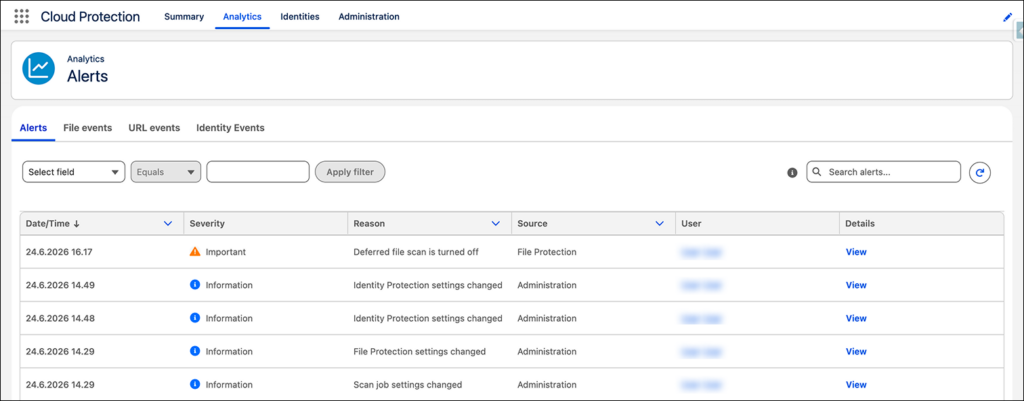
Alerts. Detections, setting changes, job statuses, and grouped breach events, each with a severity level. This gives you an immediate view of what needs attention and how urgent it is.
File scan logs. Every file scan results with its verdict and the action taken. You see what was scanned, whether it was safe or blocked, who uploaded it, where it came from, and the IP address behind it. If a malicious attachment arrives through a case or a portal upload, this is where the story lives.
URL scan logs. Every link checked across Cases, Chatter, emails, leads, and tasks, with the same verdict and action detail. Phishing links do not only arrive in the inbox. They arrive inside your Salesforce records too, and now their trail is visible where you monitor everything else.
Breach logs. Records of users whose credentials have appeared in a known breach, including the risk level, the breach source, and whether the password was exposed in plaintext. This is often the earliest warning you get that an account takeover attempt is coming.
What the trends tell you
Individual events are useful. Patterns are where the real value is.
Every metric in Security Center supports time series trending, which turns your scan logs into signals. A spike in blocked files the week after you launch a new customer portal. Malicious URLs arriving through cases from the same region. Breach alerts clustering around a specific user profile. These are patterns you act on, and they only become visible when the data sits in one place over time.
Trending also answers a question every admin eventually gets from an auditor or an executive: what protects our Salesforce, and can you show me? With this integration, the answer is already on the dashboard they trust. Not a separate tool someone has to dig up, but evidence sitting alongside the rest of your security posture.
Admin access to create permission sets and custom metrics
Records created after you upgrade to release 3.3 populate Security Center automatically. Historical data is available through the optional Data Loader backfill described above.
How to set it up
The setup happens entirely in the Salesforce Setup. No configuration is needed in Cloud Protection for Salesforce itself.
Step 1: Assign permissions. In Salesforce Setup, create a permission set with the Manage Security Center system permission and assign it to the admins who need access. Then open the Security Center from the App Launcher.
Step 2: Register the custom metrics. Go to Setup, then Security Center, then Settings, then Custom Metrics, and create one metric for each data type you want to surface: alerts, file scan logs, URL scan logs, and breach logs. For each metric you select the source object, the fields to display, the Tenant ID field, and the Record Production Date field that drives the trending. Save and activate each one.
Step 3: Verify your dashboards. Open your Security Center dashboards and confirm each metric shows data. If a metric looks empty, click Update Data. Security Center refreshes its own cadence, so the first load can take a few minutes.
That is the whole setup. For the full field by field configuration, including the recommended display fields for each metric, see the Security Center integration guide.
The full picture in one place
Security tools earn trust in two ways. By catching threats, and by showing their work. This integration takes the threat activity Cloud Protection for Salesforce catches every day and puts it where your team already looks, in the dashboard built for exactly that purpose.
Already a customer? Make sure you are on release 3.3 or later, then follow our detailed setup guide to get started today.
Not yet a customer? Book a demo and we will show you the integration live, along with everything else Cloud Protection for Salesforce catches before it reaches your users.
Frequently asked questions
What is Salesforce Security Center?
Security Center is Salesforce’s security monitoring tool. It gives admins one dashboard for tracking security posture across one or more orgs, covering areas like authentication, permissions, configuration health, and user activity.
Can the Security Center show data from third party security tools?
Yes, through custom metrics. Security Center lets you register data from other sources as metrics with trend charts. Cloud Protection for Salesforce uses this mechanism to surface its alerts, file scan logs, URL scan logs, and breach logs.
Can I see historical threat data in the Security Center?
Yes. Records created after you upgrade to release 3.3 flow automatically, and you can backfill up to six months of older records using Salesforce Data Loader.
Do I need a separate license for this integration?
No separate license is needed for this integration. You need Salesforce Security Center licensed in your org and Cloud Protection for Salesforce release 3.3 or later.
That gap is a problem. And it’s a bigger one than most organizations realize.
The data that runs the business
Think about what actually lives in your Salesforce org:
Every active opportunity and its value.
Your entire customer and prospect base, with contact details, relationship history, and account intelligence built up over years.
Revenue forecasts.
Renewal dates.
Contractual terms.
Notes from sales calls that contain more competitive intelligence than most internal briefing documents.
This is not peripheral data, it’s the operational core of the business. It drives hiring decisions, informs product strategy, and sits at the centre of almost every commercial conversation. The moment something goes wrong with it – whether through loss, corruption, or unauthorized access – the effects ripple outward. Fast.
And yet, in most enterprise security program, the CRM sits somewhere between an afterthought and a blind spot.
How this happened
It’s worth understanding why this is the case, because the gap didn’t emerge from carelessness. It emerged from the way security thinking evolved alongside cloud adoption.
For most of its history, enterprise security was built around the perimeter. You protected what sat on your network. When SaaS platforms arrived, the mental model didn’t fully keep pace. The often-unstated assumption was that SaaS providers handled security, so internal teams could focus elsewhere. That assumption was never entirely accurate, but it became baked into how security programs were structured and budgets allocated.
Salesforce, specifically, reinforced this with its reputation for reliability and enterprise-grade compliance certifications. If it ticks the SOC 2 box, it must be secure. The organization relaxed, and the CRM dropped off the threat model.
“It’s still common for Salesforce to be recognised as business-critical, but not always treated as security-critical. The turning point typically comes when organizations stop thinking of it as ‘just another SaaS application’ and start viewing it as one of their most valuable data stores. Once that shift happens, conversations naturally move toward governance, identity, continuous monitoring, and recovery. The same disciplines they’d already apply to their most critical business systems,” believes Karmina Aquino, Head of Threat Intelligence at Cloud Protection for Salesforce.
What attackers already know
Here’s the uncomfortable truth: the people who want access to your data are not making the same assumption.
A compromised Salesforce org is extraordinarily valuable. A single account with broad access can expose your full customer list, the pipeline at every stage, pricing structures, and renewal vulnerabilities. Sadly, this is the kind of intelligence a competitor or malicious actor would pay handsomely for.
Threat actors increasingly rely on stolen credentials, infostealer logs, and social engineering to gain legitimate access to CRM platforms, because they provide direct access to high-value business data and trusted customer relationships. Social engineering campaigns are crafted around the account and opportunity data they’ve already scraped from a compromised org.
Meanwhile, your security team is focused on the endpoint that got the phishing email, rather than what the access was subsequently used to reach.
“To a threat actor, a CRM is far more than a customer database. It’s a blueprint of how the business operates. Once attackers obtain legitimate credentials, they can identify key customers, upcoming renewals, high-value opportunities, trusted relationships, and the people behind them. That intelligence allows them to prioritise victims, craft highly convincing social engineering campaigns, and make follow-on attacks such as fraud, phishing, and extortion significantly more effective. The initial compromise is often just the beginning,” Aquino states.
The scope problem in practice
Treating Salesforce as out of scope has concrete consequences beyond the abstract risk. It means the platform is rarely included in pen testing. Salesforce configurations aren’t reviewed during security audits. User access isn’t subject to the same periodic review cycle as Active Directory. Offboarding processes often have gaps specific to the CRM. Data classification policies that apply everywhere else simply don’t cover the org.
The result is that one of your highest-value assets is running with less scrutiny than the average file share.
The takeaway
However, there is good news. Bringing the CRM into scope doesn’t require rebuilding your entire security program. It requires a deliberate decision that Salesforce is a critical asset and therefore treating it accordingly. This means understanding who has access to it, what they can do with that access, how the data is protected, and what your recovery position looks like if something goes wrong.
Solutions like Cloud Protection for Salesforce exist precisely because your CRM deserves the same level of dedicated protection as any other critical business system: continuous monitoring, access visibility, and the ability to recover quickly when the unexpected happens.
Your sales team already knows Salesforce is the most important system in the business. It’s time your security program caught up.
This is shadow IT in its modern form. Not consumer apps on corporate laptops, but a quiet accumulation of third-party connections sitting inside your most sensitive business system, largely unmonitored, and in many cases entirely unknown to the security team.
How the attack surface grows
Salesforce is designed to connect. The AppExchange alone lists thousands of third-party applications, and most enterprise orgs run a significant number of integrations alongside it, including marketing platforms, data enrichment services, CPQ tools, customer success software, custom-built middleware, and more. Each connection is legitimate when it’s made. The problem is what happens next.
OAuth tokens – the credentials that allow third-party apps to access Salesforce on behalf of a user – don’t expire by default. They persist unless explicitly revoked. In a large org with high staff turnover and a long history of integration projects, the gap between ‘connected apps in use’ and ‘connected apps that exist’ can be substantial.
An integration authorized by a user with broad permissions carries that same access level regardless of whether the tool is still in active use, whether the vendor has since been acquired, or whether anyone in your organization still knows it exists.
Each dormant connection is a potential entry point. If a third-party vendor is compromised, every customer whose Salesforce org that vendor can access is exposed. The attack doesn’t need to target you directly. It only requires the targeting of the weakest point in your integration ecosystem.
“Almost every time we run a connected-app assessment, the biggest surprise isn’t a new vulnerability – it’s the sheer number of OAuth tokens nobody remembers granting. Integrations get built for a project, the project ends, and the token just keeps working. Visibility is the first real security win most teams get,” says Tapas Tripathi, Salesforce Architect at Cloud Protection for Salesforce.
Why security teams miss it
Traditional security monitoring isn’t built for this problem:
Endpoint detection tools watch devices.
Network monitoring watches traffic.
SIEM platforms correlate events across infrastructure.
None of them have native visibility into what is authorized to access your Salesforce data at the application layer.
Within Salesforce itself, connected app management is an administrative function, not a security one. It falls to Salesforce admins to review what’s authorized, but without automated alerting or scheduled review processes this rarely happens proactively. The information exists inside the platform, but it isn’t surfaced in a way that makes risk visible. An admin would need to know to look for it, know where to look, and have the time to act on what they find.
The result is a class of risk that sits in a gap between security, IT, and Salesforce administration: owned by no one, reviewed by no one, and growing with every new integration that gets added.
The data exposure
The stakes are high because of what your Salesforce contains. A connected app with read access to your org can see your full customer list, pipeline, account history, and contact details. One with modify access can alter or delete records. The permission scope granted to third-party integrations is often broader than necessary – because it’s easier to grant wide access and move on than to carefully scope permissions at the point of integration.
When a third-party vendor suffers a breach, the question isn’t just what data they held on your behalf. It’s what their platform credentials could access in your systems. For organizations that haven’t audited their connected apps, the answer to that question is often uncomfortable.
“Supply chain risk isn’t just about the code you didn’t write – it’s about the access you didn’t revoke. A single over-permissioned connected app from a vendor you barely think about can be the difference between a contained incident and a full breach,” Tripathi concludes.
The takeaway
Getting visibility into your connected app landscape is the starting point. That means:
A complete inventory of every application authorized to access your Salesforce org
The permissions each holds
The last time each was used
Whether the user who authorized it is still with the organization
From there, you need a process: a regular review cycle that revokes access for dormant or decommissioned integrations, enforces least-privilege scoping for new connections, and ensures that offboarding a user also means reviewing the integrations they authorized.
The connected app problem is solvable. But it only gets solved once someone is responsible for both solving it and putting the right tooling in place to make the invisible visible.
It starts small. A sales rep needs temporary access to a restricted object to close a deal, so permission is granted but never revoked. A manager moves into a new role but keeps the access from their previous one. A consultant is given admin rights during an implementation and never walked back. A permission set is cloned without anyone checking what the original contained.
Individually, none of these decisions feel significant. Collectively, they produce an access landscape that no one designed and no one fully understands. This creates risk in ways that rarely surface until something goes wrong.
How permission sprawl happens
Salesforce’s security model is genuinely complex. Profiles, permission sets, permission set groups, role hierarchies, sharing rules, field-level security, object access – each layer interacts with the others in ways that aren’t always intuitive, even to experienced admins. In an org still finding its feet, this complexity is manageable. In an org that’s been running for five or ten years, with dozens of admins, hundreds of users, and a history of one-off configuration decisions, it becomes almost impossible to hold a complete picture of who can see and do what.
What makes this so persistent is the absence of friction. Salesforce admins are typically focused on keeping the business moving – onboarding new users, supporting sales cycles, enabling new workflows. Granting a permission takes seconds. Auditing whether it should still exist requires time and tooling that most teams don’t have. The result is a one-way ratchet: access gets added continuously, and it almost never gets taken away.
There is rarely a single owner responsible for the overall access posture of the org. Without that ownership, no one is asking the question that matters most: does this person still need this?
“Admins grant object-level View All/Modify All (or the org-wide View All Data/Modify All Data) to solve a narrow reporting or integration need, then never scope it back. This silently overrides all sharing rules, OWD, and record-level restrictions for every user holding that permission set,” says Tapas Tripathi, Salesforce Architect at Cloud Protection for Salesforce.
Why it rarely gets fixed
The root problem is visibility. Most organizations don’t have a clear, current map of who has access to what in Salesforce. Native reporting can surface some of this information, but gaining a meaningful picture of effective permissions – accounting for the interaction between profiles, permission sets, and sharing rules – requires significant manual effort. For most teams, that effort is hard to justify until something goes wrong.
There’s also an organizational gap. Access reviews are standard practice for Active Directory and core infrastructure. For Salesforce, the same rigor rarely applies. It doesn’t fall cleanly under IT security, Salesforce administration, or compliance, so it tends to fall between them. The result is that permission configurations that would fail a basic least-privilege audit sit untouched for years, simply because no one is looking.
“Instead of building least-privilege profiles, teams clone the admin profile and strip a few checkboxes. Because the base is so permissive, things like Manage Users, Modify All Data, Author Apex, or Customize Application often survive the cleanup unnoticed,” Tripathi states.
The impact when it goes wrong
Over-permissioned accounts don’t create breaches. Instead, they determine how bad they are. A phishing attack that lands on a standard user account is a bad day. The same attack on an account carrying system administrator rights, modify-all access, or broad data export permissions is a categorically different incident: full visibility into your pipeline, the ability to exfiltrate or destroy records at scale, and potentially a path into connected systems. The permission model doesn’t just define what users can do. It defines the blast radius when something goes wrong.
The same applies to insider risk. A departing employee with standard sales rep access can do damage. One with elevated permissions, accumulated over years of tenure, can do considerably more. And because permission sprawl is invisible, the security team often doesn’t know what they were capable of until after the fact.
Misconfiguration is also a factor. Overly permissive sharing rules can inadvertently expose records to users who have no business reason to access them. Field-level security gaps can leave sensitive data, such as contract values, personal information, strategic account details, visible to a far wider audience than intended.
The takeaway
Closing the permission gap starts with getting visibility. That means being able to see the effective access of every user in the org. This means not just their assigned profile, but the combined result of every permission set, sharing rule, and role hierarchy entry that applies to them.
From there, it requires a regular review cycle: a structured process for identifying access that no longer reflects current roles, flagging dormant accounts, and ensuring that exceptions granted for specific circumstances don’t become permanent. This isn’t a one-time project, it’s an ongoing discipline and needs tooling that makes the process manageable rather than a manual exercise that nobody has time for.
The permission gap is quiet, unglamorous, and almost entirely preventable. That’s exactly what makes it worth talking about.
Unfortunately not. Indeed, that assumption has aged badly. And for organizations running business-critical operations on Salesforce, the gap between perception and reality is wide enough to be genuinely dangerous.
The evolution of the threat
Traditional ransomware worked by encrypting local files and demanding payment for the decryption key. It was blunt, visible, and relatively easy to attribute. The attacker needed access to your systems, and the damage was immediate and obvious.
Modern ransomware operations are more sophisticated, more patient, and considerably more targeted. Attackers spend weeks or months inside an environment before making themselves known. Once in, they map systems, identifying the most valuable data and positioning themselves to cause maximum disruption at the moment of their choosing.
The goal isn’t just to encrypt files. It’s to make recovery as painful and expensive as possible – and then demand payment to make it stop.
Increasingly, that means targeting SaaS platforms like Salesforce as part of broader extortion campaigns. Rather than encrypting the infrastructure – which they can’t – modern ransomware groups steal, manipulate, or delete business-critical data to increase pressure on the victim. The extortion lever isn’t a locked screen. It’s the threat of your customer database being published, your pipeline wiped, or your records corrupted beyond recovery. The ransom demand follows from there.
“Security controls are designed to reduce the likelihood of compromise, but no organization should assume they’re infallible. A well-tested backup and recovery strategy is what ultimately determines how quickly you can recover when privileged access is misused,” says Karmina Aquino, Head of Threat Intelligence at Cloud Protection for Salesforce.
How attackers reach your Salesforce org
There are far more entry points than most security teams account for:
A phishing email that harvests Salesforce credentials
An OAuth token granted to a third-party app that later becomes compromised
An endpoint infection that captures session cookies before the user even knows something is wrong
A former employee whose access was never fully revoked
Once inside, an attacker with the right access can do significant damage without triggering a single traditional security alert. As part of an extortion campaign, they may:
Exfiltrate your entire customer and pipeline database – giving them leverage before they’ve touched a single record
Mass-delete records and wait until they are permanently purged from the Recycle Bin, eliminating your recovery options
Corrupt data in ways that aren’t immediately visible but undermine the integrity of everything downstream
Do all of this through the Salesforce UI, using legitimate credentials, in a way that looks like normal user behavior to anyone watching
There’s no encryption. There’s no ransom note on a locked screen – at least not yet. But the leverage is being built, and your ability to resist a demand depends entirely on what protection you had in place before the incident.
The recovery problem
This is where the absence of a proper backup strategy becomes critical. It’s also where extortion campaigns gain their real power. If an attacker has deleted or corrupted a significant volume of records and you’re relying on Salesforce’s native tools – a 15-day recycle bin, a weekly CSV export – your recovery options are severely limited. That limitation is the point. It’s what makes the ransom demand credible.
A weekly export doesn’t restore relationship data, workflow history, or configuration. It gives you a flat file of records as they existed at a point in time, with no guarantee it was before the damage occurred. And if you don’t notice the problem within 15 days, the recycle bin is already empty.
For organizations that discover the issue too late, recovery means rebuilding from incomplete data, going back to customers and prospects to verify information, and operating with a degraded CRM for months. The business cost, in terms of in lost deals, eroded customer confidence, and internal disruption, can easily eclipse what any ransom demand would have been.
The takeaway
Ransomware resilience for Salesforce isn’t about securing the platform infrastructure, because Salesforce handles that. It’s about ensuring that if an attacker uses your CRM data as extortion leverage – stealing it, corrupting it, or deleting it – your organization can recover quickly and completely, thereby removing the foundation of their demand.
That means continuous, automated backup with granular restore capabilities, rather than a weekly export that overwrites itself. It means the ability to restore specific records, relationships, and configurations to a point in time you know was good, independent of what’s in the recycle bin. A credible recovery position is what makes an extortion threat fail.
“As more business-critical processes move into SaaS platforms like Salesforce, resilience becomes just as important as prevention. Organizations need to plan not only for keeping attackers out, but also for recovering quickly if legitimate credentials are abused,” Aquino continues.
Ransomware groups don’t need to touch your infrastructure to hold your business to ransom. The question is whether your recovery position is strong enough to call their bluff.
Recently, while investigating phishing activities in our Salesforce customer environments, we came across another OAuth Device Code phishing campaign.
Microsoft has already published an excellent technical analysis of the OAuth mechanics and attacker infrastructure behind these campaigns. Rather than repeating that analysis, this article focuses on other observations not covered in that post and why it remains relevant for Salesforce admins.
A familiar technique
Device Code phishing itself isn’t new.
It has been observed in campaigns as early as 2024 that abused Microsoft’s Device Authorization Grant to obtain OAuth tokens without harvesting credentials. However, it is becoming more mainstream in the recent months along with major improvements in Phishing-as-a-Service kits that enable wider adoption within the cybercriminal ecosystem.Today’s campaigns increasingly disguise the entire process behind legitimate content hosting and collaboration platforms, template-driven phishing pages and legitimate identity-provider authentication to provide a seamless experience for the target user.
Key findings
Analyzing the phishing framework revealed:
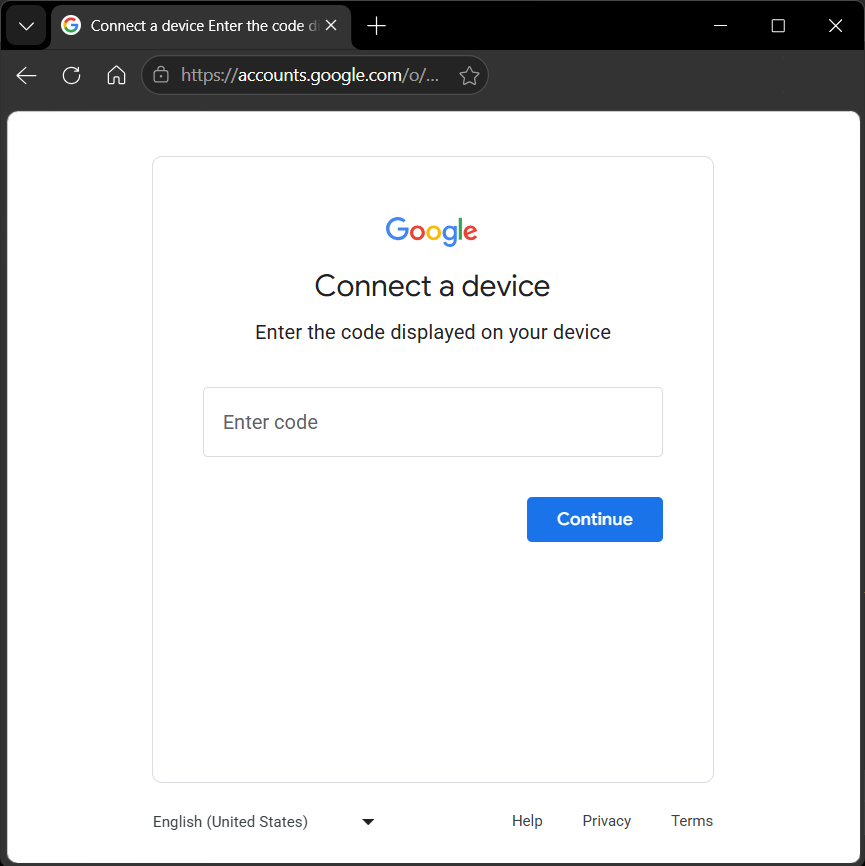
Support for both Microsoft and Google Device Code authentication
Over 30 lure templates impersonating collaboration and Microsoft services
14 supported languages with runtime localization
Abuse of legitimate SaaS platforms such as Proton Docs and Lark Docs as intermediary lures
Automation of the Device Code workflow through backend session tracking and frontend polling
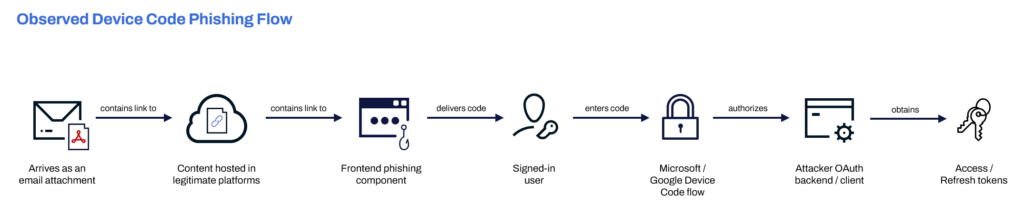
Observed device code phishing flow
While Microsoft has already documented the underlying OAuth mechanics in detail, the samples analyzed during this investigation revealed another interesting perspective: how the phishing campaign is delivered to the victim. Rather than directing users straight to a malicious login page, the attackers chain together multiple stages including legitimate content-hosting platforms, a configurable phishing frontend, and the legitimate Microsoft or Google Device Code authorization flow, to create a workflow that appears trustworthy from beginning to end.
Figure 1. High-level flow observed during analysis. The diagram intentionally simplifies the OAuth protocol to focus on how the phishing campaign is delivered rather than the underlying authorization exchange.
It all starts with a document
The campaign starts like many document-based phishing attacks.
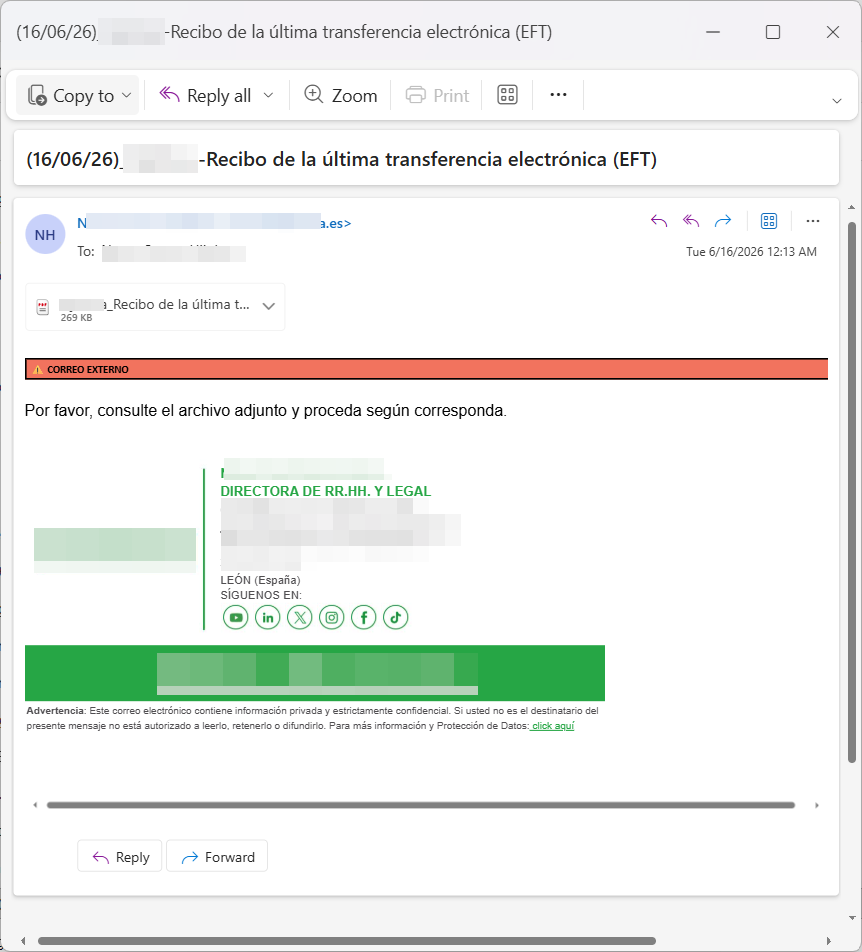
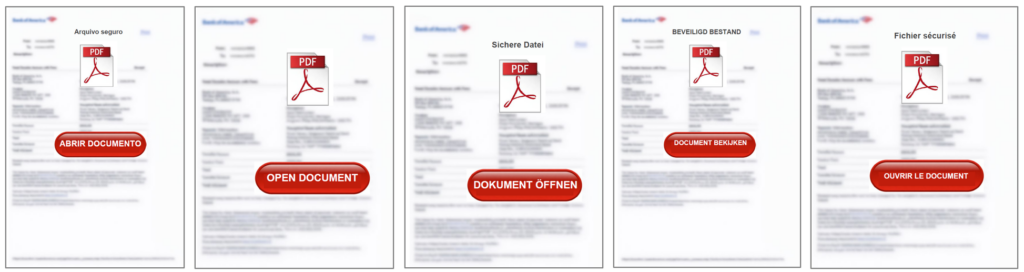
The user receives what appears to be a shared document as an email attachment.
Figure 2. Email sample in Spanish
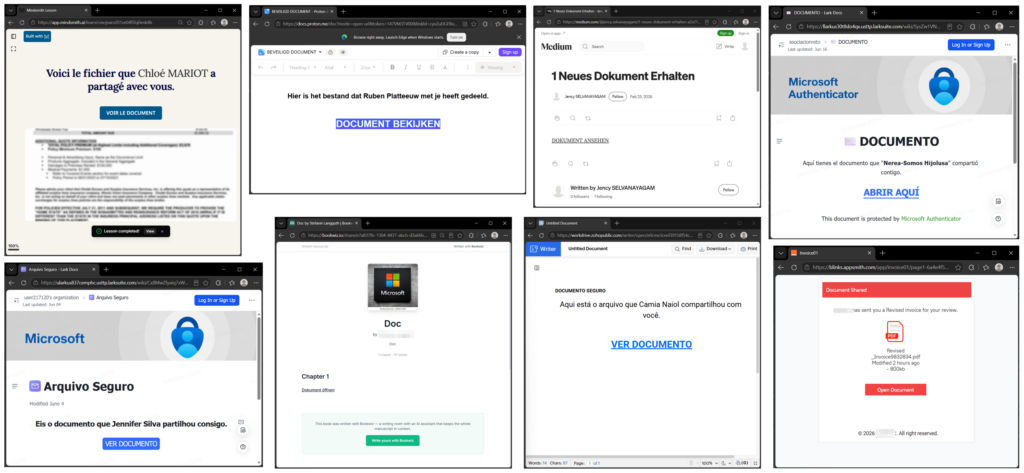
It’s noticeable that the campaign supports a wide range of languages. This language support is seen to be consistent from the attachment to the intermediary files up until the phishing pages.
Figure 3. Attachments in multiple languages
Unlike many phishing campaigns, these documents lead to legitimate SaaS platforms as intermediary hosts. Rather than directing the target users immediately to the phishing infrastructure, genuine Proton Docs, Lark Docs, Zoho Writer, Medium, Bookwiz, Mindsmith and similar services were used to host benign-looking content containing the link to the malicious phishing infrastructure.
Figure 4. Intermediary localized documents hosted in different legitimate SaaS platforms
This approach offers several advantages:
the document itself is hosted by a legitimate SaaS platform
URLs appear trustworthy
reputation-based filtering is less likely to flag the document
the phishing infrastructure is one click deeper in the chain
Additional platforms observed included Appsmith, Playbook, Soloist.ai, 7taps and Ouro Foundation.
Frontend phishing component
The original page consisted primarily of heavily obfuscated JavaScript using runtime decoding, encoded payloads, and dynamic rendering.
Once decoded, it was evident that it was a phishing framework rather than just a static phishing page.
The phishing frontend is responsible for:
rendering the fake pages based on templates
localization
copy-to-clipboard
opening Microsoft’s or Google’s Device Code page
The decoded frontend does not appear to handle OAuth tokens directly. Instead, it polls attacker-controlled API endpoints for session status. Based on this, the OAuth device-code generation and token polling likely happen server-side, through an attacker-controlled OAuth client or backend application.
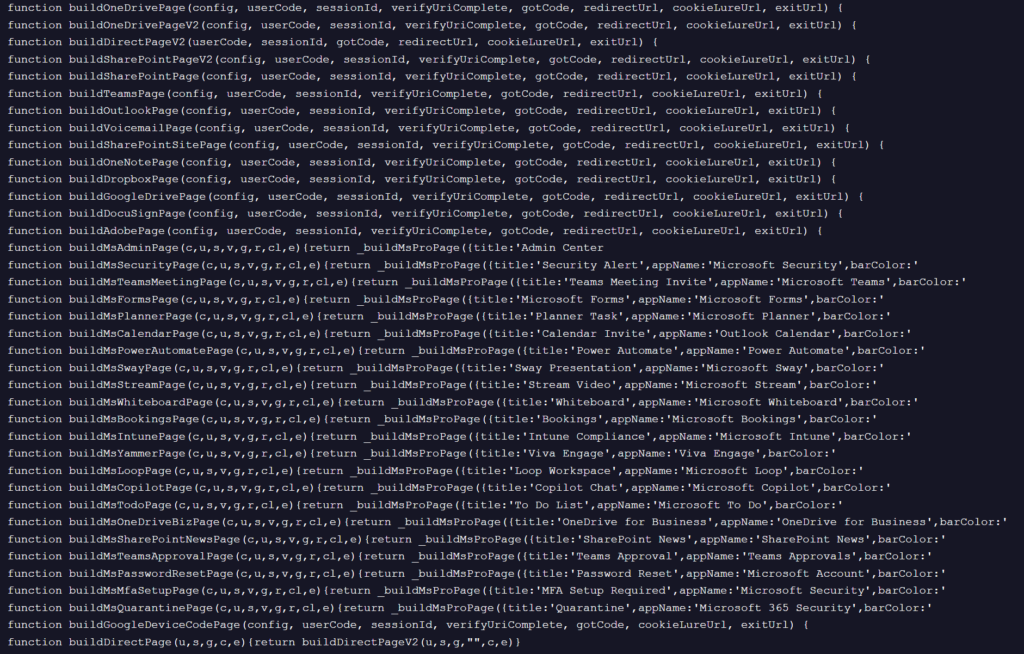
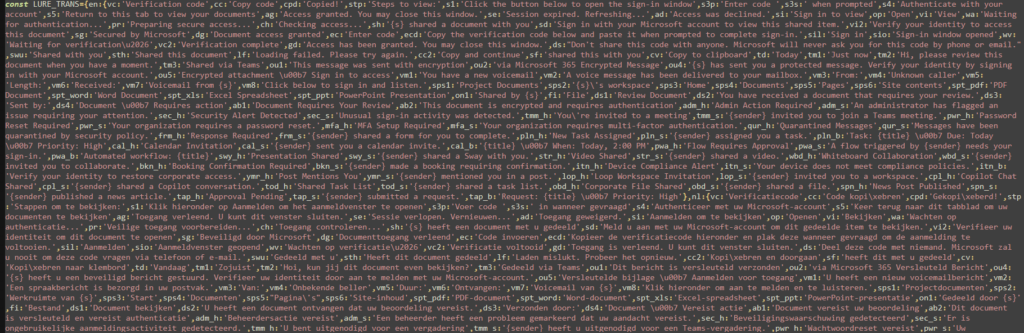
LureTemplates
The decoded JavaScript reveals a template-driven renderer that separates page layout from language and messaging.
The code revealed over 30 supported lure templates.
Figure 5. Functions for building lure templates
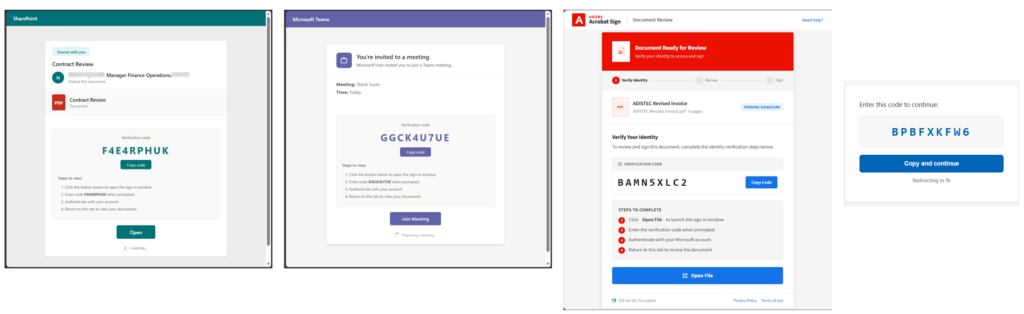
Among them were document-sharing services such as:
OneDrive
SharePoint
Dropbox
Google Drive
OneNote
DocuSign
Adobe
as well as Microsoft-branded workflows including:
Teams meetings
Planner
Forms
Intune
Bookings
Password Reset
MFA Setup
Quarantine notifications
Copilot
Stream
Whiteboard
Yammer
Figure 6. Different lure themes
Language Support
Another interesting finding was the localization support.
The decoded translation tables supported at least fourteen languages:
English
Dutch
German
French
Spanish
Portuguese
Italian
Turkish
Polish
Russian
Japanese
Korean
Chinese
Arabic
Instead of maintaining separate phishing pages for each language, the framework renders a common HTML template before replacing interface strings with localized equivalents.
Figure 7. Localized strings
This allows attackers to reuse the same backend while presenting the target users with localized lures that match different collaboration platforms and business workflows.
Figure 8. Same lure templates, different languages
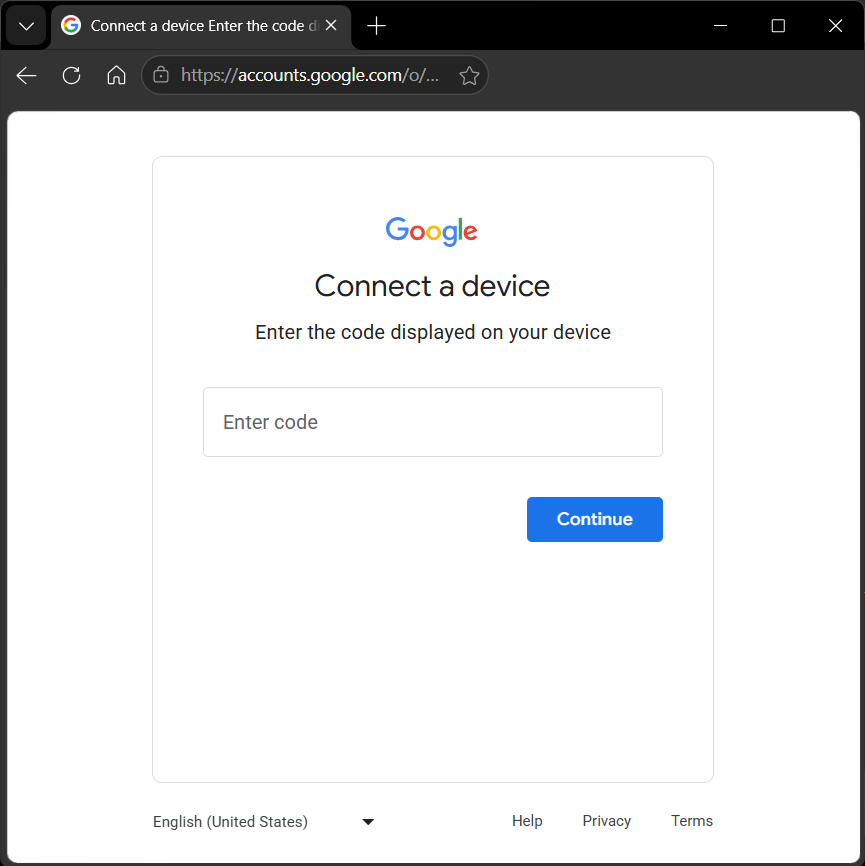
Identity Provider Support
Analysis of the decoded frontend suggests that this campaign was able to support multiple identity providers.
Figure 9. Microsoft and Google support
The identity provider to use is determined through its configuration.
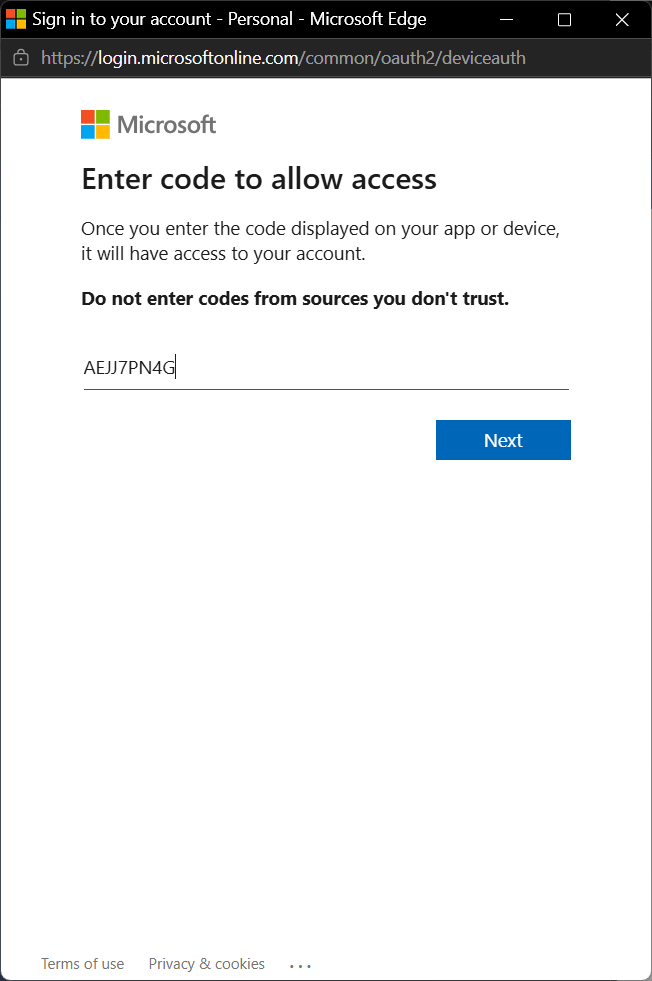
When configured for Microsoft, it directs the target users to https://login.microsoftonline.com/common/oauth2/deviceauth.
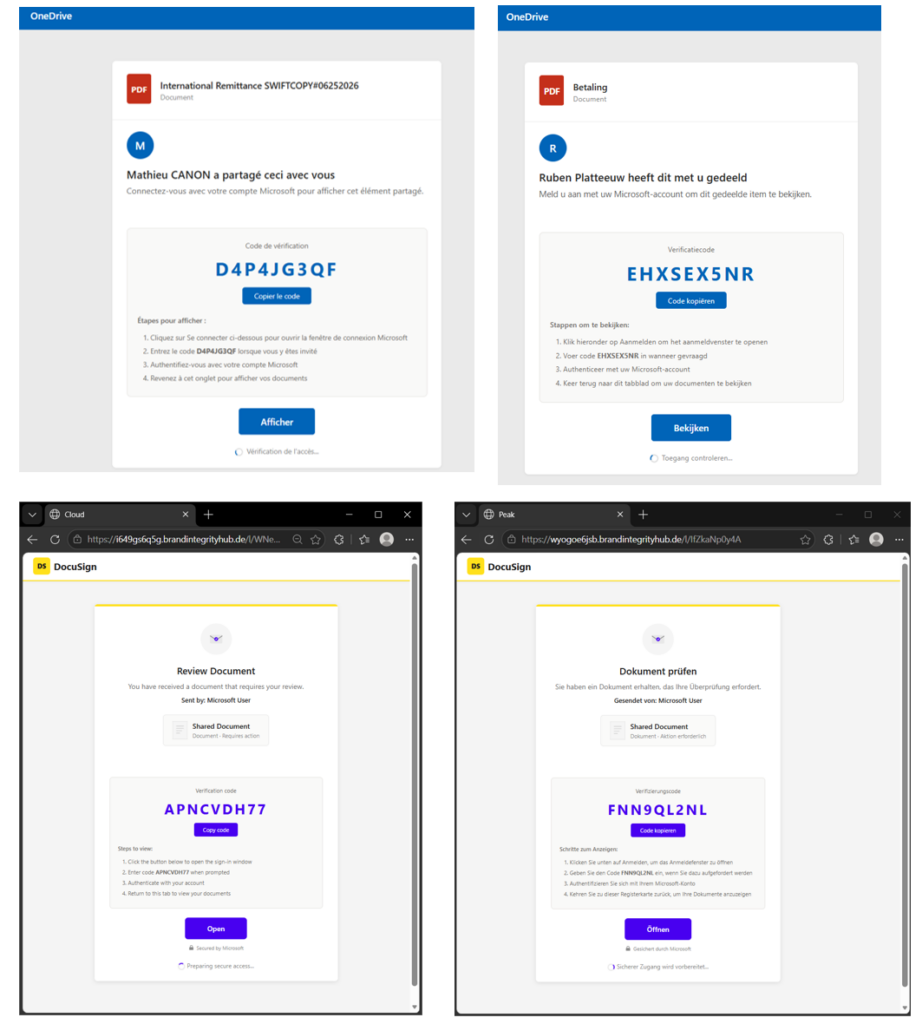
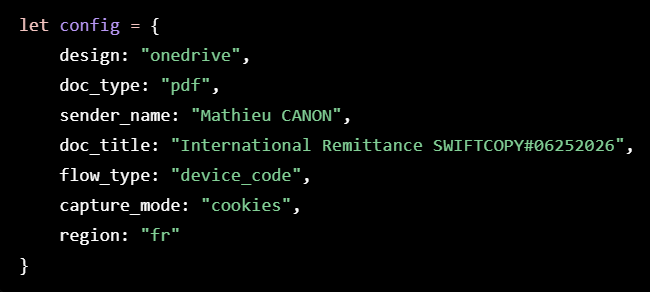
Rather than hard-coding each phishing page, the frontend loads a simple configuration object that determines how the lure is rendered. In the configuration, the visual theme, document metadata, sender name, language, and authentication workflow are indicated, allowing the same codebase to generate a wide variety of phishing lures simply by changing a handful of parameters.
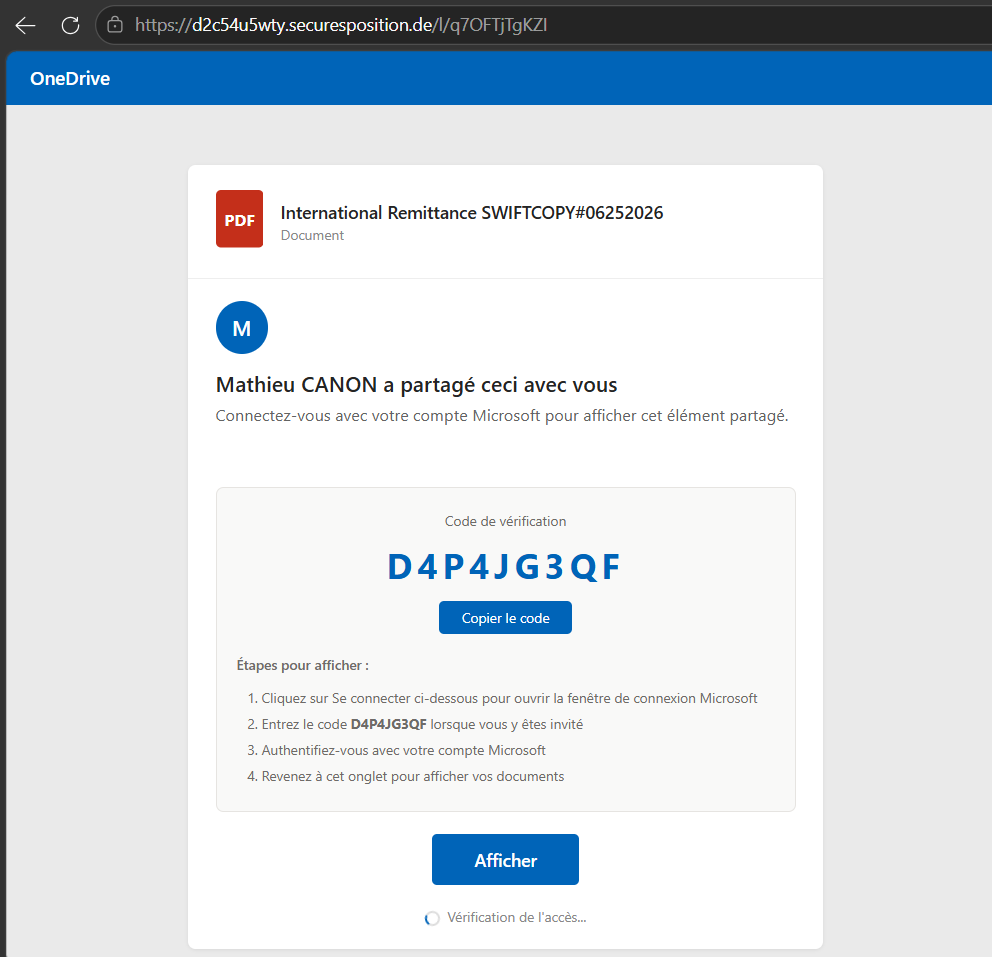
In this sample, the framework selected the OneDrive theme, displayed a PDF document, customized the sender name and document title, localized the interface to French, and configured the page to use the Device Code workflow.
Figure 12. Sample configuration
Figure 13. Generated lure based on configuration
This configuration-driven approach allows operators to rapidly adapt campaigns by changing only a few parameters rather than maintaining separate phishing pages for every brand, language, or document type.
Attacker-controlled OAuth backend / client
While this part of the infrastructure is not visible, this is likely responsible for:
requesting a device code from the identity providers
stores the device_code, user_code, session
polls the identity provider’s token endpoint until the user completes authorization
monitors authorization status
exposes simplified status to the frontend
obtains access and refresh tokens
Unlike credential phishing, Device Code phishing does not attempt to steal the user’s password or bypass MFA.
Instead, the target user completes a legitimate authentication flow with the identity provider. Even when MFA is required, the user is completing a legitimate authentication process. The attack succeeds because it abuses authorization rather than authentication.
The end goal of the attack isn’t simply to convince the user to enter a verification code. By authorizing an attacker-controlled OAuth application, the target user grants API access to their account. Depending on the identity provider, the application, and the permissions granted, this may allow attackers to access email, files, collaboration data, or other cloud resources. In enterprise environments, this delegated access may also enable movement across connected Microsoft services without requiring additional credentials. The stolen authorization can ultimately be used for data theft, business email compromise, lateral movement, or extortion.
From operator-assisted to automated phishing
One of the biggest differences compared to the Salesforce Device Flow attacks we previously documented is the amount of automation built into the phishing framework.
The Salesforce campaigns relied heavily on real-time interaction with the target user, often using vishing to persuade users to visit the verification page and enter a short-lived Device Code before it expired.
Early Microsoft Device Code phishing campaigns faced a similar challenge. Device Codes were typically delivered directly through email or messaging, making timing critical because the codes expired quickly.
The framework analyzed here largely removes that limitation.
The attacker-controlled backend continuously manages fresh authorization sessions while the phishing frontend tracks their status in real time. From the target user’s perspective, the workflow feels seamless. They simply click through the document-sharing experience and enter the displayed code.
This removes much of the urgency associated with expiring codes, eliminates the need for attackers to coordinate the interaction in real time, and makes the campaign considerably easier to scale.
Why Salesforce admins should care
Although this campaign ultimately abuses Microsoft or Google identities, we encountered it while investigating phishing activity targeting Salesforce customer environments.
In the observed cases, the phishing emails reached users through business workflows that interacted with Salesforce, demonstrating that Salesforce can become an entry point into attacks whose ultimate objective lies outside the Salesforce platform.
Once the user follows the phishing workflow, the attacker is no longer targeting Salesforce, they are targeting the user’s digital identity.
Attackers do not necessarily need direct access to Salesforce to affect Salesforce operations. Compromising that identity may expose email, cloud storage, collaboration platforms, internal documents and business communications. Those same resources frequently support Salesforce business processes, contain sensitive customer information, or are used to approve transactions and interact with Salesforce-integrated systems.
Protecting Salesforce users therefore also means protecting the communication channels through which these attacks reach them.
Recommendations
Although the OAuth authorization ultimately occurs outside Salesforce, organizations should reduce the likelihood that phishing campaigns reach users through Salesforce-connected workflows.
Salesforce administrators should consider:
Protecting Email-to-Case and other inbound email workflows against phishing attachments and document-sharing lures.
Reviewing external content delivered into Salesforce through email integrations.
Training users that legitimate Microsoft and Google authentication pages can still be part of phishing attacks.
Working with identity administrators to investigate unusual Device Code authorizations and newly authorized OAuth applications.
Cloud Protection for Salesforce customers are protected against these document-based phishing campaigns through PHISH/PDF.Agent detection, helping stop the attack before users reach the phishing infrastructure.
Conclusion
This investigation shows how attackers increasingly blend legitimate cloud services into their phishing workflows. Rather than directing users straight to malicious infrastructure, they chain together trusted document-hosting platforms, configurable phishing frontends, and legitimate Microsoft or Google authentication pages to create an experience that appears familiar from beginning to end. Every step in the workflow looks legitimate in isolation. Only when viewed together does the complete attack become apparent.
Although this campaign ultimately targeted Microsoft and Google identities, it was encountered while investigating phishing activity affecting Salesforce customer environments.
Modern cloud attacks rarely stay within a single platform. A phishing email may arrive through a Salesforce-connected workflow, lead a user to authenticate with Microsoft or Google, and ultimately compromise an identity that supports business processes spanning multiple SaaS applications.
For Salesforce administrators, protecting the platform therefore also means protecting the users and communication channels connected to it. Stopping these campaigns before users ever reach the phishing infrastructure may ultimately prevent the compromise of identities that extend far beyond Salesforce.
Cloud security is no longer defined by individual platforms. Salesforce, Microsoft 365, Google Workspace, and countless other SaaS applications all share the same users. Attackers already understand that. As defenders, we need to think the same way.
Salesforce may not be the destination of the attack, but it can still become part of the attack path.
Not the system going down. Not a slow performance issue. The data itself: contacts, opportunities, activity history, custom object records, all gone. The silence that follows usually isn’t confidence. It’s the pause of someone who has never had to answer that question for real.
Here’s what most Salesforce customers don’t fully appreciate: the platform’s legendary reliability does not extend to your data. And the reason why goes back to a foundational principle of cloud computing that too few organizations have taken on board.
The shared responsibility gap: how it came about
The shared responsibility model didn’t originate with Salesforce. It’s a principle that emerged with cloud computing in general and was formalized by hyperscalers like AWS, Azure, and Google Cloud as a way of delineating the boundary between what a provider is accountable for and what falls to the customer.
The logic is sound.
Cloud providers own:
The infrastructure
The physical hardware
Network
Uptime
And the security of the platform itself
Customers own what they put inside it:
The data they create, import, and manage.
It’s a reasonable division of labor, and it’s spelled out in the terms of service
The gap emerged not from bad faith, but from a mismatch in perception. Salesforce’s reputation for enterprise-grade reliability – 99.9% uptime SLAs, world-class infrastructure, SOC II compliance – led organizations to assume the safety net was broader than it actually is. If the platform is this robust, surely the data is protected too? It isn’t. The platform runs flawlessly while your data disappears, and Salesforce has no obligation to recover it for you.
“What surprises people most isn’t that the gap exists — it’s how long it’s been sitting there unnoticed. Most Salesforce orgs have been running for years without anyone testing what recovery would actually look like. The shared responsibility model was there in terms of service the whole time. Nobody read it as a warning,” says Markku Teerikangas, Head of IT at Cloud Protection for Salesforce.
The issues raised
Salesforce does offer some native tools – a 15-day recycle bin, a scheduled Data Export Service, and an enterprise Data Recovery Service (though its discontinuation in 2020, before being reinstated under pressure, speaks to how central it is to Salesforce’s priorities). But these aren’t a backup strategy for an enterprise company. Weekly CSV exports don’t provide point-in-time recovery, don’t restore record relationships, and don’t capture metadata or workflow history. If corrupted data goes unnoticed for a week, your last clean export may already be overwritten.
The consequences show up in recognizable ways: a developer overwrites 40,000 records in production instead of sandbox; a sales rep bulk-deletes their pipeline before walking out the door; a third-party integration silently corrupts data across the org. In each case, the impact reaches well beyond IT – sales loses deal visibility, customer service loses account history, and leadership is left working from data it can no longer trust.
Closing the gap: what organizations should do
Recognizing the gap is the starting point. Closing it requires treating Salesforce data with the same rigor applied to any other critical business system. This means going beyond what the platform provides natively.
The foundation is automated, continuous backup: not a scheduled export, but a solution that captures changes in real-time and maintains a complete, restorable history of your org’s data. This should include records, relationships, metadata, and configuration – not just a flat export of current values.
Equally important is the ability to restore granularly. Recovering from a data loss event shouldn’t mean importing a month-old CSV and manually reconciling thousands of records. It should mean selecting a point in time, identifying the affected data, and restoring it cleanly. In minutes, not days.
The best solutions in this space are built natively for Salesforce, integrating directly with the platform without requiring complex middleware or technical overhead to maintain. Crucially, they make backup and recovery accessible to the people who need it – not just IT, but Salesforce admins, RevOps teams, and business users – so that when something goes wrong, the right person can act without waiting for a ticket to be resolved.
Visibility matters, too. Knowing what data exists in your org, who has access to it, and what’s changed over time is foundational to both recovery and broader security hygiene. The right tooling surfaces that information as a matter of course, rather than requiring a forensic effort after the fact.
“The organizations that get this right stop asking ‘how do we back up Salesforce data’ and start asking ‘how do we restore Salesforce operations?’ That reframing is everything. A native approach understands the platform’s structure well enough to put things back exactly as they were – not just the values, but the relationships and configuration around them. That’s the difference between a restore that takes minutes and one that takes weeks of manual reconciliation,” Teerikangas concludes.
Take the next step
The shared responsibility model puts the obligation on you. Understanding exactly where your current setup meets that obligation – and where it doesn’t – is the first step toward closing the gap.
Summer is here, and so is our latest release.
Good security works twice. The first time is the obvious part: catching the malicious file, the phishing link, the compromised credential before it becomes a problem. The second time is quieter, but just as important. It does all of that without slowing your team down, sending them to a different tool, or leaving a scan job broken halfway through.
Summer 3.3 Cloud Protection for Salesforce is built around that second kind of value. Here’s what’s new and what it means to you.
See Cloud Protection for Salesforce inside Security Center
Salesforce admins who spend time in Security Center already know the value of having everything in one place. Policies, configuration health, security signals from across your org. It’s built to give you the full picture without jumping between tools.
A complete picture of your Salesforce security posture means more than native Salesforce signals alone. For admins who already use Salesforce Security Center, this one is straightforward: Cloud Protection for Salesforce data is now part of it. File scan results, URL scan activity, quarantine actions, and identity breach alerts now surface directly in Security Center dashboards, so the threat data from Cloud Protection for Salesforce sits alongside everything else you already monitor.
The threat activity Cloud Protection for Salesforce catches every day becomes part of your consolidated view, so you can build a more accurate and complete picture of what’s happening across your Salesforce environment. And when an auditor or an exec asks what protects Salesforce, the answer is already on the dashboard they trust, as evidence rather than a side system someone has to dig up.
You can read more about how to setup the integration with security center here.
A cleaner, faster admin experience
Admins don’t open the Cloud Protection for Salesforce administration pages occasionally. They live in them: configuring protection, reviewing settings, coming back day after day. When the tool you use most feels like an older version of Salesforce, that’s a small cost you pay on repeat.
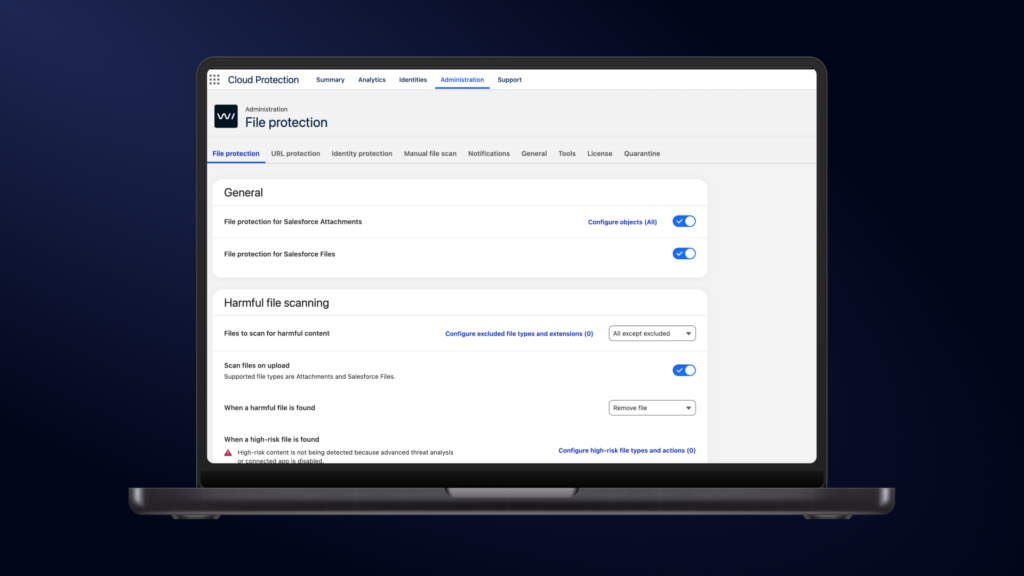
Summer 3.3 pays it back. The administration pages have been rebuilt on Lightning Web Components (LWC), the same modern foundation Salesforce itself runs on. The pages load faster, use screen space more efficiently, and are more intuitive to navigate across all sections of the administration panel. Less friction in the work you do most, and a tool that feels like a proper part of Salesforce rather than something bolted on.
Reliable file scanning, even at the limit
Anyone who runs large batch operations in Salesforce, such as high volume email sends or mass attachment inserts, knows the platform caps how much work it will take on in a single batch. When those operation limits are reached, file scanning must keep up without getting in the way of the workflows your business depends on. The value of protection that handles those moments gracefully is simple: your operations keep moving.
With Summer 3.3, scanning now handles those moments more gracefully. When a limit is reached, scans are automatically deferred so that file processing continues without interruption, and your busiest operations keep running. It’s controlled through advanced settings, so you decide how it fits your environment, and protection keeps working in the background while your heaviest processes run.
Available on AgentExchange
Summer 3.3 is available on June 29th, 2026, via Salesforce AgentExchange.
Automatic updates, sandbox environments: July 20th
Automatic updates, production environments: August 3rd
Not yet a customer? We’d love to show you what it can do for your organization. Book a demo and we’ll walk you through it personally. [Book a demo]
Security that’s ready for wherever Salesforce takes you
Salesforce keeps moving into new ground: more automation, richer external experiences, AI agents acting on your data.
Every step forward expands the surface that needs protecting. The security that holds up is the kind you never have to think about: visible when you need proof, out of the way when you need to work, and native to the platform it defends.
Summer 3.3 brings it a step closer. Wherever you take Salesforce next, your protection is already there.
These myths aren’t just wrong, they’re costly – both financially and reputationally. Organizations that rely on false assumptions about Salesforce security routinely leave themselves exposed to data breaches, compliance failures, and insider threats.
Below are seven of the most common Salesforce security myths, where they come from, and what you can do to move past them.
Myth 1: “Salesforce is secure, so our data is secure”
Salesforce invests heavily in platform-level security, such as infrastructure hardening, encryption in transit, penetration testing, and certifications like ISO 27001 and SOC 2. The myth persists because this is genuinely impressive, and it’s easy to conflate the platform’s security posture with the security of your own data sitting inside it.
But Salesforce operates on a shared responsibility model. They secure the platform, but everything else is on you. That means configuring profiles, permissions, and sharing rules correctly, controlling who can export data, and auditing what your users actually do inside the org. A misconfigured profile or an over-privileged integration user can expose sensitive records regardless of how robust Salesforce’s own infrastructure is.
What can I do? Start by understanding which side of the shared responsibility line you own — and then make sure it’s actually covered. That means securing what moves through Salesforce: the files users upload, the links they click, the identities accessing your org, and the AI workflows processing your data. WithSecure Cloud Protection for Salesforce is purpose-built for exactly this scope, operating in real time without touching your existing configuration.
Myth 2: “Our admins control access, so we know who can see what”
Many organizations assume that because they have an admin managing profiles and roles, access is under control. In reality, Salesforce’s sharing model is one of the most complex in enterprise software. Profiles, permission sets, role hierarchies, sharing rules, manual shares, and Apex-managed sharing all interact in ways that aren’t always intuitive – even for experienced admins.
This myth forms because the controls genuinely exist. The problem is that they’re hard to comprehensively audit. A user with a seemingly restrictive profile may have access to far more data than intended once sharing rules and role hierarchies are factored in.
What can I do? While fully mapping Salesforce’s sharing model requires careful manual audit work, one of the highest-impact risk factors is identities that have accumulated more permissions than they need. Cloud Protection for Salesforce’s Identity Protection flags every human and non-human identity carrying high-risk permissions – ModifyAllData, ViewAllData, and others – giving admins a single dashboard to act on them immediately. Freeze an account, trigger a password reset, or edit permissions in one click, without leaving Salesforce.
Myth 3: “We don’t need to worry about insider threats — our team is trusted”
Insider threats aren’t always malicious. A contractor who has accumulated permissions far beyond what their role requires, a departing employee whose credentials remain active across connected integrations, or a user whose login details were exposed in an external breach and is now accessing your org undetected – these are all insider risk scenarios, and they’re far more common than external attacks in CRM environments.
This myth persists because it feels uncomfortable to treat employees as potential risks, and because most Salesforce security conversations focus on external attackers.
What can I do? Cloud Protection for Salesforce gives your security team visibility into content activity inside the org – which files were uploaded, by whom, how frequently content is accessed, and from which IP addresses. Combined with Identity Protection – which flags over-permissioned identities and surfaces users whose credentials have appeared in external data breaches – it gives your security team a focused, actionable view of identity-based insider risk, without treating your whole team as suspects.
Myth 4: “We’re backed up and can always restore if something goes wrong”
Salesforce’s standard plans do not include a backup solution that meets most organizations’ recovery requirements. A paid option exists through OwnBackup – a solution Salesforce acquired – but it requires a separate license. Even then, restoring data is a manual, time-consuming process with no straightforward point-in-time recovery.
This myth likely originates from the assumption that all enterprise SaaS platforms include robust backup as standard – an assumption that is simply wrong for Salesforce.
What can I do? First, invest in a proper backup solution – one that provides daily automated backups and granular point-in-time restore, not just Salesforce’s weekly data export. But even the best backup only helps after something has gone wrong.
One of the most common scenarios that makes recovery necessary is ransomware – and ransomware arrives as a file. Cloud Protection for Salesforce scans every file at upload using the same engines that achieved 100% malware detection in independent AV-TEST evaluations, blocking ransomware and malicious files before they ever land in your org. Good backup protects you after an incident; preventing malware from entering reduces how often you need it.
Myth 5: “Our Salesforce org is private — it’s not on the public internet”
Salesforce is a cloud platform, and your org – including its login page and APIs – is accessible from anywhere with internet access. Many IT teams treat it as they would an internal system, assuming it benefits from network perimeter controls. It does not.
This leads to gaps such as weak session policies, insufficient API access monitoring, and no native controls over the content entering the org through portals and forms – all of which represent meaningful attack surface.
What can I do? Weak session policies and API access can be hardened through IP restrictions and Salesforce’s own Shield platform, though Shield requires a separate license. The gap that often goes unaddressed is the content entering the org through portals and forms – traffic your email and endpoint tools never see. Cloud Protection for Salesforce covers that blind spot, scanning every file and URL at both upload and click time, while continuously monitoring Salesforce credentials against verified breach data to flag compromised logins before they’re used.
Myth 6: “Compliance certifications mean we’re compliant”
Salesforce holds an impressive portfolio of compliance certifications. Organizations often point to these when asked about GDPR, HIPAA, or PCI-DSS readiness. But a certification on the platform does not transfer compliance obligations from you to Salesforce.
Under GDPR, for example, you remain the data controller. You are responsible for lawful processing, data subject rights, retention policies, and breach notification – none of which Salesforce manages on your behalf, and none of which any single security tool can fully resolve. Addressing them requires documented processes, legal review, and in many cases a dedicated compliance program.
What can I do? Cloud Protection for Salesforce helps strengthen your compliance posture on the content security side of the responsibility line. It provides real-time dashboards and exportable audit-ready event logs covering every file scanned, every URL inspected, and every identity risk flagged – evidence your compliance team can use directly, without depending on the Salesforce admin for every audit cycle. The solution itself holds ISAE 3000 Type 2, ISO 27001, and EU GDPR certifications.
Myth 7: “Security is a one-time project, not ongoing work”
Salesforce orgs are living systems. Permissions accumulate over time as users change roles, integrations are added, and business processes evolve. A clean security posture today can erode significantly within six months without active maintenance.
The myth is understandable. Security reviews take effort, and once an org is configured it can feel “done.” But this is a real and documented problem.
What can I do? Cloud Protection for Salesforce runs continuously, scanning every file, link, and identity in real time so your security posture doesn’t depend on when someone last ran a manual review. New users are checked for breached credentials as they’re added. New files are scanned at upload. New links are inspected at click. The real-time dashboard means your team always has a current view of the org’s threat landscape, not a snapshot from last quarter.
The bottom line
Salesforce is a powerful, well-built platform with strong security capabilities. But capability is not the same as configuration, and configuration is not the same as ongoing governance. Organizations that understand the distinction and act on it are the ones who keep their data, their people, and their customers safe.