表示されるデータ
Salesforce Security Center を利用して組織のセキュリティシグナルを監視している場合、Cloud Protection for Salesforce のデータをダッシュボードに直接統合できるようになりました。
ファイルスキャン結果、URL スキャンアクティビティ、隔離アクション、アイデンティティ侵害アラートを Security Center 内の「カスタムメトリクス(Custom Metrics)」として登録することで、Cloud Protection for Salesforce が検知した脅威アクティビティを他のセキュリティデータと並べて確認できます。
以下のデータタイプについてカスタムメトリクスを登録可能です。
- アラート: 設定変更、検知、ジョブステータス、例外、およびグループ化された侵害イベント
- ファイルスキャンログ: 個別のファイルスキャン結果と判定
- URL スキャンログ: 個別の URL スキャン結果と判定
- 侵害ログ: 個別のユーザーアイデンティティ侵害レコード
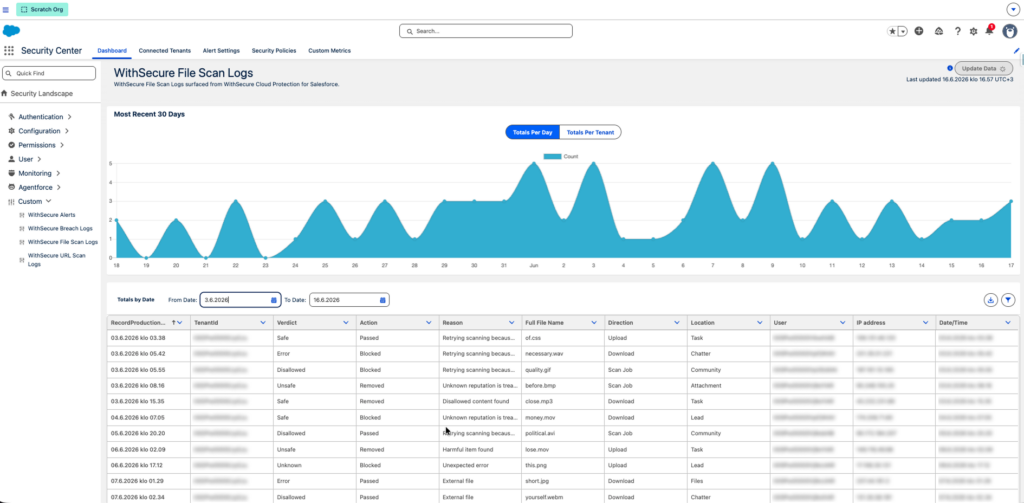
登録後、各メトリクスは Security Center ダッシュボードに表示され、長期的な履歴トレンドの分析が可能になります
設定手順
セキュリティセンターへの権限の割り当て
Salesforce の設定で、「セキュリティセンターの管理」へのシステム権限を有効にした新しい権限セットを作成します。この権限セットを適切な管理者ユーザーに割り当てます。アプリケーションランチャーから セキュリティセンター を開きます
カスタム指標の登録
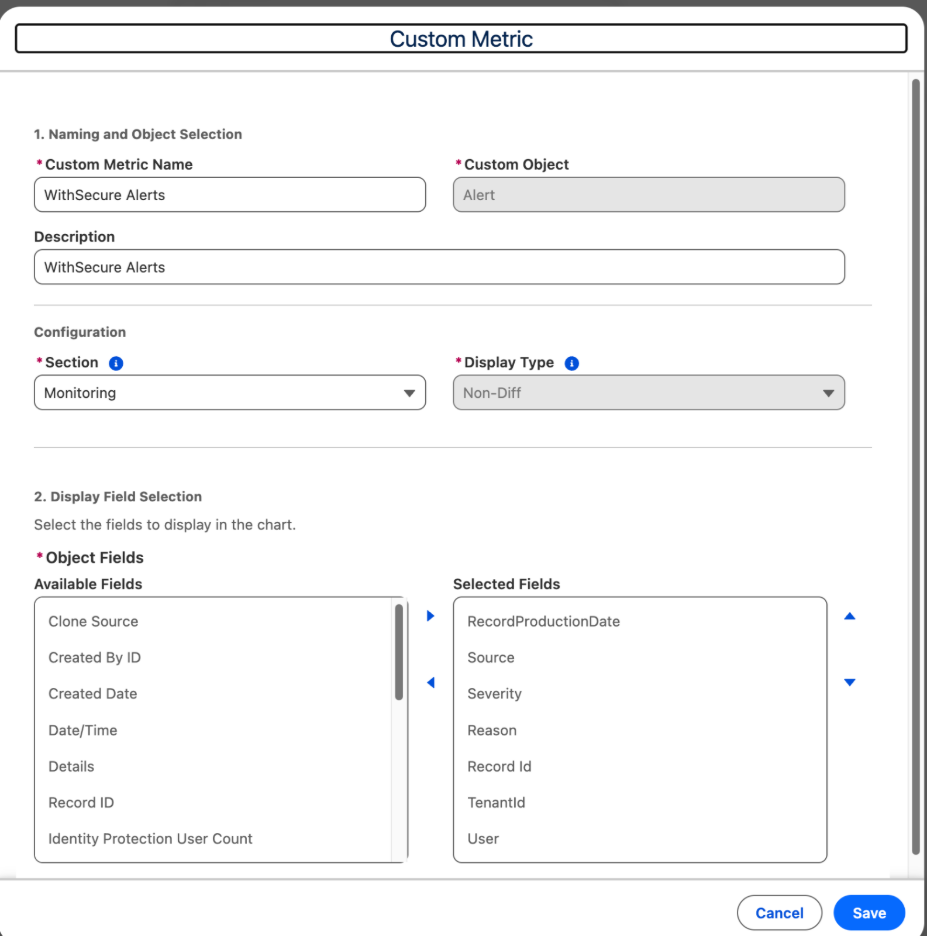
設定 > Security Center > 設定 > カスタムメトリクス > 新規カスタムメトリクス の順に移動し、データタイプごとに1つのメトリクスを作成します。各メトリクスで以下の項目を設定します。
- データを取得する Salesforce オブジェクト: 「WithSecure File scan logs」、「URL scan logs」、「Breaches」、または「Alerts」を選択します。
- 表示する項目: 関連する項目を選択します(詳細は下記の「推奨表示項目」をご参照ください)。
- テナント ID & レコード作成日項目: (組織の識別および履歴トレンドの生成に使用されます)。
各メトリクスの設定が完了したら、保存して有効化します。
メトリクスごとの推奨表示項目
Alerts — AFSC__FS_Alert__c (5 fields)
| Label | API name | Notes |
|---|---|---|
| RecordProductionDate | AFSC__RecordProductionDate = CreatedDate | The RecordProductionDate will be auto filled with the created date. |
| Severity | AFSC__Severity__c | Information / Important / Critical |
| Reason | AFSC__Reason__c | Free-text alert description |
| Source | AFSC__Source__c | Scanner that generated the alert |
| User | AFSC__User__c | Linked user or “N users affected” |
| TenantId | AFSC__TenantId__c | 15 digit Org Id |
File Scan Logs — AFSC__FSFileScanLog__c (9 fields)
| Label | API name | Notes |
|---|---|---|
| Date/Time | AFSC__RecordProductionDate AFSC__Date_Time_Scanned__c | Scan timestamp; default sort |
| Verdict | AFSC__Verdict__c | Safe / Unsafe / Disallowed / Unknown / Error |
| Action | AFSC__Action__c | Blocked / Removed / Passed / Notified |
| Reason | AFSC__Reason__c | Free-text description |
| Full File Name | AFSC__Full_File_Name__c | Links to content document or record |
| Direction | AFSC__Direction__c | Upload / Download / Scan Job |
| Location | AFSC__Source__c | Files / Attachments / Notes / etc. |
| User | AFSC__User__c | Linked user |
| IP Address | AFSC__Ip_address__c | Captured at scan time |
| TenantId | AFSC__TenantId__c | 15 digit Org Id |
| RecordProductionDate | AFSC__RecordProductionDate = CreatedDate | The RecordProductionDate will be auto filled with the created date and could be different than the scan date time. |
URL Scan Logs — AFSC__FS_URL_Scan_Log__c (9 fields)
| Label | API name | Notes |
|---|---|---|
| Date/Time | AFSC__Date_Time_Scanned__c | Scan timestamp |
| Verdict | AFSC__Verdict__c | Safe / Unsafe / Disallowed / Unknown |
| Action | AFSC__Action__c | Blocked / Removed / Passed / Notified |
| Reason | AFSC__Reason__c | Free-text description |
| URL | AFSC__URL__c | The scanned URL |
| Direction | AFSC__Direction__c | Open / Post / Internal or External Conversation |
| Location | AFSC__Location__c | Cases / Chatter / Email / Lead / Task / Field Value |
| User | AFSC__User__c | Linked user |
| IP Address | AFSC__IP_Address__c | Captured at scan time |
| TenantId | AFSC__TenantId__c | 15 digit Org Id |
| RecordProductionDate | AFSC__RecordProductionDate = CreatedDate | The RecordProductionDate will be auto filled with the created date and could be different than the scan date time. |
Breach Logs — AFSC__FS_Breach__c (14 fields)
| Label | API name | Type | Notes |
|---|---|---|---|
| RecordProductionDate | AFSC__RecordProductionDate = CreatedDate | DateTime | The RecordProductionDate will be auto filled with the created date. |
| Publish Date | AFSC__PublishDate__c | DateTime | When the breach was originally published by the breach source. |
| Risk | AFSC__Risk__c | Picklist | Low / Medium / High / Critical |
| Severity | AFSC__Severity__c | Number | Numeric severity score for the breach. |
| Reason | AFSC__Reason__c | Picklist | Breached information / Breached plaintext password. |
| Plaintext Password | AFSC__IsPlainTextPassword__c | Picklist (Yes / No) | Whether the leaked password was exposed in plaintext. |
| Password Type | AFSC__PasswordType__c | Text (255) | Type/format of the leaked password (e.g. hashed, plaintext). |
| AFSC__Email__c | Text (255) | Email address tied to the breached account. | |
| Username | AFSC__UserName__c | Text (255) | Username associated with the breached credentials. |
| Profile | AFSC__UserProfile__c | Text (255) | Salesforce profile of the breached user. |
| Role | AFSC__UserRole__c | Text (255) | Salesforce role of the breached user. |
| User | AFSC__User__c | Lookup (User) | Linked Salesforce user record for the breached account. |
| Target URL | AFSC__TargetUrl__c | Text (255) | Source site/service where the breached data was found. |
| TenantId | AFSC__TenantId__c | Text (15) | 15 digit Org Id |
ダッシュボードの確認
設定が完了したら、Security Center ダッシュボードを開き、各メトリクスが表示され、データが正常に更新されていることを確認します。
ノート: メトリクスが空に見える場合は、データの更新(Update Data) をクリックしてください。Security Center は独自の更新サイクルで動作しているため、初期データの読み込みに数分かかる場合があります。
過去データのバックフィル(追記処理)
デフォルトでは、Security Center の必須項目はアップグレード後に作成されたレコードにのみ適用されます。トレンドグラフに過去のレコードも表示させたい場合は、Salesforce Data Loader を使用して最大6ヶ月分のデータをバックフィルできます。この手順は任意です。将来のデータのみが必要な場合は、スキップしても問題ありません。
Before setting up the Security Centre, do I need to configure anything in Cloud Protection for Salesforce?
No additional configuration is required in Cloud Protection for Salesforce. The fields required by Security Center have been automatically included since Release 3.3. You simply need to complete the configuration steps in your Salesforce settings.
Can I choose the type of data displayed in the Security Centre?
Yes. As each data type is registered as a separate custom metric, you have complete control over which metrics are displayed on the Security Centre dashboard.
Will the scan data and alert data I currently have on file be displayed automatically in the Security Center?
By default, only records created after the upgrade to Release 3.3 are displayed in the Security Centre. If you wish to display historical data on trend charts, you can use Salesforce Data Loader to import records dating back up to six months.