
Recently, while investigating phishing activities in our Salesforce customer environments, we came across another OAuth Device Code phishing campaign.
Microsoft has already published an excellent technical analysis of the OAuth mechanics and attacker infrastructure behind these campaigns. Rather than repeating that analysis, this article focuses on other observations not covered in that post and why it remains relevant for Salesforce admins.
A familiar technique
Device Code phishing itself isn’t new.
It has been observed in campaigns as early as 2024 that abused Microsoft’s Device Authorization Grant to obtain OAuth tokens without harvesting credentials. However, it is becoming more mainstream in the recent months along with major improvements in Phishing-as-a-Service kits that enable wider adoption within the cybercriminal ecosystem.Today’s campaigns increasingly disguise the entire process behind legitimate content hosting and collaboration platforms, template-driven phishing pages and legitimate identity-provider authentication to provide a seamless experience for the target user.
Key findings
Analyzing the phishing framework revealed:
- Support for both Microsoft and Google Device Code authentication
- Over 30 lure templates impersonating collaboration and Microsoft services
- 14 supported languages with runtime localization
- Abuse of legitimate SaaS platforms such as Proton Docs and Lark Docs as intermediary lures
- Automation of the Device Code workflow through backend session tracking and frontend polling
Observed device code phishing flow
While Microsoft has already documented the underlying OAuth mechanics in detail, the samples analyzed during this investigation revealed another interesting perspective: how the phishing campaign is delivered to the victim. Rather than directing users straight to a malicious login page, the attackers chain together multiple stages including legitimate content-hosting platforms, a configurable phishing frontend, and the legitimate Microsoft or Google Device Code authorization flow, to create a workflow that appears trustworthy from beginning to end.
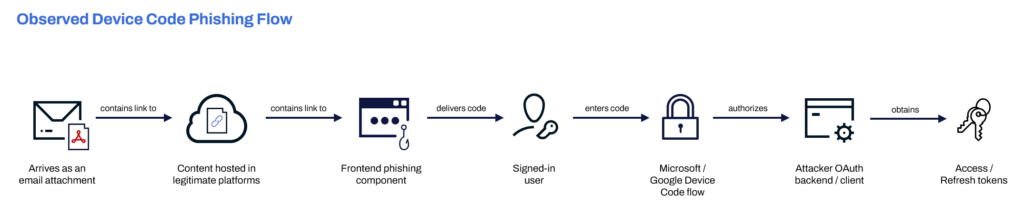
Figure 1. High-level flow observed during analysis. The diagram intentionally simplifies the OAuth protocol to focus on how the phishing campaign is delivered rather than the underlying authorization exchange.
It all starts with a document
The campaign starts like many document-based phishing attacks.
The user receives what appears to be a shared document as an email attachment.
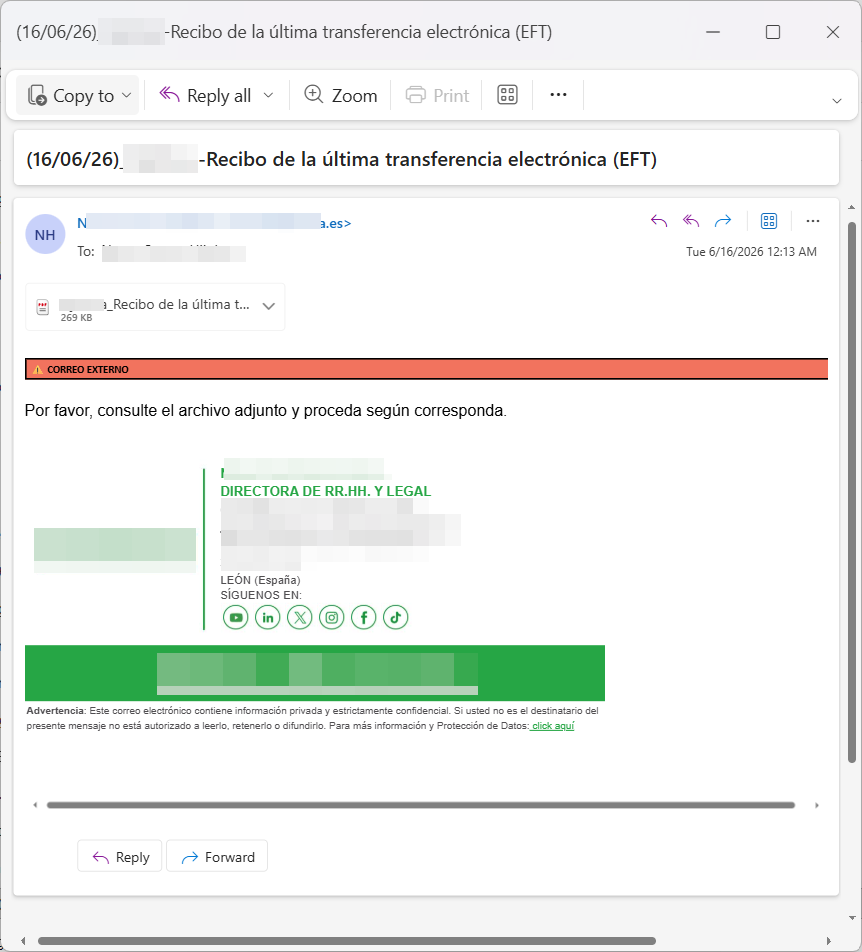
Figure 2. Email sample in Spanish
It’s noticeable that the campaign supports a wide range of languages. This language support is seen to be consistent from the attachment to the intermediary files up until the phishing pages.
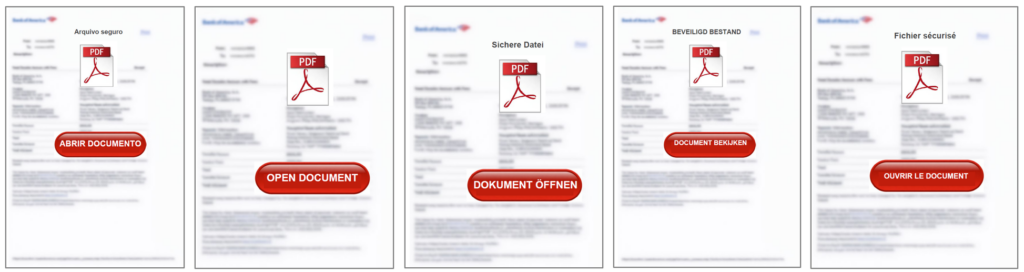
Figure 3. Attachments in multiple languages
Unlike many phishing campaigns, these documents lead to legitimate SaaS platforms as intermediary hosts. Rather than directing the target users immediately to the phishing infrastructure, genuine Proton Docs, Lark Docs, Zoho Writer, Medium, Bookwiz, Mindsmith and similar services were used to host benign-looking content containing the link to the malicious phishing infrastructure.
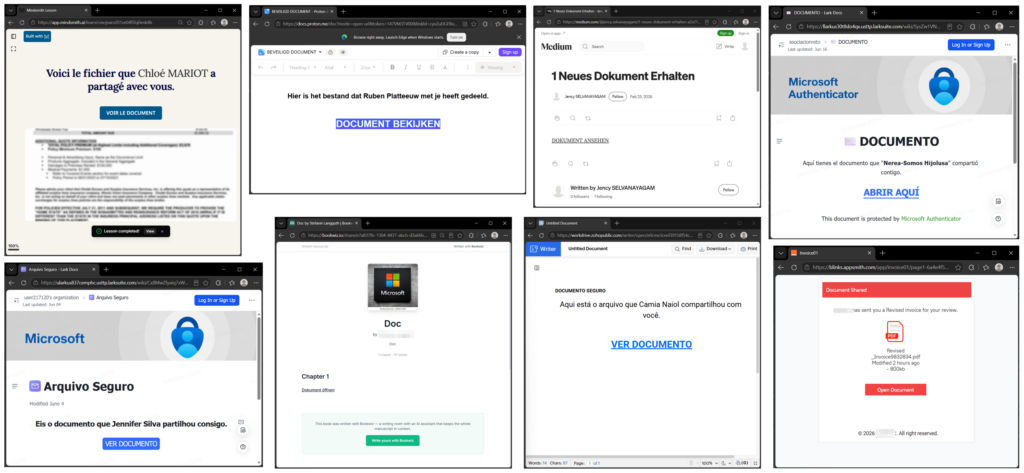
Figure 4. Intermediary localized documents hosted in different legitimate SaaS platforms
This approach offers several advantages:
- the document itself is hosted by a legitimate SaaS platform
- URLs appear trustworthy
- reputation-based filtering is less likely to flag the document
- the phishing infrastructure is one click deeper in the chain
Additional platforms observed included Appsmith, Playbook, Soloist.ai, 7taps and Ouro Foundation.
Frontend phishing component
The original page consisted primarily of heavily obfuscated JavaScript using runtime decoding, encoded payloads, and dynamic rendering.
Once decoded, it was evident that it was a phishing framework rather than just a static phishing page.
The phishing frontend is responsible for:
- rendering the fake pages based on templates
- localization
- copy-to-clipboard
- opening Microsoft’s or Google’s Device Code page
The decoded frontend does not appear to handle OAuth tokens directly. Instead, it polls attacker-controlled API endpoints for session status. Based on this, the OAuth device-code generation and token polling likely happen server-side, through an attacker-controlled OAuth client or backend application.
Lure Templates
The decoded JavaScript reveals a template-driven renderer that separates page layout from language and messaging.
The code revealed over 30 supported lure templates.
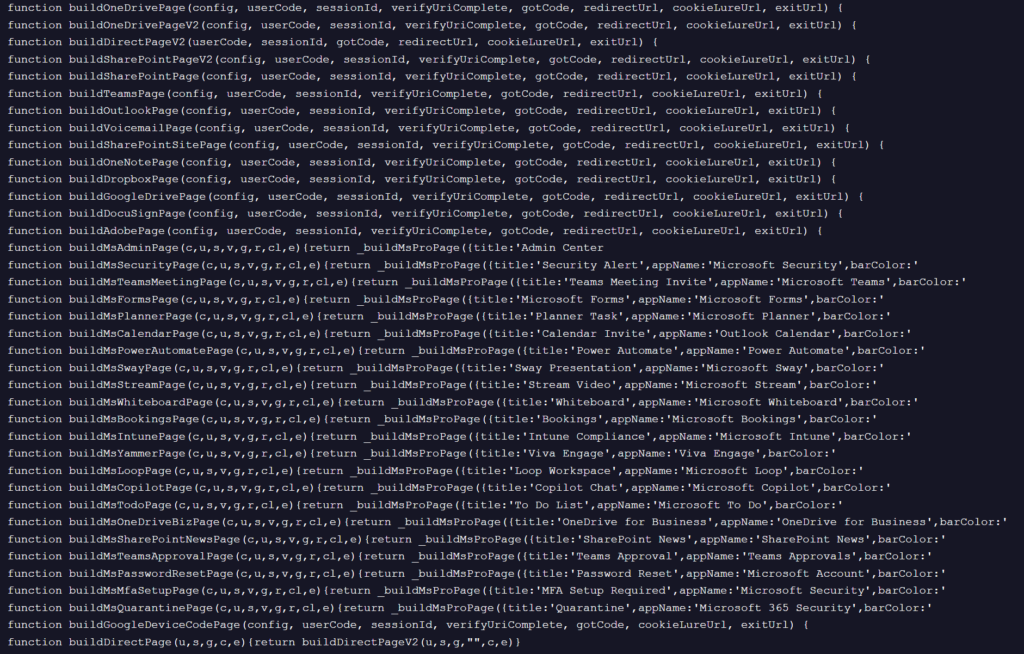
Figure 5. Functions for building lure templates
Among them were document-sharing services such as:
- OneDrive
- SharePoint
- Dropbox
- Google Drive
- OneNote
- DocuSign
- Adobe
as well as Microsoft-branded workflows including:
- Teams meetings
- Planner
- Forms
- Intune
- Bookings
- Password Reset
- MFA Setup
- Quarantine notifications
- Copilot
- Stream
- Whiteboard
- Yammer
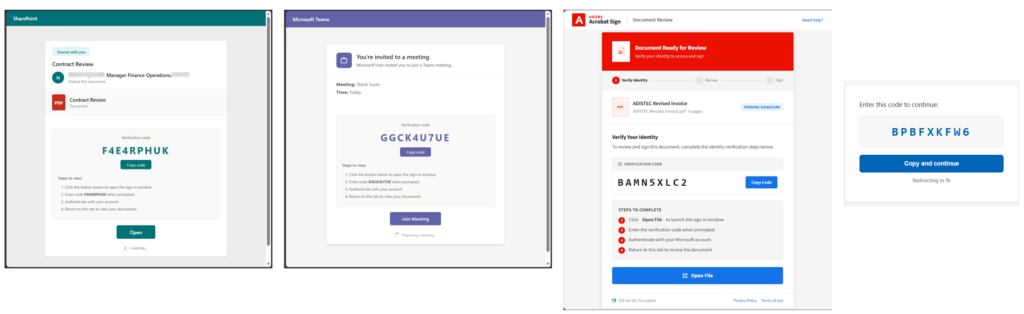
Figure 6. Different lure themes
Language Support
Another interesting finding was the localization support.
The decoded translation tables supported at least fourteen languages:
- English
- Dutch
- German
- French
- Spanish
- Portuguese
- Italian
- Turkish
- Polish
- Russian
- Japanese
- Korean
- Chinese
- Arabic
Instead of maintaining separate phishing pages for each language, the framework renders a common HTML template before replacing interface strings with localized equivalents.
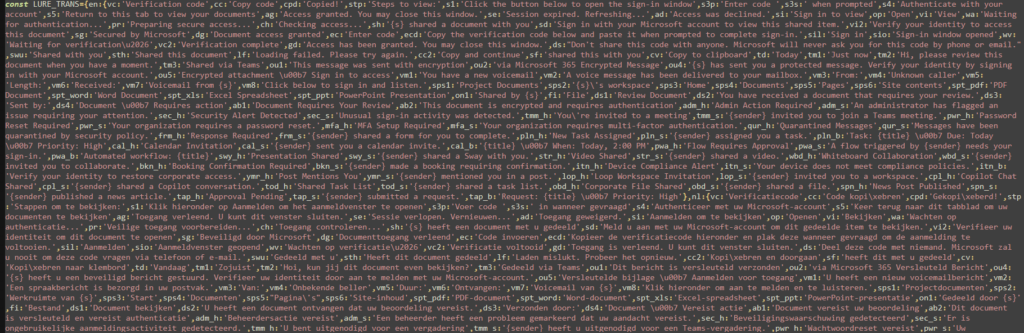
Figure 7. Localized strings
This allows attackers to reuse the same backend while presenting the target users with localized lures that match different collaboration platforms and business workflows.
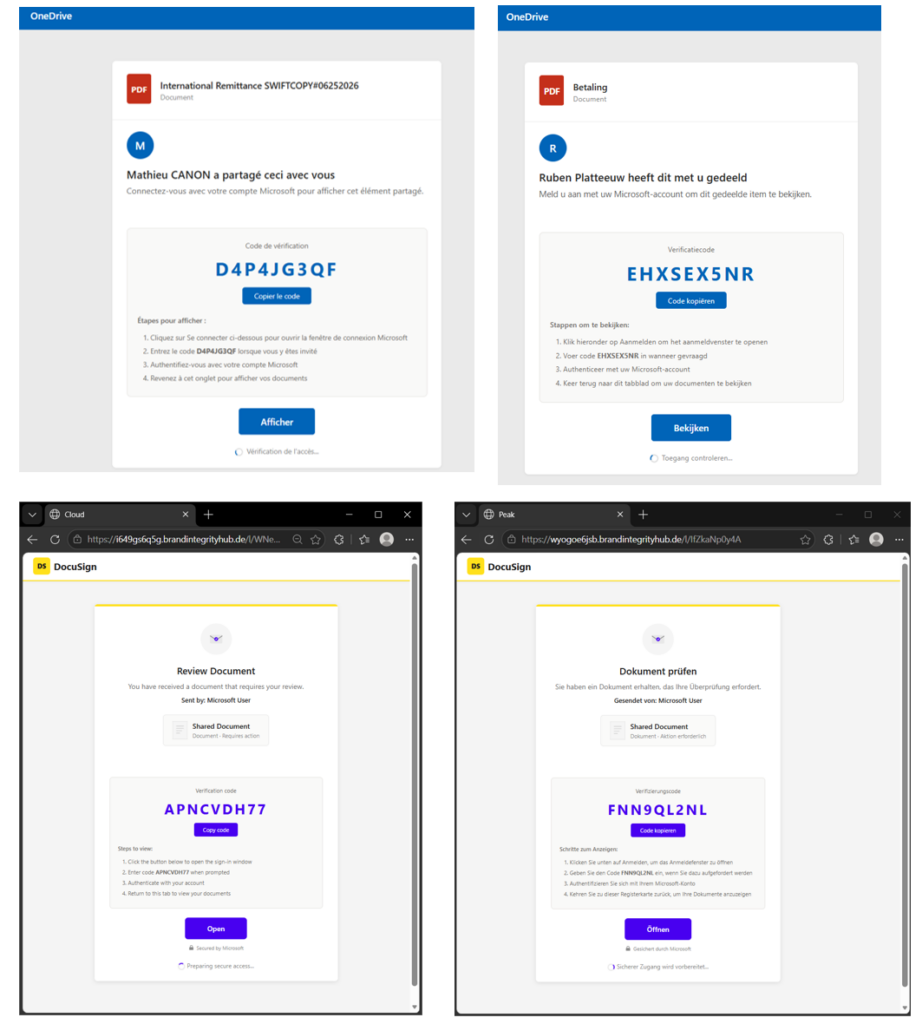
Figure 8. Same lure templates, different languages
Identity Provider Support
Analysis of the decoded frontend suggests that this campaign was able to support multiple identity providers.

Figure 9. Microsoft and Google support
The identity provider to use is determined through its configuration.
When configured for Microsoft, it directs the target users to https://login.microsoftonline.com/common/oauth2/deviceauth.
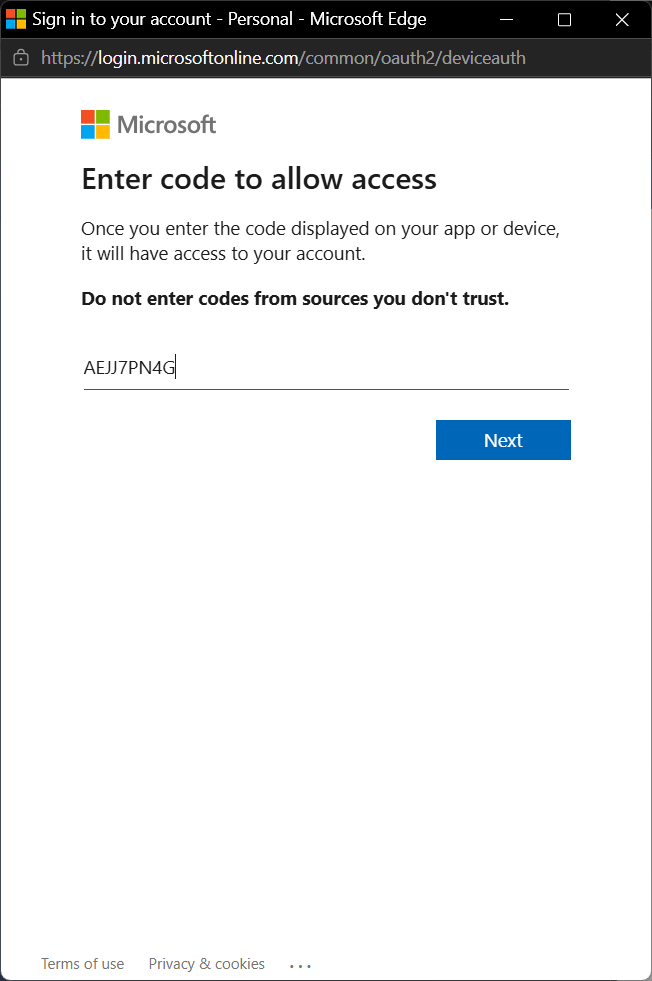
Figure 10. Legitimate Microsoft prompt
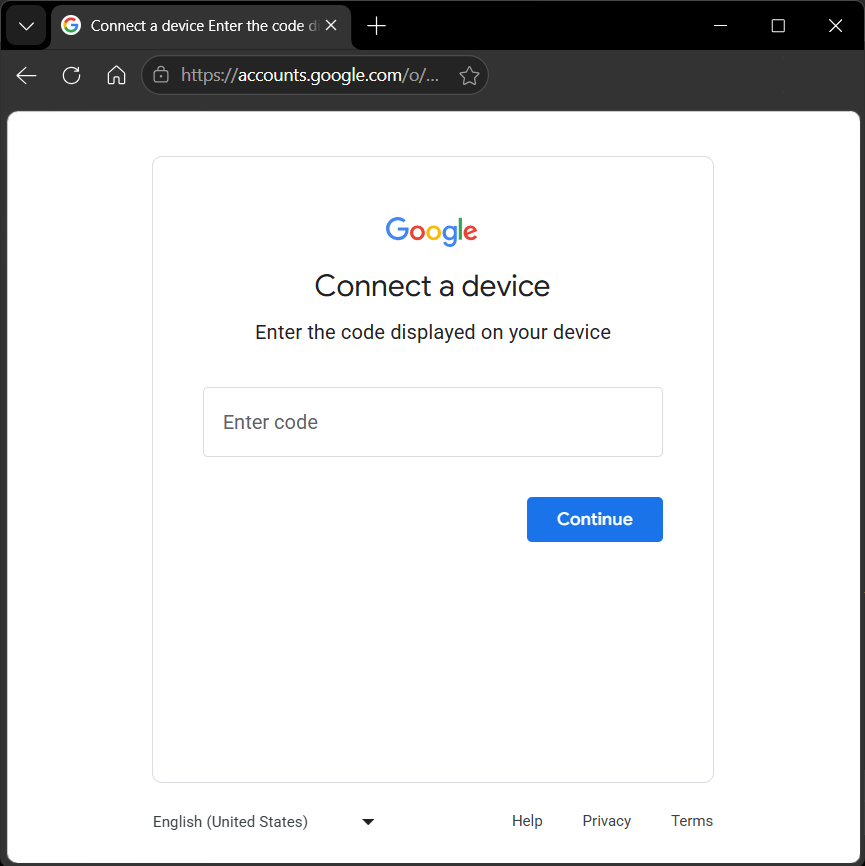
When configured for Google, it instead uses https://www.google.com/device.
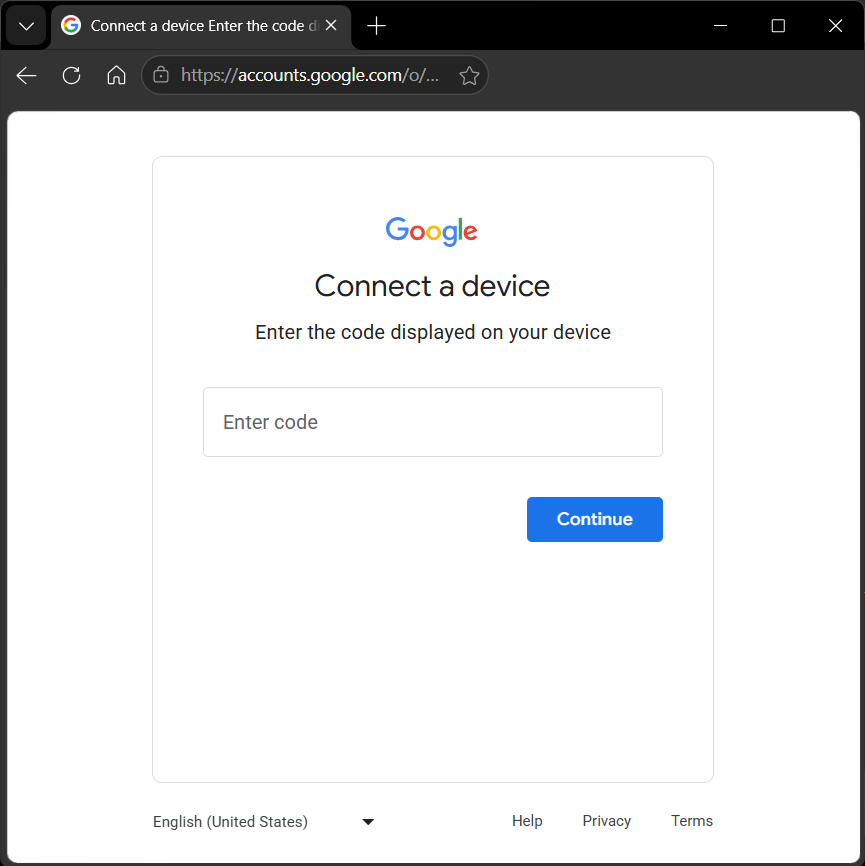
Figure 11. Legitimate Google prompt
Configuration
Rather than hard-coding each phishing page, the frontend loads a simple configuration object that determines how the lure is rendered. In the configuration, the visual theme, document metadata, sender name, language, and authentication workflow are indicated, allowing the same codebase to generate a wide variety of phishing lures simply by changing a handful of parameters.
In this sample, the framework selected the OneDrive theme, displayed a PDF document, customized the sender name and document title, localized the interface to French, and configured the page to use the Device Code workflow.
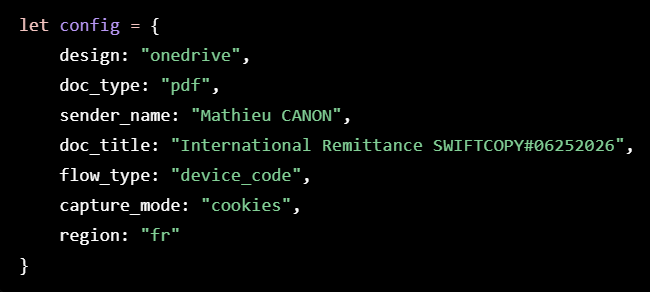
Figure 12. Sample configuration
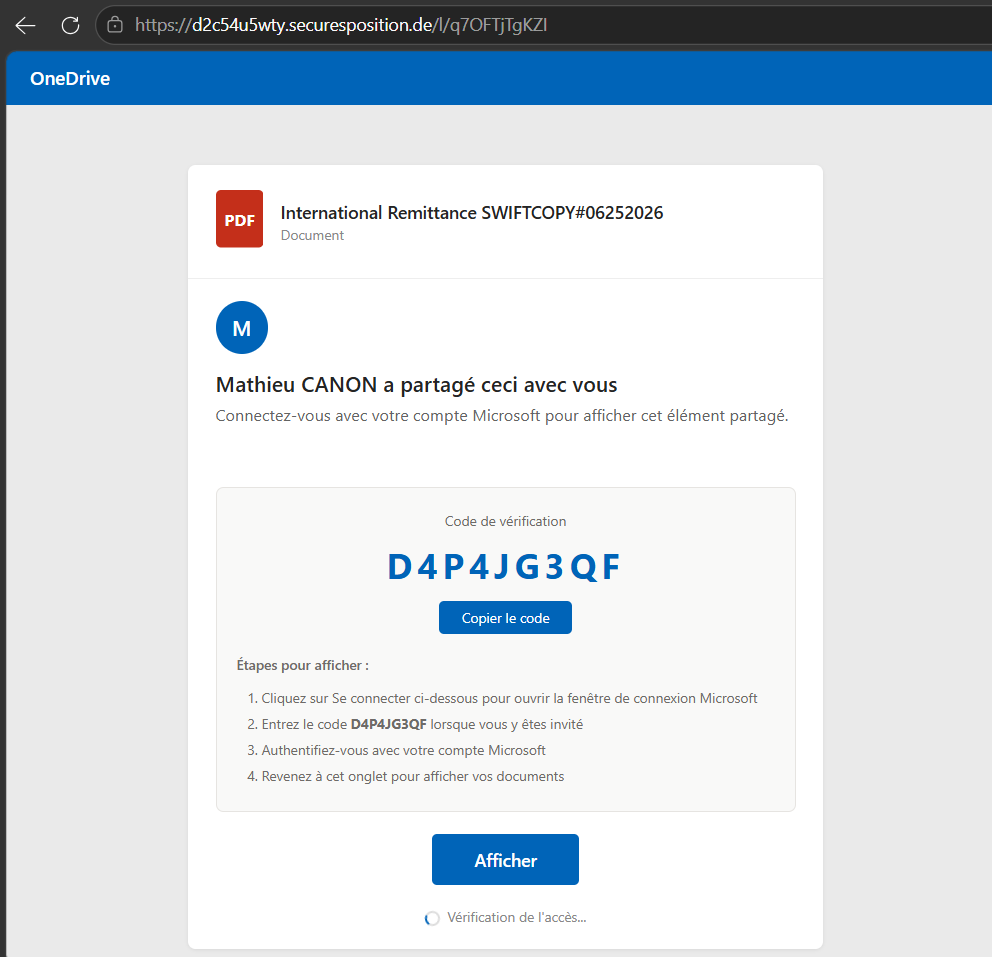
Figure 13. Generated lure based on configuration
This configuration-driven approach allows operators to rapidly adapt campaigns by changing only a few parameters rather than maintaining separate phishing pages for every brand, language, or document type.
Attacker-controlled OAuth backend / client
While this part of the infrastructure is not visible, this is likely responsible for:
- requesting a device code from the identity providers
- stores the device_code, user_code, session
- polls the identity provider’s token endpoint until the user completes authorization
- monitors authorization status
- exposes simplified status to the frontend
- obtains access and refresh tokens
Unlike credential phishing, Device Code phishing does not attempt to steal the user’s password or bypass MFA.
Instead, the target user completes a legitimate authentication flow with the identity provider. Even when MFA is required, the user is completing a legitimate authentication process. The attack succeeds because it abuses authorization rather than authentication.
The end goal of the attack isn’t simply to convince the user to enter a verification code. By authorizing an attacker-controlled OAuth application, the target user grants API access to their account. Depending on the identity provider, the application, and the permissions granted, this may allow attackers to access email, files, collaboration data, or other cloud resources. In enterprise environments, this delegated access may also enable movement across connected Microsoft services without requiring additional credentials. The stolen authorization can ultimately be used for data theft, business email compromise, lateral movement, or extortion.
From operator-assisted to automated phishing
One of the biggest differences compared to the Salesforce Device Flow attacks we previously documented is the amount of automation built into the phishing framework.
The Salesforce campaigns relied heavily on real-time interaction with the target user, often using vishing to persuade users to visit the verification page and enter a short-lived Device Code before it expired.
Early Microsoft Device Code phishing campaigns faced a similar challenge. Device Codes were typically delivered directly through email or messaging, making timing critical because the codes expired quickly.
The framework analyzed here largely removes that limitation.
The attacker-controlled backend continuously manages fresh authorization sessions while the phishing frontend tracks their status in real time. From the target user’s perspective, the workflow feels seamless. They simply click through the document-sharing experience and enter the displayed code.
This removes much of the urgency associated with expiring codes, eliminates the need for attackers to coordinate the interaction in real time, and makes the campaign considerably easier to scale.
Why Salesforce admins should care
Although this campaign ultimately abuses Microsoft or Google identities, we encountered it while investigating phishing activity targeting Salesforce customer environments.
In the observed cases, the phishing emails reached users through business workflows that interacted with Salesforce, demonstrating that Salesforce can become an entry point into attacks whose ultimate objective lies outside the Salesforce platform.
Once the user follows the phishing workflow, the attacker is no longer targeting Salesforce, they are targeting the user’s digital identity.
Attackers do not necessarily need direct access to Salesforce to affect Salesforce operations. Compromising that identity may expose email, cloud storage, collaboration platforms, internal documents and business communications. Those same resources frequently support Salesforce business processes, contain sensitive customer information, or are used to approve transactions and interact with Salesforce-integrated systems.
Protecting Salesforce users therefore also means protecting the communication channels through which these attacks reach them.
Recommendations
Although the OAuth authorization ultimately occurs outside Salesforce, organizations should reduce the likelihood that phishing campaigns reach users through Salesforce-connected workflows.
Salesforce administrators should consider:
- Protecting Email-to-Case and other inbound email workflows against phishing attachments and document-sharing lures.
- Reviewing external content delivered into Salesforce through email integrations.
- Training users that legitimate Microsoft and Google authentication pages can still be part of phishing attacks.
- Working with identity administrators to investigate unusual Device Code authorizations and newly authorized OAuth applications.
Cloud Protection for Salesforce customers are protected against these document-based phishing campaigns through PHISH/PDF.Agent detection, helping stop the attack before users reach the phishing infrastructure.
Conclusion
This investigation shows how attackers increasingly blend legitimate cloud services into their phishing workflows. Rather than directing users straight to malicious infrastructure, they chain together trusted document-hosting platforms, configurable phishing frontends, and legitimate Microsoft or Google authentication pages to create an experience that appears familiar from beginning to end. Every step in the workflow looks legitimate in isolation. Only when viewed together does the complete attack become apparent.
Although this campaign ultimately targeted Microsoft and Google identities, it was encountered while investigating phishing activity affecting Salesforce customer environments.
Modern cloud attacks rarely stay within a single platform. A phishing email may arrive through a Salesforce-connected workflow, lead a user to authenticate with Microsoft or Google, and ultimately compromise an identity that supports business processes spanning multiple SaaS applications.
For Salesforce administrators, protecting the platform therefore also means protecting the users and communication channels connected to it. Stopping these campaigns before users ever reach the phishing infrastructure may ultimately prevent the compromise of identities that extend far beyond Salesforce.
Cloud security is no longer defined by individual platforms. Salesforce, Microsoft 365, Google Workspace, and countless other SaaS applications all share the same users. Attackers already understand that. As defenders, we need to think the same way.
Salesforce may not be the destination of the attack, but it can still become part of the attack path.