

Key Takeaways
- Experience Cloud connects external audiences directly to your Salesforce data, so guest user configuration is a critical security boundary.
- Attackers have been exploiting misconfigured guest user profiles in a new campaign called City-Forum.
- No Salesforce vulnerability was involved. The attacks exploit customer configuration, which means the fix is in your hands.
- The key lesson is to practice least privilege when it comes to guest users.
What is Salesforce Experience Cloud and why do organizations use it?
If you work in the Salesforce ecosystem, you already know Experience Cloud. It is the platform that connects your business with the people outside it, whether that means customers, partners, or the public, and gives them a direct window into the data your teams manage in Salesforce every day.
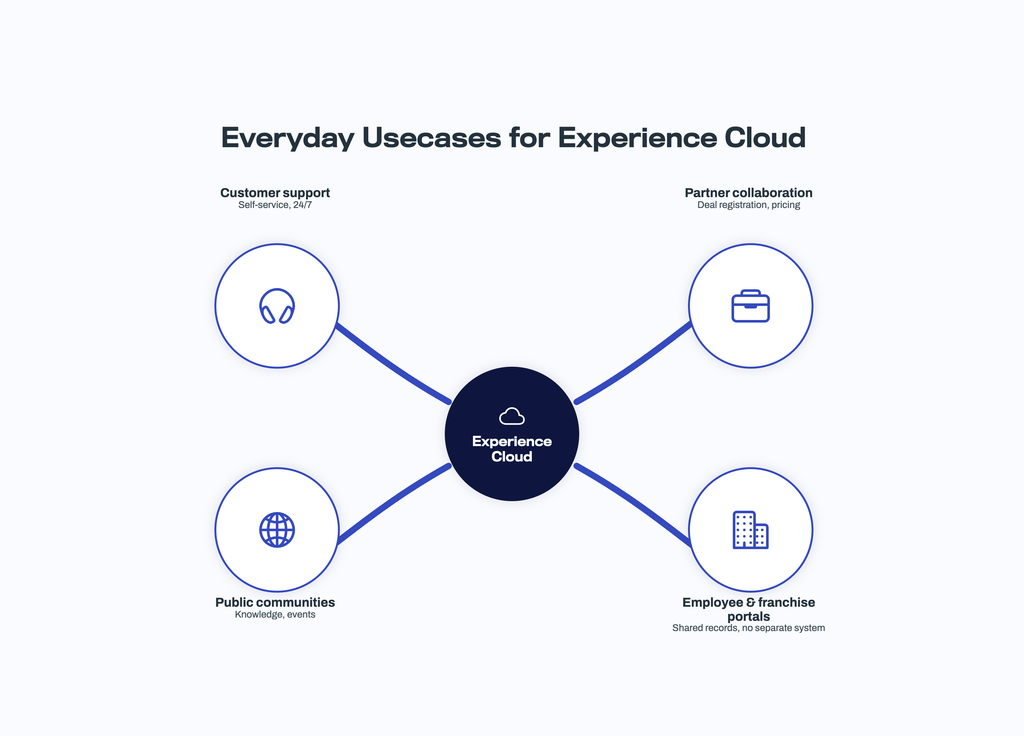
Here are a few of the ways teams put it to work every day:
- Customer support and self-service, where people log cases, track orders, and find answers at 2 am without ever calling support.
- Partner collaboration, where resellers register deals and pull the latest price lists themselves instead of emailing your sales team.
- Public communities, where prospects browse knowledge articles and sign up for events before you have ever spoken to them.
- Employee and franchise portals, where distributed teams log in for the same records and processes as headquarters, without needing a separate internal system.
What makes all of this work so well is that there is no separate website to build and no data to sync. The portal reads and writes the same records your internal teams use, so a case a customer logs in the portal is the same case your service team picks up in the console. That direct line to live CRM data is exactly why so many organizations rely on Experience Cloud.
Why Experience Cloud guest user access creates security risk
Every Experience Cloud site that allows anonymous visitors relies on something called the guest user profile. All unauthenticated visitors to your site share this single profile, and its permissions decide what those visitors can see and do. And we all know that when it comes to user permissions and profiles in Salesforce, it is a can of worms. Any admin who works with them daily will vouch for that.
The guest user profile is meant to grant access only to data you intend to make public, such as knowledge articles or product listings. But Salesforce permissions are layered and granular, spanning object access, record access, field level security, and sharing settings. If any one of those layers is set too broadly, an anonymous visitor can reach data you never intended to expose. And because Experience Cloud sites expose API endpoints to make their pages work, that access is query-able at scale, not just browsable page by page.
In other words, a guest user is an identity like any other. It just happens to be an identity that anyone on the internet can use. And after years of sitting quietly as a known weak spot, attackers have finally started to abuse it at scale.
The Experience Cloud attacks so far
This is not a theoretical risk. It is one of the most active attack patterns in the Salesforce ecosystem today.
Attackers have been abusing misconfigured guest user access since 2025, and the campaigns are still running. Importantly, none of this involved a vulnerability in the Salesforce platform itself. It comes down to the shared responsibility model: Salesforce secures the platform, and the customer is responsible for making sure permissions and configurations are designed correctly.
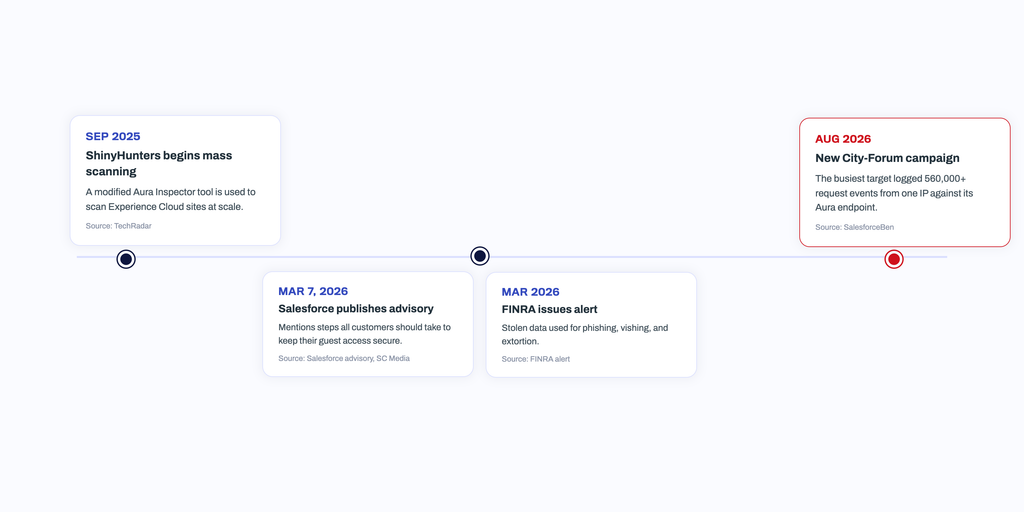
Sources (left to right): TechRadar, Salesforce advisory,FINRA alert, SalesforceBen
Two details from these campaigns deserve special attention:
- First, the attackers never needed credentials. Misconfigured guest access meant the front door was already open.
- Second, guest access was often just the starting point. Salesforce’s advisory warns that data exposed through guest misconfigurations can be used to self-register portal accounts, turning an anonymous guest session into an authenticated user with broader data access. The line between external identities and your internal data is thinner than most teams assume.
How to secure Experience Cloud guest user access
Salesforce’s advisory lists concrete hardening steps with implementation instructions for each, and they are worth acting on this week rather than this quarter. These steps will close the gap the attackers used. But there is a harder truth behind them.
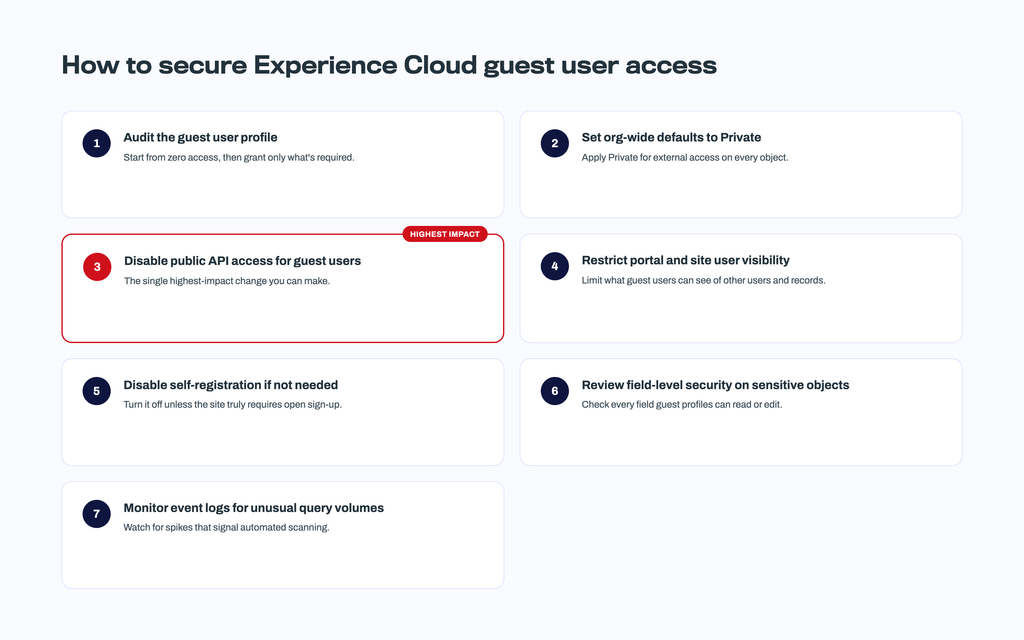
Source: Salesforce security advisory
What can you learn: least privilege is not a one-time project
None of the organizations caught in these campaigns set out to expose their data. Access just grows over time, and anyone who has managed a Salesforce org for a few years knows how it happens.
- A permission set created for a one-off project never gets cleaned up
- A profile gets cloned for convenience and carries access nobody remembers granting
- Someone changes roles and keeps everything they had before, or a partner account quietly outlives the partnership.
And let’s not forget the two most common cases of all:
- The admin who designed the permissions has since left the company,
- Or the Experience Cloud site was built by an external consultant and nobody in house ever fully owned its configuration.
We have written before about the Salesforce permission gap nobody talks about, and these attacks are what it looks like when that gap meets an attacker with automated tooling. An audit today can fix the problems you have today, but your org will not stand still. New permission sets get created, users come and go, and credentials leak in breaches you will never hear about. The question is not whether your permissions are right at this moment; it is whether you would know when they stop being right. That is the part most Salesforce security programs still miss.
Closing the gap with Identity Protection
This is the gap we built Identity Protection to close. Part of Cloud Protection for Salesforce, it gives administrators continuous visibility into user level risk across their org, focusing on three signals that matter most in the wake of these campaigns:
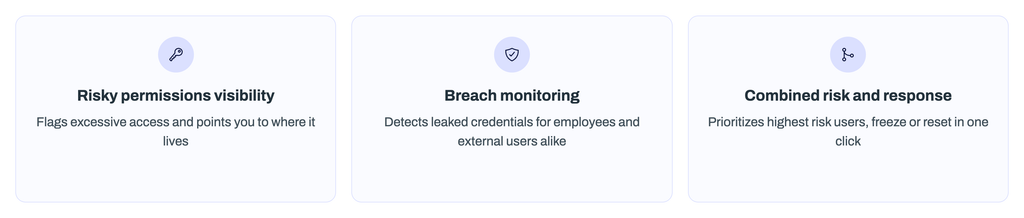
Risky permissions visibility. Identity Protection evaluates the permissions assigned to your monitored users and flags high risk system permissions such as Modify All Data, View All Data, and Manage Users. You see which users hold excessive access, and Identity Protection points you to Salesforce’s own advanced user views to pinpoint exactly where that access comes from. This is least privilege turned from an annual project into an always on practice.
Breach monitoring. Identity Protection detects when your Salesforce users’ credentials appear in third party data breaches, so you can act before attackers do. This matters for both internal users and external ones. Experience Cloud community and partner logins often sit outside your corporate security stack, with no company managed devices or identity provider behind them, yet they login and interact with the platform and the data inside your Salesforce org. Identity Protection monitors not only your employees but also these external identities at enterprise scale.
Combined risk signals and immediate response. The Identities at Risk overview brings risky permissions and breach exposure together with visibility into MFA and SSO usage and the connected apps and active tokens tied to each user, so you can prioritize the users who represent the highest combined risk. From the same panel, you can freeze a user or force a password reset immediately.
These campaigns showed what happens when one over permissioned identity, in that case an anonymous guest, meets an attacker with automated tooling. Continuous identity monitoring is how you stay ahead of both. Identity Protection is included in the Cloud Protection for Salesforce user-based license, with no separate add-on required. It works alongside file protection and URL protection to cover the content and identity layers that native Salesforce controls leave to you.
The takeaway
The organizations that were hit by these campaigns were not careless. They were running the same portals, with the same permission model, that thousands of Salesforce customers run today. The difference between being a headline and being fine came down to configuration details that are easy to get wrong and easy to lose track of.
So, treat this as your prompt. Audit your guest user access this week, work every identity in your org down to least privilege, and put something in place that tells you when things drift, because they will. The attackers are already scanning. The only question is what they find when they reach your site.
If you want to see what your identity risk looks like right now, book a demo and we will show you in minutes, not weeks.