
Before assumptions can be evaluated, risks considered, or governance decisions made, organizations first need visibility into the trust relationships within the workflow. This is the purpose of Trust Mapping Discovery.
Discovery begins with the business workflow
Existing security and governance activities may begin with applications, APIs, permissions, integrations, or other individual components. Trust Mapping Discovery deliberately starts with the business workflow.
Instead of beginning with:
What systems do we have?
Discovery begins with:
How is the work performed?
Starting with the workflow places technologies, participants, information, and actions in the business context in which they are actually relied upon.
The Discovery process
Trust Mapping Discovery follows a simple sequence.
- Select a business workflow.
- Examine it through the five trust domains.
- Identify the key trust relationships that meaningfully influence the workflow, including their responsibilities, scope, and boundaries.
- Capture the assumptions that surfaced during Discovery.
Discovery brings these findings together and connects each trust relationship with the assumptions that support it. It stops at identifying and describing those relationships, without yet assessing risk or deciding whether those relationships are appropriate. Those decisions belong to Governance.
The Discovery canvas
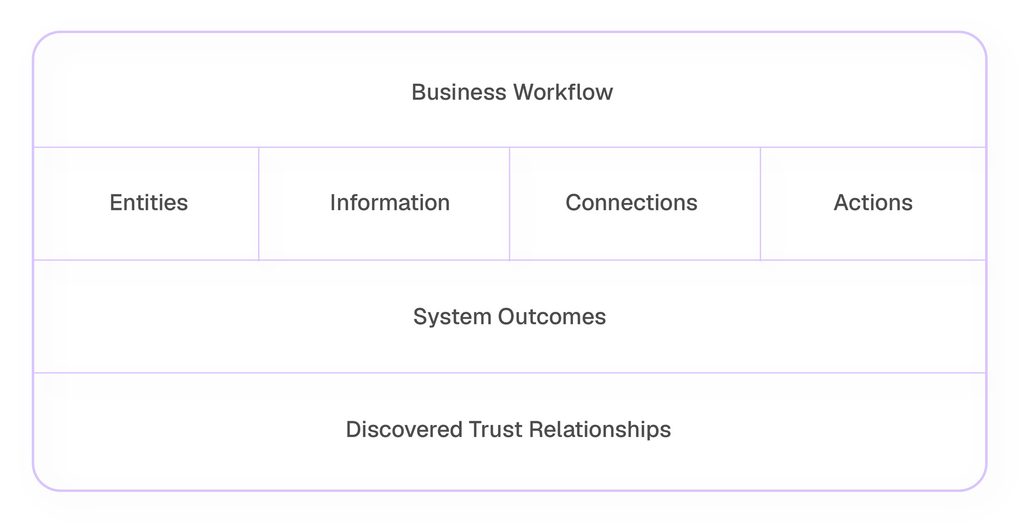
To guide this process, Trust Mapping uses a Discovery Canvas.
The Discovery Canvas examines the workflow through the five domain lenses introduced in the previous article:
- Entities — Who or what participates?
- Information — What information is relied upon?
- Connections — How is trust established or extended?
- Actions — How is trust exercised?
- System Outcomes — What results does the workflow produce?
The final section brings the five views together by capturing the trust relationships they reveal:
Where does reliance exist, for what purpose, within what scope and boundaries, and based on what assumptions?
This turns the exercise from a technology inventory into a map of trust across the workflow.
Applying the Framework
Consider a customer service workflow using Agentforce as an example.
A customer submits a support request through Experience Cloud.
Agentforce retrieves customer information and relevant knowledge articles before generating a recommended response.
A support agent reviews the recommendation and sends the final reply to the customer.
A downstream automation uses information from resolved cases to create or update knowledge article content.
This apparently simple customer service process depends on several participants, information sources, connections, and actions. Applying the five domains makes those dependencies visible.
Entities
Through the Entities lens, this workflow includes:
- Customer
- Support agent
- Agentforce agent
- Knowledge content update automation
The workflow depends on both human and non-human participants to deliver the business outcome.
Information
The Information lens highlights what those participants rely upon:
- Customer records
- Customer case details
- Customer-submitted content
- Knowledge articles
- AI-generated recommendations
The focus is on information that influences the workflow, not everything that happens to exist in the environment.
Connections
Connections show the pathways through which trust is established or extended across the workflow. In this particular workflow example, they include:
Actions are the behaviors performed within the workflow. They show how trust is exercised as people, systems, agents, and automations retrieve information, make decisions, update records, trigger processes, or otherwise carry out work.
Examples include:
- Experience Cloud
- OAuth authorization
- Salesforce API
- Agentforce
- Data Cloud
These connections allow information, authority, and trust to extend across the workflow.
Actions
Actions show how trust is exercised as the workflow operates:
- Customer submits a request.
- Agentforce agent retrieves customer information.
- Agentforce agent interprets the request.
- Agentforce agent generates a recommendation.
- Support agent reviews the recommendation and sends the response.
- Knowledge content update automation creates or updates knowledge article content based on resolved cases.
Each action may exercise one or more trust relationships and provide evidence about whether the assumptions supporting them still hold.
System outcomes
System Outcomes capture what the workflow produces:
- Customer is notified and receives assistance
- Case is resolved and status is updated
- AI recommendation is used in the response
- Knowledge article content may be created or updated from case information
- Updated knowledge content may become trusted input for future support workflows
- Follow-up workflow may be triggered, for example during escalation
Some of these outcomes may then become trusted inputs for subsequent work, creating dependencies beyond the immediate workflow.
Trust relationships become visible
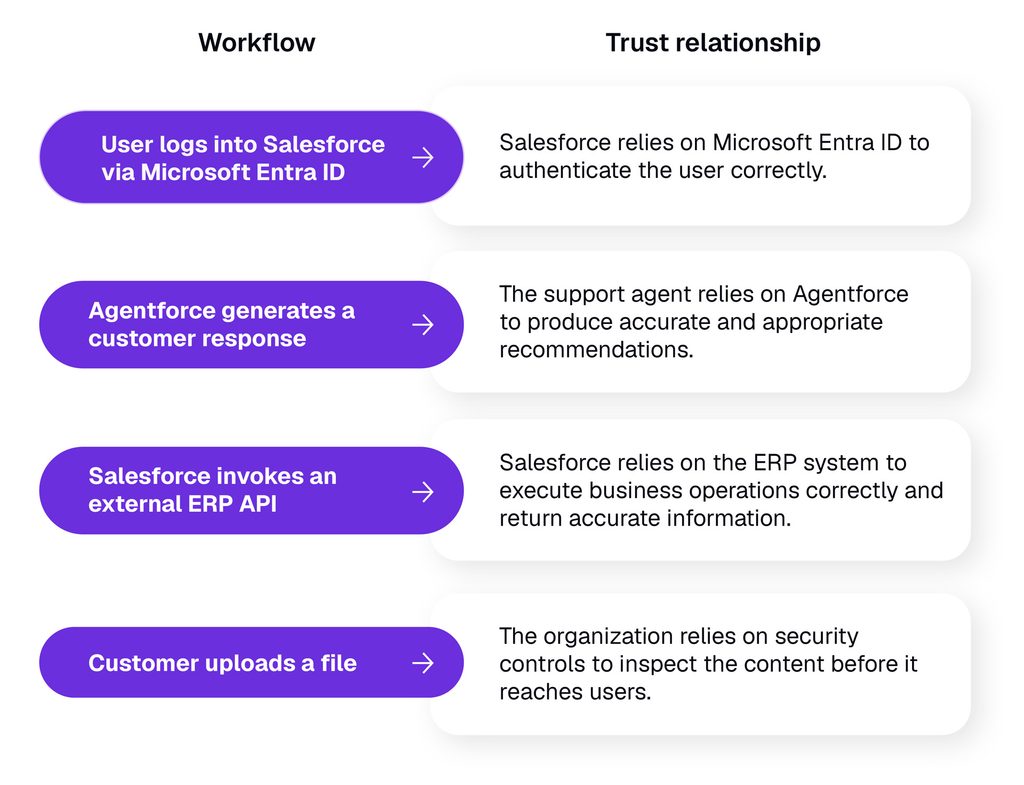
Bringing the five views together reveals the key trust relationships that enable the workflow to function, along with their responsibilities, scope, boundaries, and supporting assumptions. At this stage the objective is visibility, not a judgement about whether those relationships are good, bad, or require change.
When assumptions no longer hold
The workflow above assumes that customer-submitted content is safe for the support workflow and Agentforce to process.
Now imagine…
a customer account becomes compromised and begins submitting malicious content through the normal support workflow.
The workflow may still execute exactly as designed.
The Agentforce agent retrieves the information, interprets the request, and generates a recommendation.
The support agent reviews the recommendation and then responds to the customer.
Information from the resolved case may then be used to create or update knowledge article content, which can become trusted input for future support workflows.
The workflow still operates as expected. Yet the resulting outcomes may no longer align with the organization’s intent. The workflow itself has not necessarily changed. New evidence has challenged an assumption supporting the trust relationship, and the effect may extend beyond the original interaction if that information becomes trusted input elsewhere. The relationship may therefore warrant Governance attention.
From Discovery to Governance
Trust Mapping adds business context before governance decisions are made. Discovery identifies the trust relationships within the workflow and surfaces the assumptions supporting them. Governance then evaluates the available evidence and determines whether those relationships should be maintained, modified, or withdrawn.
In the next article, we introduce the Trust Mapping Governance process and show how these relationships are evaluated over time.