

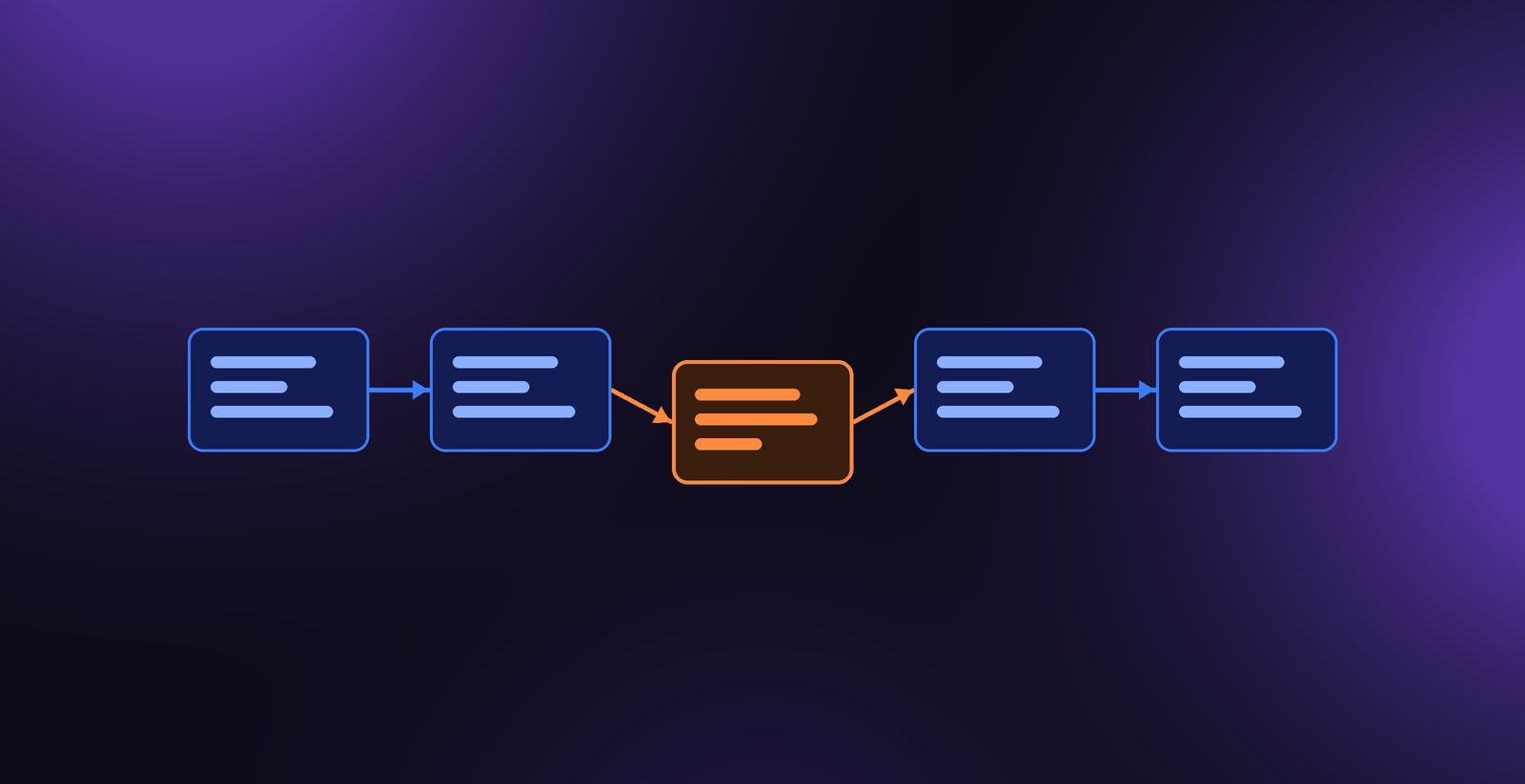
The recent Optimizely incident illustrates this. Malicious code added to its Web Experimentation scripts reached websites belonging to Salesforce and many other organizations, potentially exposing visitors through a service those websites already trusted.
What happened
On 16 November, Report URI reported malicious code in Optimizely scripts associated with 178 organizations, including Salesforce. Optimizely said an attacker had exploited a vulnerability in its Web Experimentation platform to inject JavaScript into customer projects.
Organizations use Web Experimentation to A/B test pages and personalize what visitors see. The incident shows how that ability to change a website can also provide a route for malicious code to reach visitors.
What we observed on Salesforce websites
Report URI’s Salesforce entry referred to eight domains, while naming only these four:
- evergage.com
- exacttarget.com
- pardot.com
- salesforce-scrt.com
Tableau and MuleSoft were listed as separate organizations.
These entries identify websites associated with infected snippets. They do not establish that the corresponding products, customer accounts or backend services were compromised.
Salesforce acknowledged the incident and disabled Optimizely scripts as a precaution while it investigated.
We analyzed files retrieved in public urlscan.io captures. These records show the malicious payload also loading on other Salesforce domains such as salesforce.com and salesforce-experience.com.
In the Salesforce Optimizely snippet, we identified a loader in the project’s custom JavaScript that retrieves track.js from 1688360[.]cc. We reviewed five payload builds observed in Salesforce page captures. The earliest contained cryptocurrency wallet replacement and iOS exploit delivery logic, while later builds added payment-card collection and conditional collection of cookies and page images.
How the malicious code reaches visitors
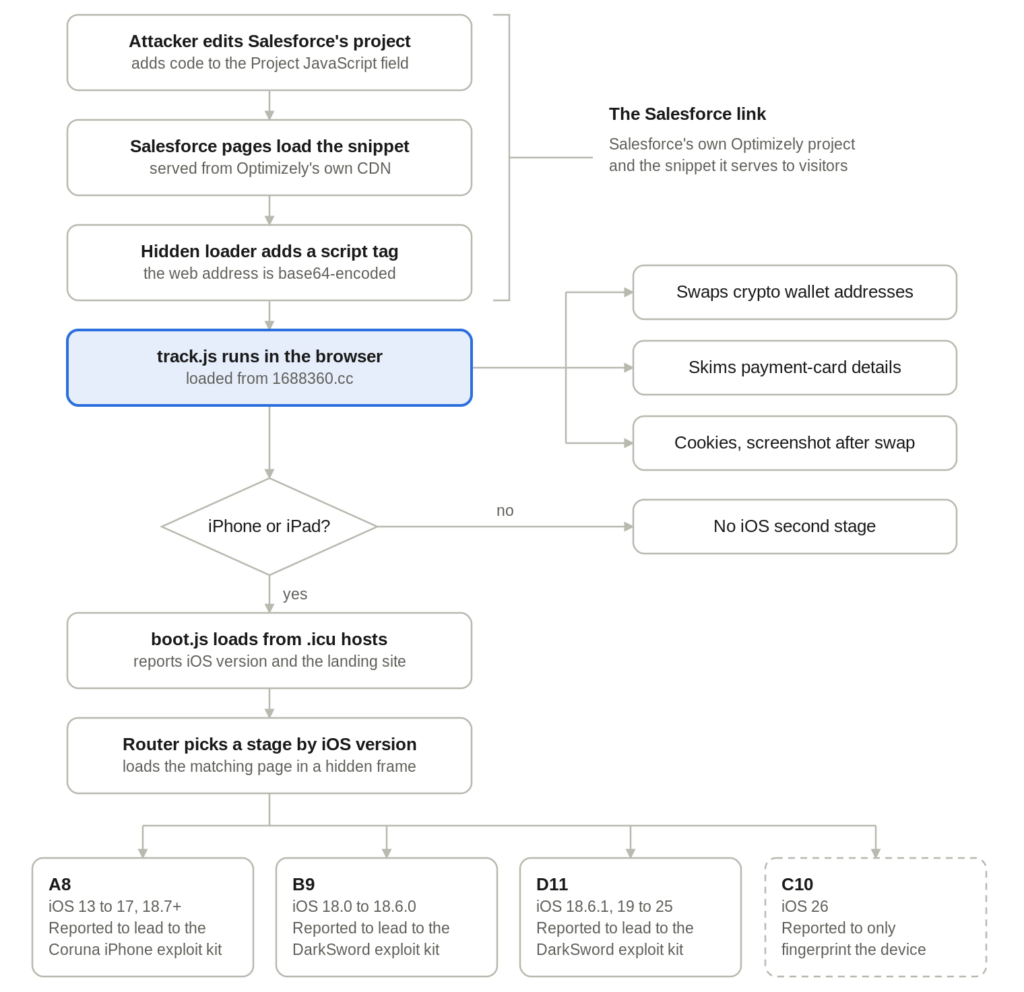
In the Salesforce-related samples, the malicious loader sits in the projectJS block, which contains the project’s custom JavaScript. When a visitor opens a page with the affected snippet, the browser retrieves it from Optimizely’s CDN and executes the injected code.
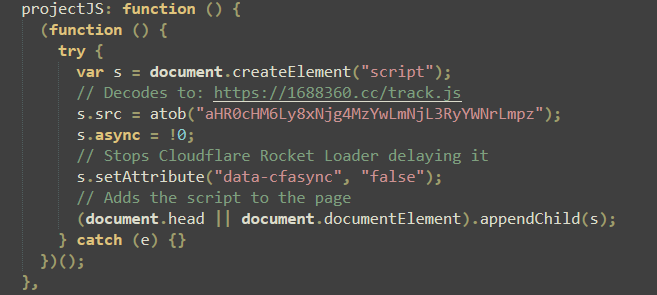
The loader decodes the payload address and loads track.js into the page. This is a script request, rather than a redirect of the visitor’s browser to another website.
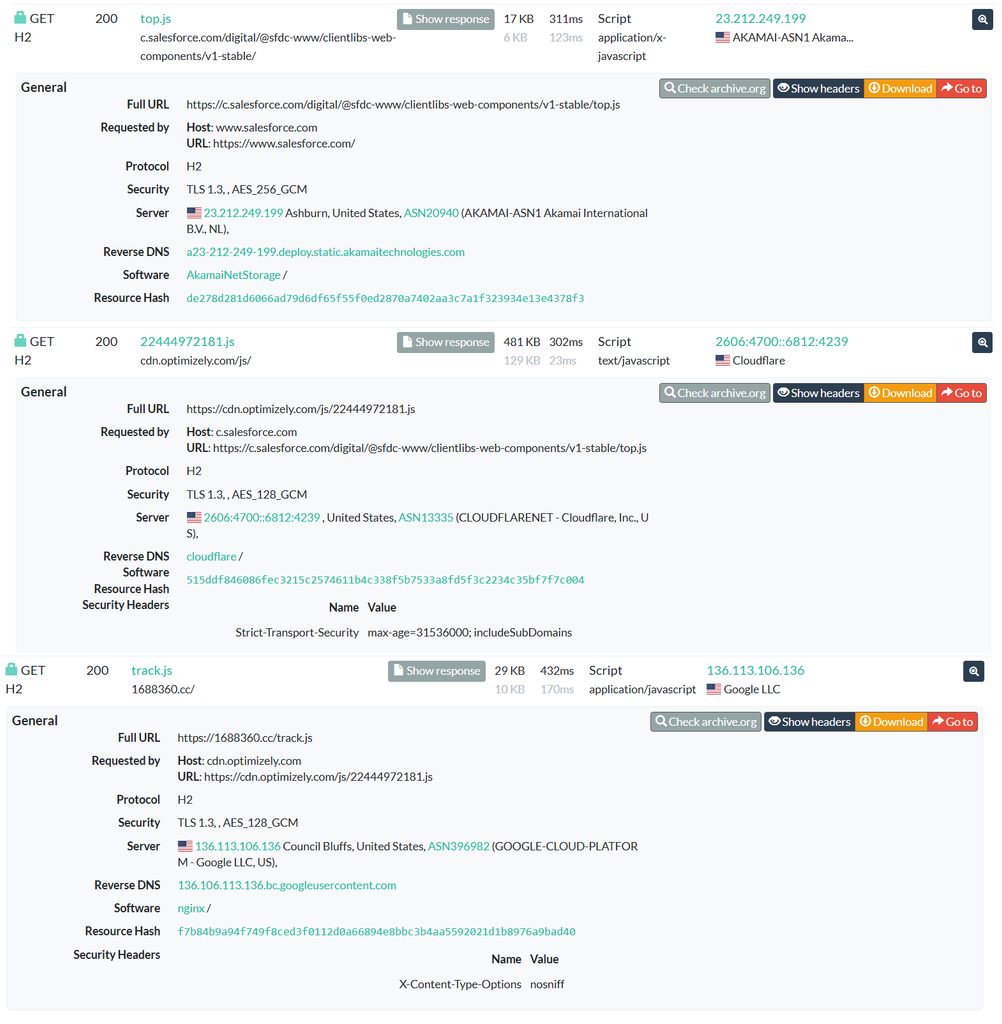
Across the five Salesforce-related builds we analyzed, we identified four main capabilities. Their presence and implementation vary between versions.
Wallet replacement
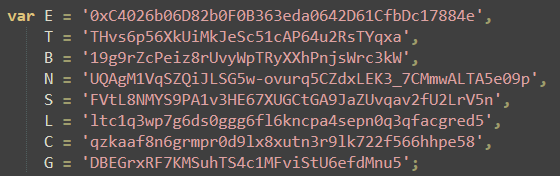
The code looks for cryptocurrency addresses in page content, form fields, links and clipboard interactions, then substitutes with attacker-controlled addresses. The earliest captured build contained replacement addresses for Ethereum, TRON and Bitcoin.

Later builds expanded the configured addresses to cover additional cryptocurrencies, including Litecoin, Bitcoin Cash, Dogecoin, Solana and TON.
Payment-card collection
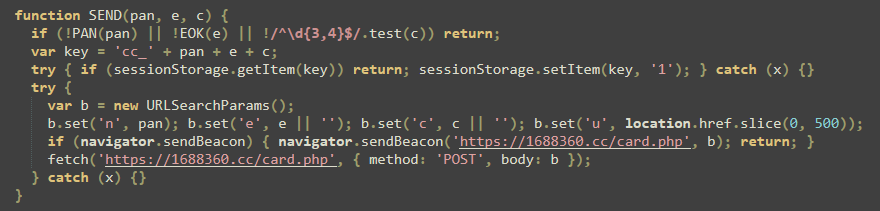
In builds containing this capability, the collection path requires a card number, expiry date and security code before sending the details to 1688360[.]cc/card.php. It targets fields accessible to the page’s JavaScript. It cannot directly read payment fields isolated in a separate provider’s cross-origin frame.
Cookie and page-image collection
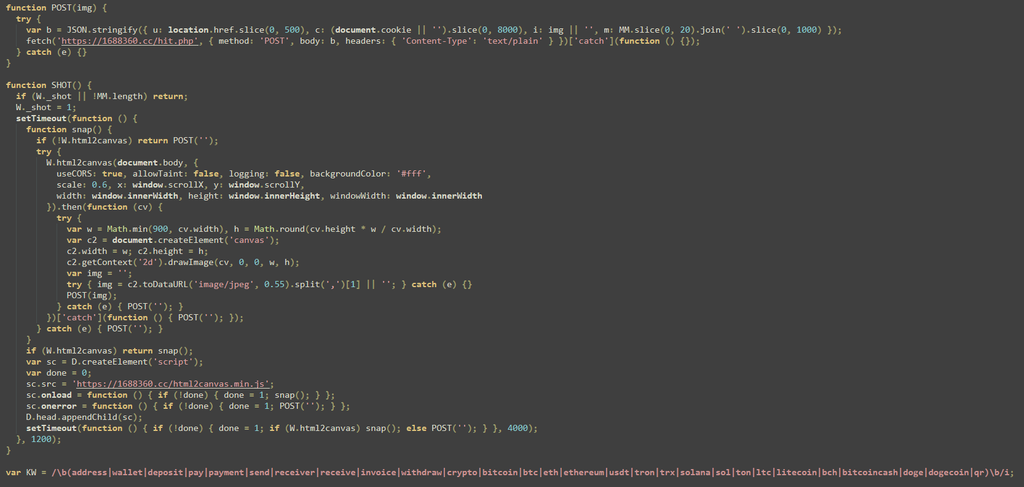
In the samples containing this capability, collection is tied to wallet replacement near wallet or payment-related wording. The code prepares the page address, up to 8,000 characters of JavaScript-readable cookies and an image rendered from the page using html2canvas, then sends the data to 1688360[.]cc/hit.php.
This is a conditional collection path, rather than evidence of collection on every visit. HttpOnly cookies are inaccessible to document.cookie, and the rendered image represents accessible page content, rather than the entire device screen. The point seems to be to collect this extra data only from pages where a crypto swap actually happened.
iOS exploit delivery logic
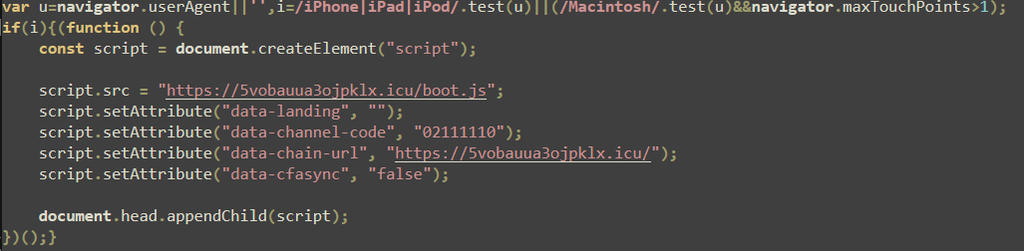
On devices matching its iPhone or iPad checks, the payload contains instructions to load boot.js and further resources. The associated delivery files were analyzed separately.
The boot.js router checks version information and selects a further page.
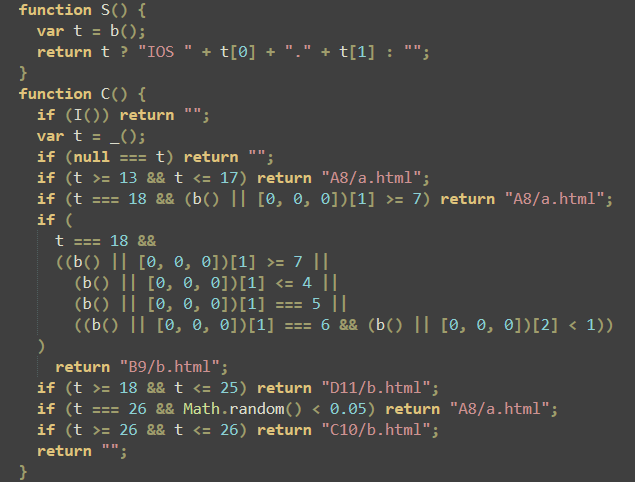
Its conditions include:
| iOS Version | Stage | Reported to lead to |
|---|---|---|
| 13 to 17 | A8 | Coruna exploit kit |
| 18.7 and later | A8 | Coruna exploit kit |
| 18.0 to 18.5, and 18.6.0 | B9 | DarkSword exploit kit |
| 18.6.1 up to 18.6.x, and 19 to 25 | D11 | DarkSword exploit kit |
| 5% of iOS 26 | A8 | Coruna exploit kit |
| the other 95% of iOS 26 | C10 | Reported to only fingerprint device |
These are routing conditions, not a tested list of vulnerable iOS versions. They do not establish that every device in those ranges can be exploited. Coruna and DarkSword have been examined in earlier research by from Google, Zimperium, and SlowMist, but those findings do not prove successful exploitation in this particular incident.
The flowchart below brings these steps together, showing how the modified Optimizely snippet loads the payload and how its behaviour branches based on the visitor’s device.
Incident Timeline
The timeline combines Report URI’s observations, public Salesforce page scans, and related advisories. The broader cleanup observations do not establish a complete exposure window for Salesforce.
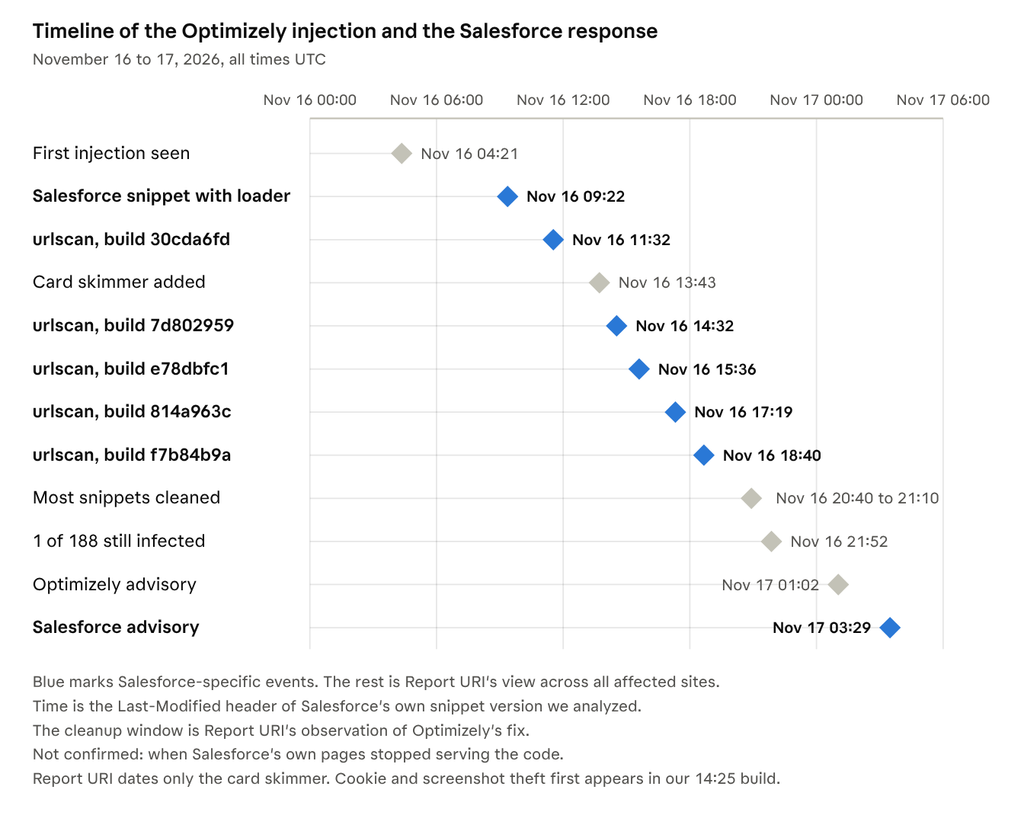
Across the Salesforce captures, the Optimizely snippet retained the same SHA-256 while five different track.js builds were returned. The payloads changed during the observed period, including additions to collection logic and replacement wallet addresses. A single copy of the snippet therefore cannot establish which payload every visitor received.
What Salesforce customers should do
Simply using Salesforce does not establish exposure to this script, and visiting an affected page does not necessarily mean information was stolen. The potential impact and appropriate response depend on the page visited, the timing, the payload loaded, the device used and the information accessible.
Closing the affected page stops the malicious script from running on that page. However, it does not undo information already sent, a cryptocurrency address already replaced or any successful exploitation of the device.
Entering no sensitive information does not rule out exposure. The iOS delivery branch can run regardless of whether the visitor enters payment details or handles cryptocurrency addresses.
| Situation | What it means | Suggested response |
| Visited a potentially affected page without entering sensitive information | This alone does not establish compromise, but it does not rule out every collection or delivery path. | Establish the page, time and device where possible. Ask the security team to review available browser, network or endpoint evidence. |
| Entered card details on a page confirmed to have loaded the malicious code | Details in fields accessible to the script may have been exposed. Fields isolated in a separate provider’s cross-origin frame are outside its direct reach. | Involve the security team and contact the card issuer for advice based on the exposure. |
| Copied, pasted or submitted a cryptocurrency address on an affected page | The address may have been replaced. | Compare the intended recipient with the address used in the transaction. Verify payment destinations through a trusted channel. |
| Used an iPhone or iPad on a page that delivered iOS resources | Delivery warrants investigation but does not prove successful exploitation. | Check installed updates and involve the team responsible for mobile-device security. |
| Entered sensitive information on a different website in another tab | The affected page’s ordinary JavaScript does not gain unrestricted access to an unrelated site. That site’s own exposure is a separate question. | Assess whether the other website was affected using its own notices and available evidence. |
| Uses Salesforce with no identified visit to an affected page | Use of Salesforce alone does not establish exposure or compromise of CRM data. | Follow Salesforce’s advisory and any direct customer notifications. |
Reviewing third-party access and dependencies
The incident shows how a supplier’s ability to deliver code can become a path into an organization’s websites. A service used to test page layouts also has access to change what runs in visitors’ browsers. Third-party risk assessments need to account for that access and its consequences.
For teams managing websites and marketing services, these five practices can help:
- Map dependencies and their access. Inventory third-party scripts, starting with pages that handle payments, sign-ups or sensitive information. Record their purpose, internal owner, loading path and accessible information. Include services they load in turn, and reassess the inventory as deployments change.
- Treat vendor configuration as a production change path. Settings that add JavaScript to live pages need appropriate access controls, approvals, audit logs and change alerts. Use single sign-on, multi-factor authentication and least privilege where supported. These controls complement the supplier’s responsibility to secure its service.
- Review browser security controls. Work with the web team to restrict which scripts can load and where they can send data. Test proposed restrictions before enforcing them, and monitor for unexpected changes. An approved supplier domain can still deliver compromised code.
- Prepare and test a way to disable dependencies. Identify who can authorize and carry out removal of a vendor script, how quickly they can do it and which functions would be interrupted. Rehearse the process before an incident.
- Require evidence from suppliers. Review how vendors protect code-changing capabilities, detect unauthorized modifications, preserve configuration history and notify customers. Include relevant subcontractors and downstream services, and establish which logs your team could obtain during an investigation.
This also connects to Trust Mapping: understanding which services a workflow depends on, what access they have and what could happen if that trust is abused. Making those relationships visible helps teams prioritize review and security controls, and reassess them as things change.
What remains unclear
The samples we analyzed show a delivery mechanism and payload capabilities. They do not identify every affected visitor or establish successful exploitation of the later iOS stages.
As of 17 November 2026, open questions included the full set of affected Salesforce pages, the complete exposure period, whether visitor or customer data was accessed, and whether any iPhone or iPad was successfully compromised through this chain.
Follow Salesforce Trust and Optimizely’s incident notices for updates and customer-specific guidance.
Indicators of compromise and related artefacts
| Type | Value | Context |
| Affected snippet | hxxps://cdn.optimizely[.]com/js/22444972181.js | Legitimate Salesforce project snippet URL; analyzed revision 10751. Use the captured file, hash and timestamp to establish whether it contained the injection. |
| Encoded payload URL | aHR0cHM6Ly8xNjg4MzYwLmNjL3RyYWNrLmpz | Decodes to the track.js URL below. |
| Main payload | hxxps://1688360[.]cc/track.js | Retrieved by the injected loader. |
| Collection endpoints | hxxps://1688360[.]cc/hit.php | Page-information and card-collection paths. |
| Supporting resource | hxxps://1688360[.]cc/html2canvas.min.js | Library used to render page content. |
| iOS delivery hosts | 5vobauua3ojpklx[.]icu | Hosts referenced by the iOS branch. |
| Hidden-frame path | hxxps://eil786npto9u5bq[.]icu/JIUJIU888/weifile.html | Referenced in later payload builds. |
| Stage paths | /A8/a.html, /D11/b.html, /C10/b.html, /B9/b.html, /D12/b.html | Paths in supporting iOS version-dependent delivery code. |
| Additional configured hosts | ios-hack[.]icu | Strings in boot.js variants. |
| Campaign code | 02111110 | data-channel-code in the boot.js loaders. |
| Historical hosting observation | 136[.]113[.]106[.]136 | Recorded for 1688360[.]cc in Salesforce page scans on 16 November. |
Sample hashes
515ddf846086fec3215c2574611b4c338f5b7533a8fd5f3c2234c35bf7f7c00430cda6fdc5783aef4da4367335e9ad27fe12f853c9a1db5b4b3859c21d2abe3a7d802959a67b44d9c3e7874577263f7ecc0b8511f7da81f10462a94f191c74a8e78dbfc1454a0c9570d04966148cd916630a837c718fdbdebf388c8d903748eb814a963c0da480e2449d9b6664480156e1cd6d731014117401bf635badec3a0ff7b84b9a94f749f8ced3f0112d0a66894e8bbc3b4aa5592021d1b8976a9bad403b18b850f5364dd4fc3243653373d35744ed04424bf3c02538c8b155fd12c50da13c49ea3b5878b09fd929a1aa039728d2980f7a4ff5c39869fcff8bb0ebfacc2f69879f1c5bdfe9c075ef67ddb6405afe992aff89dcf42863567f83237d3ba6f286c965982bee4225c4edda261ce8685a55721dd997ddedf106666101118c078cb1a25ea5dd23c5bf033da6b1ceb375cfcf9edcf49e2eb44da727853d597a47
Wallet addresses in the analyzed builds
| Currency | Address |
| ETH | 0xC4026b06D82b0F0B363eda0642D61CfbDc17884e |
| TRX | THvs6p56XkUiMkJeSc51cAP64u2RsTYqxa |
| BTC | 19g9rZcPeiz8rUvyWpTRyXXhPnjsWrc3kW |
| LTC | ltc1q3wp7g6ds0ggg6fl6kncpa4sepn0q3qfacgred5 |
| BCH | qzkaaf8n6grmpr0d9lx8xutn3r9lk722f566hhpe58 |
| DOGE | DBEGrxRF7KMSuhTS4c1MFviStU6efdMnu5 |
| SOL | FVtL8NMYS9PA1v3HE67XUGCtGA9JaZUvqav2fU2LrV5n |
| TON | UQAgM1VqSZQiJLSG5w-ovurq5CZdxLEK3_7CMmwALTA5e09p |